
Nabbed vs securememo.app
Side-by-side comparison to help you choose the right AI tool.

Nabbed is your career CRM, helping you manage your job search like a sales pipeline with AI tools and target tracking.
Last updated: April 13, 2026
securememo.app
Discover a private, open-source memo service that encrypts everything on your device.
Visual Comparison
Nabbed

securememo.app
Feature Comparison
Nabbed
Dual Sales Pipelines
Manage your entire career search through two interconnected Kanban-style pipelines, mirroring tools like HubSpot. One pipeline is dedicated to tracking job applications through stages from "Tracking" to "Closed Won," while the other manages your networking and outreach efforts. This visual system allows for drag-and-drop stage updates, provides momentum tracking, and delivers velocity analytics, giving you a clear, strategic overview of your search's health and progress just as you would a sales quota.
AI Career Suite
Supercharge your application materials and preparation with a suite of four integrated AI tools. This suite can generate personalized cover letters, tailor your resume to match specific job descriptions, provide intelligent interview coaching based on the role and company, and compose outreach emails that sound authentically like you. It’s designed to save hours of manual work while increasing the quality and relevance of every interaction in your job search process.
Chrome Extension with ATS Autofill
This powerful browser extension acts as your search co-pilot. With one click, you can save job listings from over 10 platforms like LinkedIn and Indeed directly into your Nabbed pipeline. Its standout feature is the ability to autofill application forms on more than 60 Applicant Tracking System (ATS) platforms, including Greenhouse and Workday, pulling data from your profile to save immense time and reduce application fatigue.
Company Intelligence & Hiring Signals
Go into every application with deep insight. When you save a job or add a target company, Nabbed automatically enriches it with real-time data including funding rounds, employee headcount, Glassdoor ratings, and tech stack. Most critically, it monitors for "hiring signals"—like growth announcements or new funding—alerting you when your dream companies are most likely to be hiring, giving you a proactive edge in your outreach.
securememo.app
Client-Side Encryption
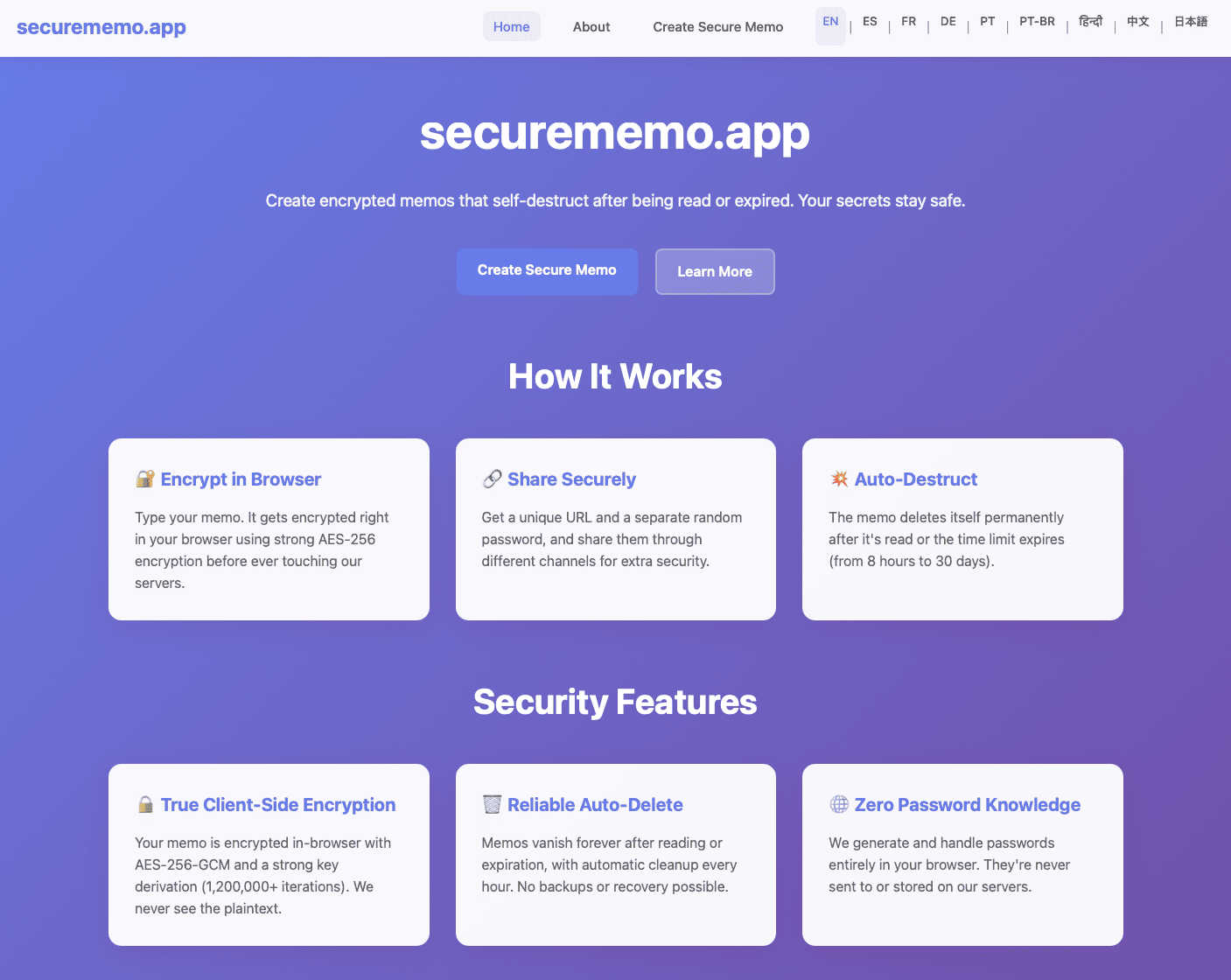
This is the foundational pillar of securememo.app's security. When you create a memo, the encryption process happens entirely within your own web browser using robust algorithms. Your sensitive text is transformed into unreadable ciphertext on your computer or phone before it ever travels over the internet to securememo.app's servers. This means the service never handles your unencrypted, plain-text data. Even if someone were to intercept the data in transit or access the servers, they would only ever see encrypted gibberish, making your information completely inaccessible to outside parties, including the service providers themselves.
Self-Destructing Notes
Each memo you create is designed to be ephemeral. Once you generate a shareable link, the note is programmed to automatically and permanently delete itself after it has been read by the recipient. This creates a one-time-view experience, ensuring the information does not persist indefinitely on any server. It's like a digital message that burns after reading, significantly reducing the risk of your sensitive data being exposed in a future data breach or being accidentally left accessible in a forgotten inbox.
Password-Protected Sharing with Zero Knowledge
Sharing is a two-key process that maximizes security. When you create a memo, the app generates a strong, random password entirely on your device. To access the note, a recipient needs both the unique link and this exact password. Crucially, the password is never sent to or stored by securememo.app's servers. You must share it through a separate, secure channel (like a Signal message or in person). This "zero-knowledge" design means the platform has no ability to decrypt your memos, as it never possesses the key, placing complete control and responsibility for the password squarely in your hands.
No-Account Anonymity & Ease of Use
Prioritizing privacy and simplicity, securememo.app requires no sign-up, no email address, and no personal information to use. You can immediately start creating and sharing encrypted notes from any modern browser. This barrier-free approach not only makes the service incredibly quick and easy to use but also enhances your anonymity. There is no digital trail linking you to the memos you create, allowing for truly discreet communication without the friction of account creation or management.
Use Cases
Nabbed
The Strategic Job Hunter
For the professional who treats their job search as a targeted account-based campaign. They use Nabbed to create a shortlist of "dream company" targets, populate their dashboards with enriched company intelligence, and set up alerts for hiring signals. This allows them to time their outreach perfectly, engage with informed questions, and manage a focused pipeline of high-intent opportunities rather than applying indiscriminately.
The Network-First Candidate
For the individual who knows their network is their greatest asset. This user leverages Nabbed’s full Contact & Network CRM to log every interaction, schedule follow-ups, and track warm introductions through a dedicated networking pipeline. They use the email tracking and template features to run sequenced, measurable outreach campaigns, ensuring no connection goes cold and every warm lead is nurtured effectively.
The Efficiency-Seeking Applicant
For anyone overwhelmed by the repetitive grind of modern job applications. This user relies heavily on the Chrome extension to capture jobs in one click and autofill lengthy ATS forms in seconds. They use the AI tools to instantly generate tailored resumes and cover letters for each role, compressing hours of work into minutes and allowing them to maintain a high volume of quality applications without burnout.
The Data-Driven Negotiator
For the candidate preparing to maximize their offer. They utilize Nabbed’s salary benchmarking and offer analysis tools to understand their market value. By tracking all communications and interview stages within the platform, they have a complete record to reference during negotiations. The AI interview prep also helps them practice for compensation discussions, ensuring they enter final talks with confidence and data.
securememo.app
Sharing Sensitive Login Credentials
Instead of sending a password over email or an insecure chat, you can use securememo.app to share it safely. Place the username and password in an encrypted memo, generate the link, and share the link and the auto-generated password via different channels (e.g., link in Slack, password via text message). The recipient gets one-time access, and the credentials are then wiped from the server, preventing them from being discovered later in a compromised email account.
Submitting Anonymous Tips or Feedback
For individuals who need to report sensitive information to journalists, organizations, or HR departments anonymously, this tool is ideal. A whistleblower or source can compose their message, share the secure link, and communicate the password through an anonymous method. The recipient can read the information once, and the memo self-destructs, leaving no evidence on the server that could be subpoenaed or leaked, protecting the source's identity.
Sending Private Drafts or Confidential Documents
Writers, lawyers, or business professionals can share early drafts, contract clauses, or strategic plans with colleagues or clients without fear of the document being stored on a third-party server in an unencrypted form. The self-destruct feature ensures the draft is only available for a single viewing session, encouraging focused review and preventing uncontrolled distribution of sensitive work-in-progress materials.
Secure One-Time Communication for Events
Organizers of private events, surprise parties, or sensitive meetings can distribute key details like addresses, entry codes, or itineraries to a select group. By using securememo.app, they ensure that the information is encrypted and can only be accessed by those who have both the link and the separately shared password, and that it disappears after being read, keeping the details confidential until the last moment.
Overview
About Nabbed
What if you could apply the same disciplined, data-driven process you use to close deals to the most important deal of all: your next career move? Nabbed is the first Career CRM, a revolutionary platform built from the ground up for sales and revenue professionals. It transforms the chaotic, often emotional job search into a strategic, pipeline-driven operation. Imagine having a centralized command center where you can visually track every job application, manage your network like a contact CRM, and receive AI-powered intelligence on target companies—all while automating the tedious parts of applying. With its powerful Chrome extension, Nabbed integrates directly into your workflow, autofilling applications on over 60 ATS platforms and syncing your Gmail to detect key communications like interview invites. It’s more than a job tracker; it’s a complete career operating system designed to give you the leverage, insight, and velocity you need to close your next role efficiently and effectively. Built by a CRO who understands the revenue playbook, Nabbed eliminates the guesswork and empowers you to run your job search like a pro.
About securememo.app
Imagine a digital space where your most sensitive thoughts, passwords, or confidential details can exist for just a moment, shared with absolute certainty that no one else—not even the platform itself—can ever peek inside. This is the core promise of securememo.app, a fascinating tool that redefines ephemeral and private communication. At its heart, it's a privacy-first memo service that allows you to create and share encrypted notes that self-destruct after being read, all directly from your web browser without any software installation. The magic lies in its architecture: everything you type is encrypted on your own device before a single byte of data is sent to a server. This client-side encryption model ensures that your data is technically impossible for anyone else to decipher, creating a true "zero-knowledge" environment. It's designed for anyone who values discretion—journalists sharing leads, professionals exchanging login credentials, whistleblowers submitting tips, or even individuals planning a surprise party. By eliminating the need for user accounts, securememo.app not only simplifies the process to a few clicks but also fiercely protects your anonymity. Available in over 20 languages, it invites a global audience to explore a more secure way of passing information, turning a simple memo into a digital secret that vanishes without a trace.
Frequently Asked Questions
Nabbed FAQ
How does Nabbed's email tracking work?
Nabbed integrates with your Gmail account to place a secure, invisible tracking pixel in the emails you send through its system. When a recipient opens your email, the pixel is loaded, and Nabbed records this activity in real-time within your dashboard. This provides you with actionable data, showing you who is engaging with your messages before they even reply, a feature highlighted as unique compared to other job search tools.
Is there a free version of Nabbed?
Yes, Nabbed offers a free tier to get started. This includes access to core job tracking features and the Chrome extension for basic job capture and autofill functionality. For advanced capabilities like full Gmail email tracking, AI-powered tools, LinkedIn contact capture, and outreach sequences, you can upgrade to the Core plan.
What makes Nabbed different from other job search trackers?
Nabbed is fundamentally built as a CRM, specifically for sales and revenue professionals. This means its entire philosophy—from dual pipelines and contact management to trigger-based alerts—maps directly to a sales playbook. Key differentiators include its unique email open tracking, deep company intelligence with hiring signals, and a comprehensive networking CRM, treating your career search as a strategic business development operation rather than simple list management.
How does the "Job Fit Score" work?
The Job Fit Score is an AI-powered analysis that matches your profile and resume against a specific job listing. It evaluates factors like skills, experience keywords, and role requirements to generate a score indicating how strong a match you are for the position. This helps you quickly identify where to focus your efforts and understand what aspects of your application might need tailoring to improve your chances.
securememo.app FAQ
How does securememo.app ensure my data is private?
Privacy is ensured through client-side encryption and a zero-knowledge architecture. Your memo is encrypted on your device before it leaves your browser. The decryption key (password) is generated locally and never sent to our servers. We only store the encrypted data, which is mathematically impossible for us to read without the password, which we never have. Your data's privacy is cryptographically guaranteed.
What happens if someone guesses the password to my memo?
The password generated by securememo.app is a long, random string of characters designed to be extremely resistant to guessing (brute-force) attacks. It is practically impossible to guess. The security of the memo ultimately depends on you sharing this password through a secure channel. If you share the link and password together in an insecure way, the memo's security is compromised.
Can I access a memo after it has been read and self-destructed?
No. The core function of a self-destructing note is that it is permanently and immediately deleted from the server after the first successful decryption and viewing. There is no way to recover a memo after it has been read. This is a deliberate security feature to ensure ephemerality.
Do I need to install any software to use securememo.app?
No installation is required. securememo.app is a web application that runs directly in your modern web browser (like Chrome, Firefox, or Safari). You can access it from any device with an internet connection and a browser, making it highly accessible and convenient for spontaneous, secure sharing without any software commitments.