
Mailopoly vs SupaSidebar
Side-by-side comparison to help you choose the right AI tool.

Mailopoly
Mailopoly is your AI-driven email assistant that organizes, extracts key details, and drafts replies to streamline your.
Last updated: February 28, 2026

SupaSidebar
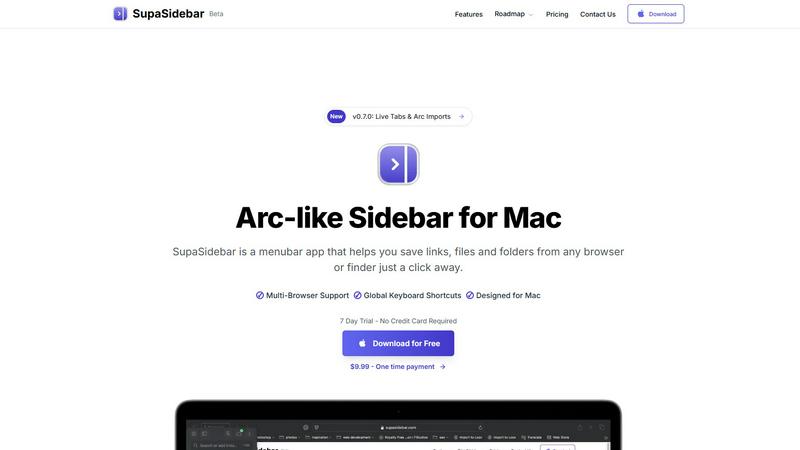
Discover an Arc-style sidebar for Mac that instantly saves and opens your links, files, and folders.
Last updated: February 28, 2026
Visual Comparison
Mailopoly

SupaSidebar
Feature Comparison
Mailopoly
Intelligent Email Management
Mailopoly's intelligent email management feature automatically sorts your inbox, ensuring that only relevant emails are visible while filtering out the noise. It surfaces what matters, allowing you to focus on critical communications and reducing the overwhelming clutter that often accompanies traditional email systems.
Instant Information Extraction
With Mailopoly, you no longer have to sift through emails to find essential details. This feature extracts key information such as invoice amounts, booking details, and delivery updates right at a glance. It provides you with immediate access to the information you need, streamlining your workflow and enhancing productivity.
AI-Powered Reply Drafting
Say goodbye to the hassle of typing responses. Mailopoly's AI drafting feature creates replies in your voice, maintaining your unique style and tone. With multiple suggestions available, you can effortlessly edit or send replies within seconds, making communication more efficient and personalized.
Built-in Task Manager
Mailopoly includes a robust task manager that helps you keep track of personal finances, events, and shipments. It monitors deliveries with a comprehensive timeline and sends notifications about upcoming tasks and deadlines, ensuring you stay organized and on top of your commitments.
SupaSidebar
Universal Save & Copy Shortcuts
Ever felt the process of saving a link or file was just a few clicks too many? SupaSidebar streamlines this into an instant action. With dedicated global keyboard shortcuts, you can press CMD+CTRL+S to save the current website link directly to your sidebar, or CMD+CTRL+C to copy it. This feature turns a multi-step process into a single, fluid motion, capturing inspiration and references before they slip away, all without interrupting your current task.
Recents & Intelligent Tracking
Lost in a labyrinth of tabs and recently opened files? SupaSidebar's "Recents" feature acts as your digital short-term memory. It automatically tracks every website you've visited across all major browsers within the last 48 hours, presenting them in a clean, searchable list. This means you can instantly jump back to that article, dashboard, or document you were just viewing, effectively ending the frantic tab-switching hunt and bringing lost context back to your fingertips.
Fast, Unified Search
Switching between apps to find a file, folder, or website breaks your concentration. SupaSidebar's powerful search function, activated with CMD+CTRL+K, becomes your universal finder. Simply start typing to instantly search across all your saved links, files, folders, and even applications. This creates a seamless bridge between your local machine and your online workspace, delivering what you need in seconds and keeping you firmly in a state of flow.
Organized Spaces & Pinned Favorites
To combat the chaos of opening the same resources repeatedly, SupaSidebar offers elegant organization. You can pin your most crucial items to the top of your sidebar for immediate, one-click access. Furthermore, the app supports multiple "Spaces"—allowing you to create dedicated sidebars for different projects, contexts, or modes of work. This lets you organize links, files, and folders exactly how your mind works, making context-switching a clean and organized affair.
Use Cases
Mailopoly
Streamlined Professional Communication
For professionals managing multiple projects, Mailopoly ensures that important emails are prioritized. Users can easily filter through their inbox to focus on critical communications, reducing the chances of missing essential updates or deadlines.
Personal Life Management
Individuals juggling personal and professional responsibilities can use Mailopoly to keep track of appointments, bills, and events. The intelligent sorting and extraction of information help users manage their personal lives seamlessly without feeling overwhelmed.
Enhanced Side-Hustle Efficiency
For side-hustlers balancing work with entrepreneurial ventures, Mailopoly helps maintain organization by extracting relevant information from various email accounts. This feature allows users to focus on their side projects without losing track of crucial communications.
Stress-Free Travel Planning
Mailopoly simplifies travel planning by automatically pulling out booking details and itinerary information from confirmation emails. Users can access essential travel updates and reminders, ensuring a smooth travel experience without the usual chaos of managing numerous travel-related emails.
SupaSidebar
The Researcher & Student
For anyone conducting deep research or managing academic projects, SupaSidebar is a game-changer. As you dive through dozens of browser tabs for sources, articles, and papers, you can instantly save each crucial link to a dedicated "Research" space with a single shortcut. Later, all your references are neatly organized and instantly searchable in one place, eliminating the tab overload and making citation and review processes dramatically faster and more coherent.
The Creative Professional
Designers, writers, and content creators constantly juggle inspiration boards, asset folders, tool websites, and project files. SupaSidebar becomes the central staging area for all creative resources. Save mood board links, pin frequently used design tool websites, and have quick access to local brand asset folders—all accessible from a unified sidebar without ever leaving your creative software, allowing uninterrupted creative flow.
The Multitasking Project Manager
Professionals managing multiple clients or projects need to switch contexts rapidly and efficiently. With SupaSidebar, you can create a separate Space for each client or project. Each Space contains all relevant communication links (Slack, email), cloud documents, project management boards, and local files specific to that context. Switching your entire digital workspace for a meeting or focused work session becomes as simple as clicking between Spaces.
The Developer & Technical Worker
Developers often work with a complex stack of local documentation, API references, GitHub repositories, and terminal commands. SupaSidebar can host quick links to all essential documentation, pinned repository pages, and local project directories. The global search allows for instantly pulling up a specific command reference or a project folder, streamlining the development process and reducing context-switching friction between the browser, IDE, and system finder.
Overview
About Mailopoly
Mailopoly is not just another email client; it is a revolutionary tool designed to transform how you manage your inbox and daily life. By leveraging advanced AI technology, Mailopoly automatically extracts crucial information from your emails, allowing you to focus on what truly matters without the clutter of unnecessary notifications. With the ability to manage multiple email accounts seamlessly, Mailopoly serves individuals juggling various responsibilities—from busy professionals to side-hustlers—by ensuring that important messages are highlighted while distractions are minimized. Moreover, it offers an integrated AI chatbot named Poly, which can answer questions about your personal finances, events, and tasks. With Mailopoly, you can enjoy a cleaner, more organized inbox, empowering you to take control of your life without the usual stress associated with email management.
About SupaSidebar
Have you ever imagined what your digital workflow could be if you had a single, elegant command center for everything on your Mac? SupaSidebar is the answer to that daydream. It's a beautifully crafted, Arc-inspired menubar application designed to fundamentally transform how you interact with your digital workspace. At its heart, SupaSidebar is about eliminating friction and rediscovering flow. It acts as your universal sidebar, a central hub where you can instantly save, organize, and access your most important links, files, and folders. The magic lies in its simplicity: pull anything from any browser or Finder window directly into your sidebar with a simple global shortcut. Built natively for macOS, it runs lightly and seamlessly in the background, staying out of your way until the moment you need it. Whether you're a researcher drowning in a sea of tabs, a creator juggling countless resources, or a professional multitasking across multiple projects, SupaSidebar is for anyone who craves a more organized, faster, and intuitively fluid way of working. Its core promise is profound yet elegantly simple: it keeps everything you need right where you need it, in one beautiful, distraction-free panel, helping you maintain your focus without ever leaving the app you're in.
Frequently Asked Questions
Mailopoly FAQ
How does Mailopoly reduce email volume?
Mailopoly intelligently filters and sorts your inbox, ensuring that only important emails are displayed. By hiding irrelevant messages, it reduces email clutter and helps you focus on what truly matters.
Is Mailopoly easy to set up?
Absolutely! Mailopoly requires zero setup and migration, making it easy to connect all your existing email accounts without any hassle. You can start using it right away.
Can Mailopoly handle multiple email accounts?
Yes, Mailopoly supports various email providers, including Gmail, Outlook, Yahoo, and any IMAP account. This allows you to manage all your emails from one centralized platform.
Is my data secure with Mailopoly?
Mailopoly is designed with security in mind. It is SOC 2 certified and follows a privacy-first approach, ensuring that your personal information and email data are protected at all times.
SupaSidebar FAQ
Is SupaSidebar a browser extension?
No, SupaSidebar is not a browser extension. It is a standalone, native macOS application that runs from your menubar. It works by intelligently integrating with your system and all major browsers (like Safari, Chrome, Firefox, and Arc) to capture the active tab's URL when you use its global keyboard shortcuts. This architecture ensures broad compatibility, light performance, and deep system integration without being tied to a single browser.
Which browsers does SupaSidebar work with?
SupaSidebar is designed to work seamlessly with all major browsers on macOS. This includes Safari, Google Chrome, Mozilla Firefox, Arc, and others. Because it operates at the system level using global shortcuts, it can capture the currently active tab's URL from virtually any browser you use, making it a truly universal tool for capturing web content regardless of your browser preference.
What macOS version do I need?
SupaSidebar requires macOS 13 (Ventura) or a newer version to run. This ensures the application can utilize the latest macOS frameworks and technologies to provide a smooth, native, and secure experience. Always check for the most up-to-date system requirements on the official SupaSidebar website before downloading.
Where is my data stored?
Your data privacy is a core principle. All the data you save into SupaSidebar—your links, file paths, and organizational structures—is stored locally on your Mac. Nothing is sent to external servers or the cloud unless you explicitly choose to use a syncing service. This means your information remains private, secure, and under your control.
Alternatives
Mailopoly Alternatives
Mailopoly is an innovative AI-powered email client that falls within the productivity and management category, designed to revolutionize the way users interact with their inboxes. By automatically extracting key information from emails and streamlining notifications, it dramatically reduces inbox clutter and transforms email management into a more efficient and less stressful experience. Users often seek alternatives to Mailopoly for a variety of reasons, including pricing, specific feature sets, or compatibility with their preferred platforms. When searching for an alternative, it's important to consider factors such as the user interface, ease of integration with existing tools, and the range of features offered to ensure it meets your unique needs and enhances your productivity.
SupaSidebar Alternatives
SupaSidebar is a macOS productivity tool that reimagines your menubar as a universal command center. It belongs to the category of workflow and information management apps, designed to centralize your links, files, and folders for instant access. This approach helps users cut through digital clutter and maintain focus. People often explore alternatives for various reasons. Perhaps they need a solution that works across multiple operating systems, or they have specific budget constraints. Others might be looking for a different feature mix, such as deeper integration with certain cloud services or a distinct organizational philosophy. When evaluating options, consider what truly streamlines your personal workflow. Look at how an app captures information, its search capabilities, and its overall design philosophy. The goal is to find a tool that feels like a natural extension of your thinking process, reducing friction rather than adding another system to manage.