
Magic Hour vs Nano Photo
Side-by-side comparison to help you choose the right AI tool.

Magic Hour
Discover a free AI studio where you can instantly create professional videos and images.
Last updated: March 4, 2026

Discover how NanoPhoto.AI makes stunning AI photo and video editing effortlessly simple.
Last updated: March 1, 2026
Visual Comparison
Magic Hour

Nano Photo
Feature Comparison
Magic Hour
Unified AI Studio
Imagine having a creative command center that brings over 100 specialized AI tools under one roof. Magic Hour's browser-based studio eliminates the need to juggle multiple subscriptions and complex interfaces. You can seamlessly transition from generating an AI image, to animating it into a video, to upscaling its quality and syncing lip movements—all within a cohesive workflow. This consolidation is the key to unlocking rapid experimentation and production, making advanced media creation surprisingly straightforward and efficient.
Text-to-Video & Video-to-Video
Dive into the frontier of dynamic content creation. With Text-to-Video, you can describe a scene in words—like "a serene sunset over mountain peaks"—and watch as the AI generates a unique video clip from scratch. Conversely, Video-to-Video allows you to reimagine existing footage. Ever wondered what your vlog would look like as a cyberpunk animation or a watercolor painting? Apply new artistic styles with a few clicks, breathing entirely new life into your current media library without starting from zero.
AI Face Swap & Lip Sync
Explore the power of personalization and dubbing. The Face Swap tools allow you to seamlessly replace faces in both photos and videos, opening doors for fun content, actor replacements, or personalized marketing. Coupled with advanced Lip Sync, you can make any talking photo or character accurately mouth new dialogue. This combination is perfect for creating localized ads, generating engaging social media clips with synchronized audio, or even bringing historical figures to life in educational content.
AI Image Generator & Editor
Unleash your visual imagination without needing advanced design skills. Start from a text prompt to generate original, high-quality images for any concept. Then, refine them directly within the platform using the AI Image Editor, where you can instruct changes through text commands. Need to expand a background, change an outfit color, or add an object? Simply describe what you want. This feature turns the editing process into a conversational and intuitive experience, drastically speeding up asset creation.
Nano Photo
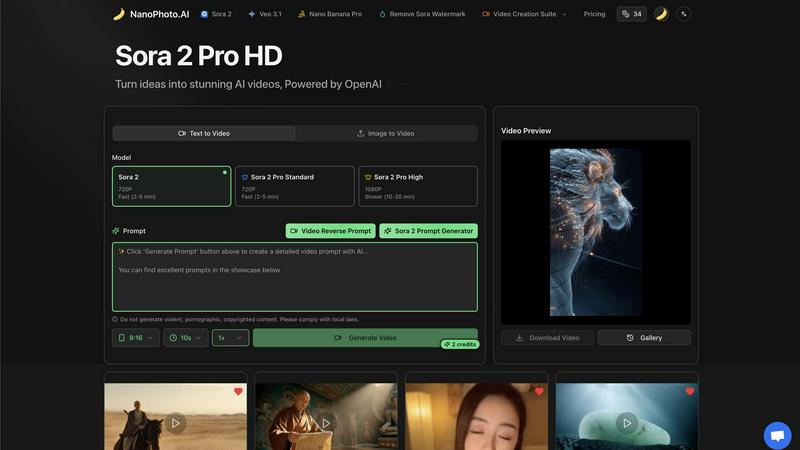
Sora 2 Pro Video Generation
Unlock the power of OpenAI's cutting-edge Sora 2 model directly within Nano Photo. This feature allows you to generate high-definition videos from simple text descriptions or by uploading an existing image to use as a starting point. Choose from different tiers like Standard (720P, fast generation) or High (1080P, for more detailed scenes), giving you control over quality and speed to match your project's needs, all without needing deep technical expertise.
Nano Banana Pro Image Generation
Beyond video, explore powerful AI image creation with the Nano Banana Pro tool. This feature empowers you to generate detailed, high-quality visuals from text prompts, serving as perfect standalone artwork, storyboard elements, or the foundational images you can later animate using the video suite. It expands your creative palette within the same familiar platform.
AI-Powered Prompt Assistants
Ever struggle to find the right words to make the AI understand your vision? Nano Photo's built-in prompt generators, including the Sora 2 Prompt Generator, solve this. They act as creative collaborators, transforming your rough ideas and concepts into optimized, detailed prompts that guide the AI models to produce more accurate and impressive results, effectively flattening the learning curve.
Streamlined Video Editing Suite
Nano Photo provides essential tools to refine your creations after generation. This includes capabilities like removing the default Sora watermark for a clean, professional finish, and a Video Reverse Prompt feature that helps you analyze and understand the elements of your generated content, fostering a deeper learning process for your next creative experiment.
Use Cases
Magic Hour
Rapid Social Media Content Creation
For influencers, small businesses, and social media managers, Magic Hour is a content powerhouse. Quickly generate eye-catching video clips from text ideas for Reels or TikTok, apply trending visual styles to existing footage, and create personalized talking-head videos using AI headshots and lip sync. The vast library of templates ensures every post is perfectly sized for each platform, enabling creators to maintain a consistent, professional presence without a production team.
Scalable Marketing & Advertising Campaigns
Marketing teams and agencies can leverage Magic Hour to produce personalized ad variants at scale. Use the AI UGC generator and image-to-video tools to create thousands of unique assets for A/B testing. Implement face swap for localized ads featuring different spokespeople or create virtual try-on experiences. The API allows for seamless integration into live campaigns, enabling dynamic content personalization that drives higher engagement and conversion rates.
Educational & Training Material Production
Educators and corporate trainers can transform static information into engaging learning experiences. Convert text-based scripts or storyboards into explanatory videos with AI-generated visuals. Use animation and talking photos to simplify complex topics. Easily update training videos by swapping in new presenter footage or syncing new narration with lip sync, ensuring materials stay current without costly reshoots.
Creative Exploration & Prototyping
Artists, writers, and filmmakers can use Magic Hour as a digital sandbox for prototyping ideas. Visualize scenes from a script with text-to-video, experiment with different cinematic styles on a sample clip, or generate concept art and storyboards with the AI image tools. It’s an ideal platform for brainstorming, mood boarding, and presenting visual concepts quickly before committing to full-scale production.
Nano Photo
Social Media Content Creation
Quickly produce eye-catching, original short clips for platforms like TikTok, Instagram Reels, or YouTube Shorts. Generate trending visuals, explainer snippets, or branded promotional videos from a simple text idea in minutes, keeping your content calendar fresh and engaging without a full production crew.
Storyboarding and Concept Visualization
Filmmakers, writers, and marketers can use Nano Photo to rapidly visualize scenes and story beats. Transform script excerpts or narrative descriptions into visual sequences, allowing teams to explore creative directions, pitch ideas convincingly, and plan shoots with a clear visual reference, all before a single camera rolls.
Prototyping for TV Commercials
Agencies and solo creators can prototype commercial concepts efficiently. Generate multiple visual variants of a product scene or narrative moment to test different creative approaches with clients. This use case dramatically speeds up the pre-production feedback loop and helps secure buy-in with compelling AI-generated previews.
Educational and Explainer Content
Educators and content creators can transform complex topics into engaging visual explanations. Generate simple animations, illustrative scenes, or character-driven videos to break down abstract concepts, historical events, or scientific processes, making learning more accessible and captivating for audiences.
Overview
About Magic Hour
What if you could unlock a universe of creative potential without ever leaving your web browser? Welcome to Magic Hour, an all-in-one AI studio that consolidates over 100 powerful tools into a single, intuitive platform. It's designed to make professional-grade video and image creation fast, easy, and accessible to everyone. Whether you're a solo creator experimenting with new ideas, a marketer racing against a deadline, or a team needing to scale content production, Magic Hour empowers you to produce stunning visuals. Forget expensive equipment, complex software, and tedious reshoots. The core magic lies in its simplicity: start with a text prompt, an image, or a video clip, and watch as it transforms into engaging, share-ready content. From generating videos from scripts to applying new artistic styles to existing footage, personalizing with face swaps, or creating professional headshots, it streamlines the entire creative workflow. Built for rapid iteration and consistency, it's your gateway to exploring cinematic 4K scenes, maintaining brand aesthetics, and publishing perfectly sized content for any channel—all from a single, unified studio.
About Nano Photo
Have you ever felt a spark of an idea for a video or image, only to be met by the daunting complexity of traditional production or the confusing jargon of AI tools? Welcome to Nano Photo, your all-in-one creative studio designed to bridge that gap. This discovery-oriented platform is built on a simple, powerful premise: what if bringing your most imaginative concepts to life was intuitive, fast, and genuinely fun? Nano Photo demystifies the world of AI-powered creation by integrating the industry's most advanced models—like OpenAI's Sora 2 and Google's Veo 3.1—into a single, streamlined workflow. It's crafted for the curious explorer, the aspiring storyteller, and the professional creator alike, removing technical barriers so you can focus purely on creativity. From generating stunning videos from a simple text prompt to transforming an existing image into a dynamic scene, the platform empowers you to experiment and iterate with ease. Its secret weapon? Intelligent prompt generators that act as your creative co-pilot, helping articulate your vision in the language AI understands best. Nano Photo isn't just a tool; it's an invitation to explore the boundless possibilities of visual storytelling, all from one centralized and welcoming hub.
Frequently Asked Questions
Magic Hour FAQ
Is Magic Hour really free to start?
Yes! Magic Hour offers a free tier that allows you to access and experiment with a wide range of its core AI tools, including face swap, image generation, and basic video creation. This is a fantastic way to explore the platform's capabilities. For higher-volume usage, advanced features, and commercial applications, they offer scalable paid plans and API access, but you can start creating immediately without a credit card.
What kind of files can I create with Magic Hour?
Magic Hour is designed for modern media output. You can create high-quality videos, including cinematic 4K scenes, as well as high-resolution images. The platform supports generating content in formats and aspect ratios optimized for social media platforms, advertisements, websites, and more. The built-in templates help ensure your outputs are share-ready for any specific channel or use case.
Do I need technical or design skills to use it?
Not at all. Magic Hour is built with an intuitive, user-friendly interface that prioritizes simplicity. The core interaction is often as simple as typing a text prompt or uploading a file. Guided tools and templates make the process accessible to beginners, while the depth of features and API supports the needs of advanced creators and developers.
How does the API work for developers?
The Magic Hour API provides a powerful way to integrate AI video and image generation directly into your own applications or workflows. With drop-in SDKs for popular languages like Python and Node.js, developers can make a single API call to access tools like text-to-video or image-to-video. You can install, authenticate, and start generating media in under 60 seconds, scaling from a few requests to millions with usage-based pricing.
Nano Photo FAQ
What AI models does Nano Photo use?
Nano Photo seamlessly integrates state-of-the-art models to give you the best results. This currently includes OpenAI's Sora 2 for advanced text-to-video and image-to-video generation, Google's Veo 3.1, and its proprietary Nano Banana Pro model for high-quality image generation. The platform is designed to be your unified gateway to these powerful technologies.
Do I need experience with AI prompts to use Nano Photo?
Not at all! A core philosophy of Nano Photo is to make AI accessible. The platform includes intelligent prompt generators that guide you. You can start with a basic idea, and the tool will help expand it into a detailed, effective prompt that the AI models can understand, allowing you to learn and improve your skills as you create.
What video formats and qualities can I generate?
You have flexible options to suit your needs. Using the Sora 2 Pro feature, you can generate videos in standard definition (720P) quickly, or opt for higher definition (1080P) for more detailed outputs. The platform also supports various aspect ratios, like 9:16 for social media, and gives you control over the video duration.
How does the pricing work? Is there a free trial?
While specific plan details are available on the NanoPhoto.AI website, the platform operates on a credit-based system for generations. They frequently offer special promotions, such as an annual payment half-price special offer, to make the creative tools more accessible. It's best to visit the official Pricing page for the most current plans and any available trial information.
Alternatives
Magic Hour Alternatives
Magic Hour is a free, browser-based AI studio that consolidates a vast suite of tools for generating and editing professional videos and images. It belongs to the rapidly evolving category of AI-powered content creation platforms, designed to make high-quality visual production accessible without complex software. Even with its robust offering, users often explore alternatives for various reasons. Some may seek specialized features for a niche workflow, require a different pricing model or subscription tier, or need a platform that integrates deeply with other tools in their existing tech stack. The specific demands of a project, team size, or preferred user interface can also prompt a search for other solutions. When evaluating alternatives, it's wise to consider your primary creative goals. Look at the core AI models for video and image generation, the flexibility of the editing suite, and the quality of the final output. Also, assess the platform's ease of use, collaboration features for teams, and the overall value relative to its cost. The ideal choice aligns closely with your specific production needs and creative process.
Nano Photo Alternatives
Nano Photo is a discovery-oriented AI creative suite that transforms ideas into stunning visual content. It belongs to the category of all-in-one AI video and image generation platforms, integrating powerful models like Sora 2 and Veo 3.1 to simplify complex creative tasks. Users often explore alternatives for various reasons. Some may seek different pricing models or subscription tiers, while others might need specific features not covered by a single platform. The desire for a tool that aligns perfectly with a unique workflow, creative style, or technical requirement is a common driver for this search. When choosing an alternative, consider what matters most for your projects. Look at the core AI models available, the ease of use for your skill level, and the specific output types you need, such as storyboards or TV commercials. Evaluating the overall value and how a tool fits into your creative process will guide you to the right choice.