
LayoffAlert vs SoloTools
Side-by-side comparison to help you choose the right AI tool.

LayoffAlert
Stay informed of potential layoffs at your job with timely alerts and access to essential support resources.
Last updated: February 28, 2026

SoloTools
SoloTools uses AI to rapidly generate polished client proposals, simplifying project scope, pricing, and e-signature.
Last updated: March 4, 2026
Visual Comparison
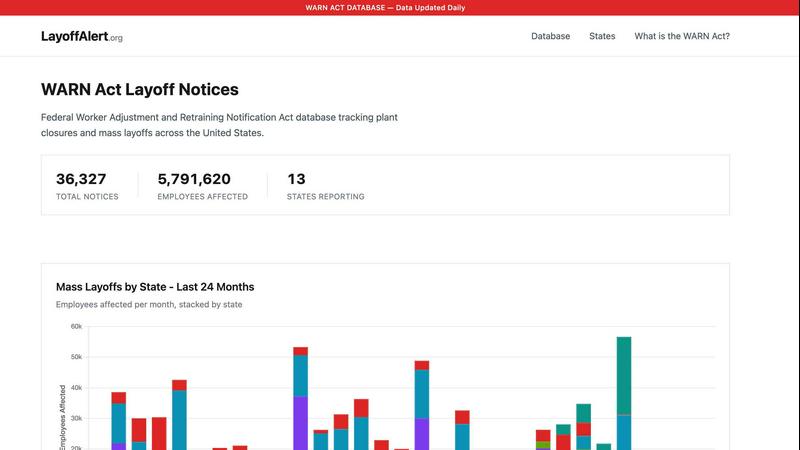
LayoffAlert
SoloTools

Feature Comparison
LayoffAlert
Comprehensive WARN Act Database
LayoffAlert maintains an extensive database of WARN Act notices, regularly updated to reflect the latest filings. With over 41,000 notices tracked across 49 states, users can easily access timely and accurate information regarding mass layoffs and plant closures.
Real-Time Email Alerts
Users can sign up for personalized email alerts based on specific companies or geographical areas. This feature ensures you receive immediate notifications when new WARN notices are filed, allowing you to respond proactively to potential job changes.
Advanced Search Capabilities
The platform provides robust search functionalities, enabling users to filter layoff notices by company name, location, industry, or date. This tailored search experience helps users quickly find the information they need to stay ahead of industry trends.
Detailed Layoff Statistics
LayoffAlert offers insightful statistics regarding layoffs by state, including the number of employees affected and the frequency of notices filed. This information can be invaluable for professionals analyzing labor market trends or researching specific industries.
SoloTools
AI-Powered Proposal Generation
SoloTools utilizes cutting-edge AI technology to create proposals in seconds. Users only need to provide basic project details, and the AI generates a complete, polished proposal with all necessary elements, allowing for quick turnaround and immediate client engagement.
Editable Proposals
Every proposal generated by SoloTools is fully editable. Users can tailor the content to meet specific client needs or preferences, ensuring that each proposal is unique and aligned with their brand voice.
Client Tracking and Analytics
SoloTools provides detailed analytics on each proposal sent, including notifications when a client views the document. This allows users to understand engagement levels and follow up effectively, enhancing their chances of closing deals.
E-signature Integration
The platform supports legally-binding e-signatures, making it easy for clients to approve proposals directly through the document. This feature eliminates the need for cumbersome paperwork and speeds up the approval process.
Use Cases
LayoffAlert
Monitoring Employer Layoffs
Individuals can utilize LayoffAlert to keep a close eye on their current employer's layoff activities. By tracking WARN notices, employees gain insights into the stability of their jobs and can prepare for potential changes in their employment status.
Industry Trend Analysis
Researchers, analysts, and business leaders can leverage the data provided by LayoffAlert to analyze trends within specific industries. Understanding layoff patterns can inform strategic decisions and highlight areas of growth or concern.
Geographic Layoff Tracking
Residents can monitor layoffs in their local areas by utilizing the geographic search features of LayoffAlert. Staying informed about layoffs in their region can help job seekers be proactive in their job search or career planning.
Legal and Financial Preparation
LayoffAlert not only provides data on layoffs but also offers recommendations for legal and financial assistance. This resource is essential for individuals seeking guidance on their rights or options following a layoff.
SoloTools
Freelance Designers
Freelance graphic designers can leverage SoloTools to quickly create compelling proposals for potential clients. By inputting project specifics, designers can generate professional documents that showcase their creativity and detail project scopes, timelines, and pricing.
Marketing Consultants
Marketing consultants can use SoloTools to streamline their proposal process when pitching new campaigns or strategies. The ability to create tailored proposals in seconds allows them to focus more on strategy and less on paperwork.
IT Consultants
Independent IT consultants benefit from SoloTools by efficiently drafting proposals for various projects, from software development to system upgrades. The AI-generated proposals help in outlining technical details clearly and concisely.
Event Planners
Event planners can utilize SoloTools to quickly generate proposals for weddings, corporate events, or private parties. With clear pricing structures and detailed service descriptions, clients can easily understand what to expect.
Overview
About LayoffAlert
LayoffAlert is a comprehensive tool designed to track mass layoffs and plant closures across the United States. By aggregating official WARN Act notices filed with state governments, it provides critical information to workers, employers, and industry analysts alike. Companies with over 100 employees are legally required to file WARN notices at least 60 days before mass layoffs, ensuring that employees receive advance notice of potential job losses. LayoffAlert organizes over 6,000 notices from 49 states into a single, user-friendly searchable database, encompassing more than 561,000 affected employees. Users can search by company name, location, industry, or date to find relevant layoff notices before they occur. Additionally, LayoffAlert offers email alerts for new WARN filings related to specific companies or regions, allowing users to stay informed in real-time. This powerful tool not only provides essential early warning but also offers recommendations for financial or legal assistance, empowering users to prepare for any eventualities.
About SoloTools
SoloTools is an advanced AI proposal generator tailored specifically for freelancers and independent consultants who are looking to optimize their proposal creation process. In a fast-paced world where time is precious, this tool allows users to bypass the tedious task of starting from a blank document. By simply entering key project details—such as client name, project type, budget, and brief scope notes—users can generate a comprehensive proposal in around 30 seconds. The AI crafts a polished, client-ready document that includes essential components like an executive summary, detailed scope of work, itemized pricing, a well-defined timeline, and standard terms. Whether you are a busy graphic designer, a marketing consultant, or an IT specialist, SoloTools streamlines your workflow and enhances client interactions. With features that include fully editable proposals, downloadable PDFs, and shareable links, this tool not only saves time but also boosts professionalism. SoloTools offers a free plan that allows three proposals a month, while the Pro plan includes unlimited proposals, custom branding options, and proposal view analytics for tracking client engagement.
Frequently Asked Questions
LayoffAlert FAQ
How does LayoffAlert collect its data?
LayoffAlert aggregates data directly from official WARN Act notices filed with state governments. This ensures the accuracy and reliability of the information provided to users.
Is there a cost associated with using LayoffAlert?
The basic features of LayoffAlert, including access to the WARN database and email alerts, are free to users. This accessibility allows anyone to stay informed about potential layoffs without financial barriers.
How often is the data updated?
LayoffAlert updates its database daily, ensuring that users have access to the most current information regarding mass layoffs and plant closures across the country.
Can I track multiple companies or states?
Yes, LayoffAlert allows users to track multiple companies or states. You can easily set up alerts for different entities and receive notifications tailored to your interests.
SoloTools FAQ
How does SoloTools generate proposals so quickly?
SoloTools employs advanced AI algorithms that analyze the input project details and automatically construct a complete proposal, including all essential components, in a matter of seconds.
Can I edit the proposals generated by SoloTools?
Absolutely! All proposals created with SoloTools are fully editable. You can modify any section to better fit your client's needs or your personal style before sending it out.
What is included in the free plan?
The free plan allows users to create up to three proposals per month at no cost. This is a great way to explore the features of SoloTools and see how it can benefit your business without any financial commitment.
Is there a way to track client engagement with my proposals?
Yes, SoloTools offers tracking features that notify you when a client views your proposal. This information can help you follow up effectively and improve your chances of closing the deal.
Alternatives
LayoffAlert Alternatives
LayoffAlert is a specialized service that provides notifications about potential layoffs across the United States by tracking WARN Act notices filed by companies. It falls under the HR & Recruiting category, offering users vital information regarding mass layoffs and plant closures, ultimately helping them prepare for possible job loss. Users often seek alternatives to LayoffAlert for various reasons, including pricing, specific feature requirements, or platform compatibility. When choosing an alternative, it's essential to consider factors such as the comprehensiveness of data, notification frequency, user interface, and additional support services like financial or legal assistance to ensure it meets your unique needs.
SoloTools Alternatives
SoloTools is an innovative AI-powered proposal generator designed for freelancers and independent consultants. It streamlines the process of creating client proposals, allowing users to quickly input project details and receive a polished, professional document in seconds. As a part of the business and finance category, SoloTools caters to those seeking efficiency in their client interactions. Users often seek alternatives to SoloTools for various reasons, including pricing structures, feature sets, or specific platform needs that may not be fully met by the software. When exploring alternatives, it’s essential to consider factors such as ease of use, customization options, integration capabilities, and the overall value offered for the price. Finding a solution that aligns with your unique requirements can significantly enhance your proposal creation experience.