
JSON to Video vs Seeddance
Side-by-side comparison to help you choose the right AI tool.

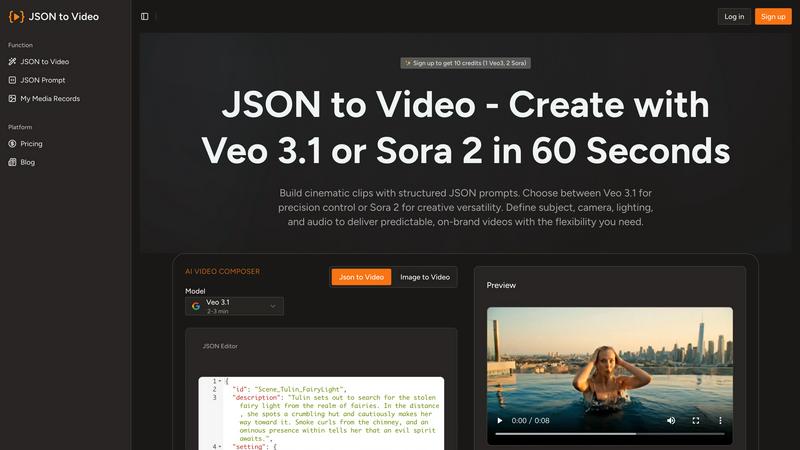
JSON to Video
Discover how structured JSON prompts unlock predictable, cinematic videos in just sixty seconds.
Last updated: March 1, 2026

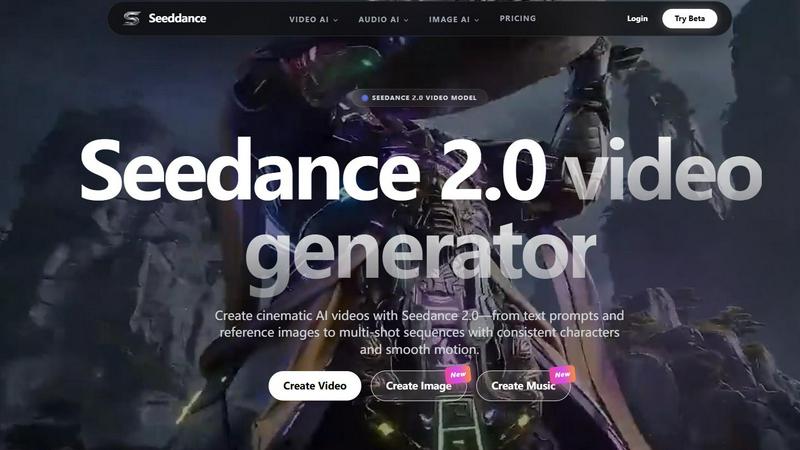
Seeddance
Discover how Seedance 2.0 transforms your text and images into cinematic AI videos with smooth motion and consistent characters.
Last updated: April 13, 2026
Visual Comparison
JSON to Video
Seeddance
Feature Comparison
JSON to Video
Structured JSON Schema for Precision
The cornerstone of JSON to Video is its comprehensive JSON schema, which acts as a blueprint for your video. Each field corresponds to a specific visual or auditory parameter, allowing you to define elements like shot composition, camera movement, subject description, wardrobe, scene location, and audio mix with incredible detail. This structure eliminates the ambiguity of traditional text prompts, ensuring the AI model interprets your creative direction accurately and consistently, leading to predictable and high-quality outputs every time.
Multi-Model Support (Veo 3.1, Seedance 2, etc.)
The platform offers the flexibility to leverage the unique strengths of multiple state-of-the-art generative video models. You are not locked into a single AI's interpretation. Whether you need the cinematic quality of Veo 3.1, the dynamic motion of Seedance 2, or the capabilities of Wan 2.6 and Kling 2.6, you can choose the best tool for your specific project. This allows for exploratory creativity, letting you see how different models render the same structured prompt.
Detailed Cinematic Control
Go beyond basic subject matter. The schema provides granular control over true cinematic elements. You can specify the lens type (e.g., "35mm with cinematic softness"), frame rate, camera movements like "smooth slider pans," intricate lighting setups, and a detailed color palette. This level of control empowers users to craft videos with a specific tone and professional aesthetic, making it feel less like AI generation and more like digital filmmaking.
Integrated Audio and Timeline Specification
JSON to Video understands that sound is half the experience. The schema includes dedicated audio sections for music, ambient sound, and sound effects, complete with mix levels. Furthermore, the timeline array allows you to break down the video sequence by seconds, describing the action and visual progression moment-by-moment. This feature is perfect for storyboarding complex narratives and ensuring the audio-visual elements are perfectly synchronized from start to finish.
Seeddance
Seedance 2.0 Video Generator
Dive into the heart of the platform with the Seedance 2.0 model, engineered for cinematic quality. This feature allows you to generate videos directly from text descriptions or by using an image as a creative springboard. What sets it apart is its sophisticated ability to maintain consistency across multiple shots, enabling you to create sequences where characters, aesthetics, and motion flow together seamlessly, pushing beyond single, disjointed clips into the realm of coherent visual narratives.
AI-Powered Viral Effects Library
Unleash a wave of playful creativity with a constantly growing library of over 60 one-click AI video effects. Ever wondered what it would look like for a photo to break into dance or share a heartfelt hug? This feature makes it effortlessly possible. It's designed for rapid, engaging content creation, allowing users to apply trendy, attention-grabbing transformations to their images and videos, perfect for crafting posts that stand out on social media platforms.
Multi-Modal Creative Studio
Seeddance transcends being a single-tool wonder by integrating a full suite of generative AI capabilities. Beyond video, you can explore its AI image generator for creating reference shots or keyframes, and its text-to-music audio generator to compose original soundtracks and sound effects. This interconnected studio approach lets you ideate and produce all assets for a project—visuals, motion, and audio—within a single, cohesive platform.
Cutting-Edge Model Playground
For the AI enthusiast who loves to experiment, Seeddance offers access to a rotating roster of the latest models. The platform frequently integrates new releases like Kling 3 for bringing images to life with motion, Vidu Q3, and Grok Imagine Video for rapid image-to-cinematic clip conversion. This feature ensures creators always have their fingers on the pulse of the most advanced generative technology available.
Use Cases
JSON to Video
Branded Marketing and Advertisement Clips
Marketers can produce on-brand video content with remarkable consistency. By codifying brand guidelines—such as color palettes, lighting moods, and character styles—into a JSON template, teams can generate countless ad variations, product showcases, or social media clips that all maintain perfect brand alignment. This allows for rapid A/B testing of different scenarios while ensuring visual coherence across an entire campaign.
Narrative Short Film and Storyboarding
Independent filmmakers and writers can use the platform as a dynamic storyboarding tool. The structured prompt allows for pre-visualizing complex scenes, experimenting with different cinematography choices, and understanding the flow of a narrative before live production. It’s a sandbox for visualizing script elements, from character actions and props to camera angles and environmental transitions, bringing written stories to life quickly.
Educational and Explainer Content
Educators and instructional designers can create engaging explainer videos with clear, consistent visual metaphors. By structuring the lesson into a timeline with defined scenes and subjects, complex topics can be broken down into digestible, visually compelling segments. The predictable output ensures that key educational elements are always presented clearly, enhancing learning retention.
Product Visualization and Prototyping
Designers and architects can visualize products or spaces in cinematic environments. Imagine showcasing a new piece of furniture or a room layout through a curated video sequence, with controlled lighting to highlight features and specific camera movements to guide the viewer's eye. This use case transforms static designs into immersive experiences, ideal for client presentations and concept validation.
Seeddance
Social Media Content & Viral Campaigns
Creators and marketers can rapidly produce a high volume of eye-catching, trend-aligned content. Use the viral effects for fun, engaging posts, or leverage Seedance 2.0 to generate unique, cinematic short clips for Instagram Reels, TikTok, or YouTube Shorts that tell a brand story or capture a mood without the need for expensive filming equipment or crews.
Concept Visualization & Storyboarding
Filmmakers, writers, and game developers can use Seeddance as a powerful pre-visualization tool. Quickly generate video clips or keyframes from script excerpts or descriptive text to explore scene compositions, character appearances, and atmospheric styles. This allows for iterative experimentation and provides a tangible visual reference to communicate creative ideas to teams or stakeholders.
Personalized Digital Art & Entertainment
Artists and hobbyists can explore new frontiers of digital expression. Transform your own drawings or photographs into animated sequences, create music to accompany your visual art, or craft entirely AI-generated short films. It's a sandbox for personal projects, allowing you to experiment with styles and narratives that would be difficult or impossible to achieve through traditional means.
Prototyping for Advertising & Marketing
Advertising agencies and product teams can prototype commercial concepts at lightning speed. Generate multiple video variants for A/B testing, create mock-ups for potential ad campaigns, or produce compelling product explainer videos directly from concept descriptions. This significantly accelerates the creative ideation phase and reduces costs associated with traditional pre-production.
Overview
About JSON to Video
What if you could direct an AI video model with the precision of a film director, not the guesswork of a prompt engineer? JSON to Video is a groundbreaking platform that unlocks this exact possibility. It transforms the often-frustrating process of text-to-video generation into a structured, predictable, and deeply creative workflow. By using a detailed JSON schema instead of ambiguous text prompts, you gain meticulous control over every cinematic element. Imagine filling out a digital storyboard where you can specify the exact subject, camera movements, lens type, lighting conditions, color grading, soundtrack, and even subtle sound effects. This platform is specifically engineered to interpret your structured data payload and translate it faithfully into high-quality video clips using cutting-edge models like Veo 3.1, Seedance 2, Wan 2.6, and Kling 2.6. It's designed for creators, marketers, educators, and brands who are curious about AI video but demand reliability and alignment with their vision. The core value proposition is profound: replace randomness with repeatability, and transform structured data into stunning, cinematic scenes in as little as 60 seconds. It invites you to explore a new language of visual creation, one where your intent is clearly understood and executed.
About Seeddance
What if you could conjure entire cinematic worlds from a single sentence or a still image? Seeddance invites you on that very adventure. It's not just another AI tool; it's an all-in-one creative platform built for the curious explorer, the aspiring filmmaker, and the social storyteller. At its core is the powerful Seedance 2.0 model, a next-generation AI video generator designed to transform your text prompts and reference images into smooth, high-definition videos with remarkable multi-shot consistency. This means you can craft scenes where characters and styles remain coherent, opening the door to genuine short-form storytelling. But the exploration doesn't stop at video. The platform is a vibrant creative suite, also offering AI-powered image generation, text-to-music tools, and a playful library of viral effects that can make photos dance, hug, or kiss in one click. Seeddance positions itself as a unified creative stack, empowering users to ideate, visualize, animate, and score their ideas in one intelligent environment. Whether you're a content creator seeking viral magic, a marketer prototyping ad concepts, or simply an artist experimenting with new forms of expression, Seeddance provides the playground to bring your wildest imaginative seeds to life.
Frequently Asked Questions
JSON to Video FAQ
What is the main advantage of using JSON over a text prompt?
The main advantage is precision and predictability. A text prompt like "a person in a room" is open to vast interpretation by an AI. A JSON schema allows you to specify that the person is an "adult in simple, clean clothing," the room is a "modern living room with ambient shelves," the camera uses a "35mm lens," and the movement is a "smooth slider pan." This structured approach drastically reduces guesswork and ensures the output closely matches your detailed vision.
Do I need to be a programmer to use JSON to Video?
Not at all. While familiarity with JSON's basic structure (key-value pairs in braces) is helpful, the platform is designed to be accessible. The website provides clear templates and examples for various genres (Action, Ad, Narrative, etc.) that you can copy and modify. You simply fill in the values for each field, much like completing a detailed form, without needing to write complex code from scratch.
Which AI video models does JSON to Video support?
The platform supports several leading generative video models, including Google's Veo 3.1, Kuaishou's Seedance 2, as well as Wan 2.6 and Kling 2.6. This multi-model approach gives you creative flexibility, allowing you to select the model that best suits the style or motion requirements of your specific project, all within the same structured prompting interface.
Can I control the audio and sound design?
Yes, audio control is a core feature. The JSON schema includes a dedicated "audio" section where you can describe the music style (e.g., "soft, ascending ambient pad"), ambient sounds, specific sound effects, and their mix levels. This allows for the creation of a cohesive audio-visual experience, where the soundtrack and effects are integral to the scene's mood and action, not an afterthought.
Seeddance FAQ
What is Seedance 2.0 and how is it different?
Seedance 2.0 is the flagship next-generation AI video model within the Seeddance platform. It specializes in generating high-quality, cinematic-style videos from text prompts or reference images. Its key differentiator is a strong focus on motion coherence and multi-shot consistency, allowing users to create sequences where elements like characters and visual style remain stable across different shots, enabling more complex storytelling than typical single-prompt video generators.
Is there a free way to try Seeddance?
Yes, you can begin your creative exploration with a free tier that provides access to core features of the platform. This allows you to test the video, image, and audio generation capabilities. For more advanced needs like higher resolutions, longer video generations, batch processing, and faster generation times, paid subscription plans are available that unlock these premium features.
What can I actually create with this platform?
Your creative possibilities are vast. You can create cinematic video clips from simple text descriptions, generate dynamic video variations from a single reference image, and build multi-shot sequences with consistent characters. Beyond video, you can generate images for inspiration or as video inputs, compose original music and sound effects, and apply fun, viral AI effects to existing photos and videos for social media.
How does Seeddance handle content safety and copyright?
The platform is designed for creative flexibility but operates under a clear content policy that prohibits illegal or harmful material. Users are responsible for ensuring they have the rights to any content they upload or reference. For generated content, commercial usage rights typically depend on your subscription plan, with paid subscribers generally granted broader licenses for commercial use compared to free tier users.
Alternatives
JSON to Video Alternatives
JSON to Video is a specialized tool in the generative AI video space, allowing creators to build cinematic scenes using structured JSON data instead of ambiguous text prompts. This approach offers a unique blend of creative control and predictable output, setting it apart from more conventional video generation platforms. Users often explore alternatives for various reasons. Some may seek different pricing models or free tiers to experiment with. Others might need compatibility with specific platforms or workflows, or desire a different balance between ease of use and granular creative control. The search for the right tool is a natural part of finding the perfect fit for one's project needs and technical comfort. When evaluating other options, consider the core trade-off between flexibility and predictability. Look at how much direct control you have over visual elements like camera work and lighting versus the simplicity of a text-only interface. Also, assess the output quality, supported formats, and how well the tool integrates into your existing content creation pipeline. The goal is to find a solution that aligns with both your creative vision and practical requirements.
Seeddance Alternatives
Seeddance is a versatile AI creative platform that excels in the video and image generation categories. It combines cinematic AI video creation from text or images with tools for generating music and viral visual effects, all powered by its advanced Seedance 2.0 model. Users often explore alternatives for various reasons. Some may be seeking a different pricing structure or a free tier with more generous limits. Others might need a platform focused on a single specialty, like only image generation, or require specific integrations for their workflow. When evaluating other options, consider your primary creative goal. Look for the core capability you need, whether it's multi-shot video consistency, high-quality image generation, or unique AI effects. Also, assess the user experience, output quality, and how well the tool fits into your existing creative process.