
Geekflare Connect vs SimpleDraw
Side-by-side comparison to help you choose the right AI tool.

Geekflare Connect
Geekflare Connect unifies top AI models for seamless collaboration, empowering teams to optimize performance and cut.
Last updated: March 1, 2026

SimpleDraw
Effortlessly create accurate floor plans and room layouts online with SimpleDraw's intuitive web-based drawing tool.
Last updated: March 1, 2026
Visual Comparison
Geekflare Connect
SimpleDraw
Feature Comparison
Geekflare Connect
Integrated with the World's Best AI Models
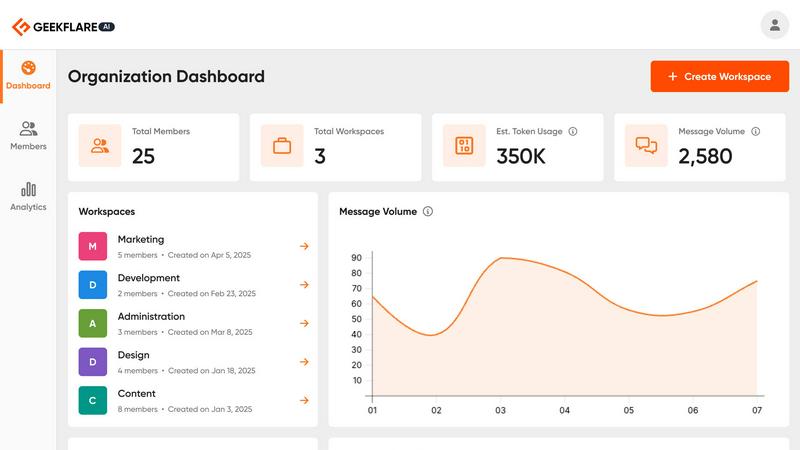
Geekflare Connect seamlessly connects with top AI models like OpenAI, Anthropic, and Google, offering users a versatile platform to engage with multiple AI solutions. This integration empowers teams to select the most effective model for every task, promoting efficiency and enhanced output quality.
Multi-Model Comparison
One of the standout features of Geekflare Connect is its multi-model comparison capability. Users can instantly compare responses from different AI models, such as GPT-5.2, Claude 4.5, and Gemini 3, side-by-side. This feature helps teams identify the best outputs for their specific needs, significantly improving decision-making processes.
Live Web Access
Supercharge your AI experience with Geekflare Connect's live web access feature. This allows users to perform real-time web searches, gathering the latest data from the internet to enhance AI responses. Powered by advanced technologies like Parallel, Exa, and Firecrawl, this feature ensures that users have the most current information at their fingertips.
Collaborative Workspaces
Geekflare Connect's collaborative workspaces enable teams to organize chats by project, manage team member contributions, and securely share conversations. This feature is essential for maintaining alignment within teams, enhancing productivity, and ensuring everyone is on the same page when working on shared tasks.
SimpleDraw
Floor Plan Mode
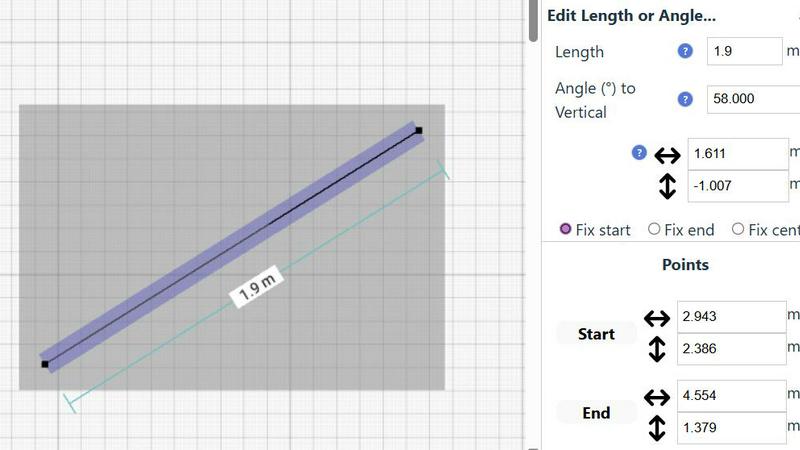
The Floor Plan Mode is a specialized feature designed to facilitate the creation of accurate floor plans for various spaces like rooms, apartments, and houses. With just a single click, you can draw walls and add essential elements such as windows and doors, while real-time measurements provide feedback as you adjust your design.
Smart Alignment System
This innovative system enhances your drawing experience by assisting you in positioning points and lines with pinpoint accuracy. As you move your mouse, SimpleDraw visually indicates the optimal placement for your lines or points, ensuring that everything aligns perfectly. For greater precision, you can zoom in and adjust your elements with ease.
Flexible Zoom and Variable Precision
With SimpleDraw, you can effortlessly zoom in and out to focus on any part of your drawing. The alignment precision adapts based on your zoom level, allowing you to control the detail as needed. This feature is particularly useful when fine-tuning intricate designs or layouts.
Comprehensive Measurement System
SimpleDraw offers a robust measurement system that lets you display and control measurements according to your preferences, with options for both metric and US units. Contextual measurements are dynamically shown as you work, helping you maintain accuracy in your drawings and ensuring that everything is just as you envisioned.
Use Cases
Geekflare Connect
Marketing Campaign Development
Marketing teams can leverage Geekflare Connect to streamline their campaign development processes. By utilizing multiple AI models to generate content ideas and strategies, they can quickly identify the best-performing concepts, optimizing their marketing efforts and reducing costs.
Customer Support Enhancement
Customer support teams can use Geekflare Connect to improve their response times and service quality. By integrating AI models that specialize in customer inquiries, they can provide instant, accurate answers, enhancing customer satisfaction and reducing operational costs.
Software Development Assistance
Development teams can utilize Geekflare Connect to enhance their coding and debugging processes. By comparing outputs from different AI models, developers can quickly identify the most effective solutions, accelerating project timelines and improving software quality.
Data Analysis and Reporting
Data analysts can harness the power of Geekflare Connect to analyze vast datasets more efficiently. By using the platform's multi-model capabilities, they can generate insights from diverse AI models, leading to comprehensive reports and informed decision-making.
SimpleDraw
Kitchen and Bathroom Renovations
Planning a renovation project for your kitchen or bathroom? SimpleDraw allows you to create accurate floor plans that help visualize layouts before you start any physical work. This ensures that all elements fit perfectly in your intended design.
Room Layouts and Furniture Planning
Before purchasing new furniture, use SimpleDraw to design layouts for your bedroom, living room, or office. This feature allows you to see how different pieces will fit within your space, ultimately saving time and money by preventing ill-suited purchases.
House and Apartment Plans
For homeowners and real estate professionals alike, SimpleDraw enables the creation of complete floor plans suitable for home projects or rental listings. This feature helps in space planning, making it easier to understand how to utilize every inch of your property effectively.
Community-Driven Feature Development
With SimpleDraw, users can actively participate in the development of the platform by providing feedback and suggesting improvements. Engaging with the community through Discord allows you to influence future features, making it a tool that evolves based on real user needs.
Overview
About Geekflare Connect
Geekflare Connect is a groundbreaking BYOK (Bring Your Own Key) AI platform designed to empower modern businesses by optimizing AI-related expenses and enhancing team collaboration. In a landscape where AI models evolve at breakneck speed, Geekflare Connect provides organizations the agility to select the most suitable AI solutions for various tasks. This platform is particularly beneficial for teams across diverse sectors such as marketing, sales, development, and support, allowing them to collaborate seamlessly within a centralized workspace. By integrating multiple leading AI models such as OpenAI, Google, and Anthropic into a single interface, Geekflare Connect streamlines operations, fosters teamwork, and facilitates effective monitoring of AI usage. Organizations can achieve cost optimizations of up to 65% through its innovative features, including real-time data access and shared environments for all team members. Geekflare Connect is not merely an AI tool; it is a transformative solution that empowers teams to harness the full potential of artificial intelligence while keeping budgets under control.
About SimpleDraw
SimpleDraw is a cutting-edge online tool tailored for individuals ranging from casual users to professionals who are keen on creating precise and accurate scale drawings effortlessly. This versatile platform caters to a variety of needs, whether you're initiating a DIY home project, planning a room renovation, or designing an entirely new layout. SimpleDraw empowers users by providing a user-friendly interface that eliminates the need for prior CAD experience, making it accessible for everyone—from homeowners to hobbyists. The standout feature of SimpleDraw is its completely free service, allowing users to dive into their drawing projects without the hassle of login or registration. This means you can start crafting detailed floor plans and technical drawings instantly. With SimpleDraw, you enjoy the convenience and precision of digital tools while retaining the simplicity and familiarity of traditional pen and paper methods, making it an essential resource for anyone looking to visualize their space.
Frequently Asked Questions
Geekflare Connect FAQ
What is BYOK in Geekflare Connect?
BYOK stands for Bring Your Own Key. It allows organizations to maintain control over their AI data security and access, enabling them to integrate their own encryption keys for enhanced security while using the platform.
How does Geekflare Connect reduce AI expenses?
Geekflare Connect helps organizations cut AI spending by providing a unified workspace for multiple AI models, allowing teams to efficiently compare outputs, optimize usage, and monitor costs, potentially achieving savings of up to 65%.
Can I collaborate with my team on Geekflare Connect?
Absolutely! Geekflare Connect offers collaborative workspaces where team members can manage projects, share prompts, and track usage metrics. This feature significantly enhances teamwork and ensures everyone is aligned towards common goals.
Is my data secure on Geekflare Connect?
Yes, Geekflare Connect prioritizes data security. With its BYOK feature, organizations can securely upload documents and manage their data access, ensuring that sensitive information remains protected while leveraging AI capabilities.
SimpleDraw FAQ
How do I start drawing with SimpleDraw?
You can start drawing immediately by visiting the SimpleDraw website. There's no need for sign-up or software installation, allowing you to dive right into your project.
Is SimpleDraw suitable for beginners?
Absolutely! SimpleDraw is designed to be user-friendly, requiring no prior CAD experience. Its intuitive interface makes it accessible for beginners while offering powerful features for advanced users.
Can I save my drawings?
While SimpleDraw is a free online tool, the ability to save drawings may depend on your browser settings. It is advisable to download or take screenshots of your work as a backup.
What types of measurements can I use in SimpleDraw?
SimpleDraw provides a comprehensive measurement system that allows you to choose between metric and standard US units. You can also customize which measurements are displayed as you create your drawings.
Alternatives
Geekflare Connect Alternatives
Geekflare Connect is an innovative BYOK (Bring Your Own Key) AI platform designed to streamline teamwork and reduce AI-related costs, making it a valuable tool for businesses across various sectors. By integrating multiple AI models into a single workspace, it enhances collaboration and operational efficiency. Users often seek alternatives to such platforms due to factors like pricing, specific feature sets, or unique platform needs that may not be fully met. When choosing an alternative, consider aspects such as model integration capabilities, collaboration features, and real-time data access to ensure it aligns with your team's requirements and goals.
SimpleDraw Alternatives
SimpleDraw is an innovative web-based tool designed for creating precise scale drawings and detailed floor plans. It caters to a diverse audience, from casual users embarking on DIY projects to professionals in need of accurate technical drawings. Given its user-friendly nature and free access model, many users may seek alternatives to explore different features or platforms that better align with their project requirements, budget considerations, or specific functionality needs. When searching for an alternative, it’s essential to consider factors such as ease of use, available features, pricing structure, and compatibility with various devices. --- [{"question": "What is SimpleDraw?", "answer": "SimpleDraw is an online tool that allows users to create precise scale drawings and floor plans effortlessly."}, {"question": "Who is SimpleDraw for?", "answer": "SimpleDraw is designed for everyone, including homeowners, hobbyists, and professionals looking to create accurate technical drawings."}, {"question": "Is SimpleDraw free?", "answer": "Yes, SimpleDraw offers a free service with no login or registration required."}, {"question": "What are the main features of SimpleDraw?", "answer": "The main features of SimpleDraw include accurate scale drawing capabilities, a specialized floor plan creator, a smart alignment system, and comprehensive measurement tools."}]