
GAAbstract vs SimpleDraw
Side-by-side comparison to help you choose the right AI tool.

GAAbstract
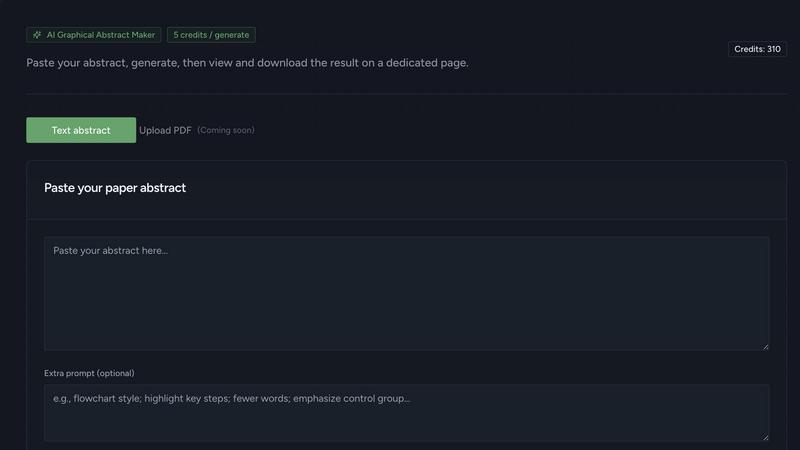
Discover how AI transforms your research abstract into a stunning graphical summary in seconds.
Last updated: February 28, 2026

SimpleDraw
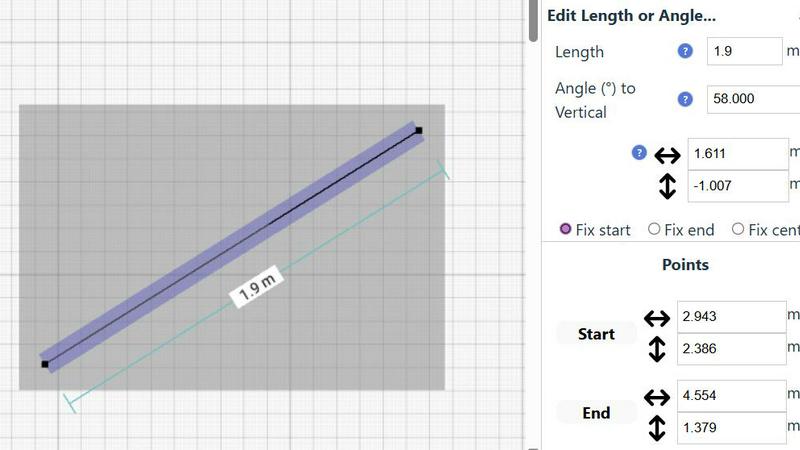
Effortlessly create accurate floor plans and room layouts online with SimpleDraw's intuitive web-based drawing tool.
Last updated: March 1, 2026
Visual Comparison
GAAbstract
SimpleDraw
Feature Comparison
GAAbstract
AI-Powered Research Comprehension
At the heart of GAAbstract is an AI engine built to understand scientific language. When you paste your abstract, it doesn't just scan for keywords; it analyzes the narrative to identify the core problem, methodology, key results, and conclusions. It maps out the relationships between different entities and processes, forming a logical structure that becomes the blueprint for your graphical abstract. This deep comprehension ensures the generated visual accurately reflects the intellectual contribution of your work.
Seconds to First Draft Generation
The tool eliminates the daunting blank canvas. Leveraging its analysis, GAAbstract generates a complete, structured draft of your graphical abstract almost instantaneously. This initial draft includes a suggested layout, relevant icons, and textual labels, providing a solid, editable foundation. This feature allows researchers to rapidly visualize their ideas and begin the iterative process of refinement immediately, turning hours of potential design work into minutes of productive review.
Fully Editable Real-Time Canvas
Every element generated by the AI is fully customizable, fostering an exploratory editing environment. You can refine text, adjust styles, swap icons, and reorganize the layout with real-time preview. This flexibility ensures that the final output aligns perfectly with your vision and any specific journal guidelines. The tool supports your creativity, allowing you to experiment with different visual narratives until you discover the most effective way to communicate your findings.
High-Resolution Multi-Format Export
Once your exploration yields the perfect graphical abstract, GAAbstract facilitates seamless sharing and submission. You can export your creation in high-resolution formats suitable for any purpose, whether it's a journal submission requiring specific dimensions (like 4x2 inches at 300 DPI), a slide for an upcoming conference talk, or a shareable image for academic social media. This removes technical export hassles and ensures your visual is always publication-ready.
SimpleDraw
Floor Plan Mode
The Floor Plan Mode is a specialized feature designed to facilitate the creation of accurate floor plans for various spaces like rooms, apartments, and houses. With just a single click, you can draw walls and add essential elements such as windows and doors, while real-time measurements provide feedback as you adjust your design.
Smart Alignment System
This innovative system enhances your drawing experience by assisting you in positioning points and lines with pinpoint accuracy. As you move your mouse, SimpleDraw visually indicates the optimal placement for your lines or points, ensuring that everything aligns perfectly. For greater precision, you can zoom in and adjust your elements with ease.
Flexible Zoom and Variable Precision
With SimpleDraw, you can effortlessly zoom in and out to focus on any part of your drawing. The alignment precision adapts based on your zoom level, allowing you to control the detail as needed. This feature is particularly useful when fine-tuning intricate designs or layouts.
Comprehensive Measurement System
SimpleDraw offers a robust measurement system that lets you display and control measurements according to your preferences, with options for both metric and US units. Contextual measurements are dynamically shown as you work, helping you maintain accuracy in your drawings and ensuring that everything is just as you envisioned.
Use Cases
GAAbstract
Accelerating Journal Submissions
Many high-impact journals now require or strongly recommend a graphical abstract to accompany submissions. Researchers can use GAAbstract to quickly generate a professional visual summary that meets strict journal specifications, streamlining the submission process and enhancing the paper's appeal to editors and readers by clearly showcasing the key finding upfront.
Creating Engaging Presentation Materials
Crafting slides for lab meetings, conference talks, or grant proposals becomes more efficient. Scientists can use GAAbstract to produce clear, consistent graphical abstracts that serve as powerful visual anchors in presentations, helping audiences grasp complex concepts quickly and making the research narrative more memorable and engaging.
Enhancing Research Dissemination on Social Media
For scientists looking to share their work on platforms like Twitter/X or LinkedIn, a compelling visual is essential. GAAbstract enables the rapid creation of shareable graphical abstracts that can summarize a study's impact in a single, glanceable image, driving higher engagement and facilitating broader dissemination of research findings to both academic and public audiences.
Supporting Student and Lab Workflow
Principal investigators and lab managers can integrate GAAbstract into their group's workflow to maintain a consistent visual language across all publications and presentations from the lab. It also serves as an excellent training tool for graduate students and postdocs, helping them learn how to distill and visualize their research effectively without a steep learning curve in complex design software.
SimpleDraw
Kitchen and Bathroom Renovations
Planning a renovation project for your kitchen or bathroom? SimpleDraw allows you to create accurate floor plans that help visualize layouts before you start any physical work. This ensures that all elements fit perfectly in your intended design.
Room Layouts and Furniture Planning
Before purchasing new furniture, use SimpleDraw to design layouts for your bedroom, living room, or office. This feature allows you to see how different pieces will fit within your space, ultimately saving time and money by preventing ill-suited purchases.
House and Apartment Plans
For homeowners and real estate professionals alike, SimpleDraw enables the creation of complete floor plans suitable for home projects or rental listings. This feature helps in space planning, making it easier to understand how to utilize every inch of your property effectively.
Community-Driven Feature Development
With SimpleDraw, users can actively participate in the development of the platform by providing feedback and suggesting improvements. Engaging with the community through Discord allows you to influence future features, making it a tool that evolves based on real user needs.
Overview
About GAAbstract
What if you could unlock the visual story hidden within your dense research text? GAAbstract is an AI-powered exploration tool designed for curious minds in the scientific community, from graduate students embarking on their first publication to seasoned principal investigators. It tackles a fundamental challenge in research communication: transforming complex, written abstracts into clear, compelling, and publication-ready graphical abstracts. The process begins with a simple act of discovery—paste your abstract text, and the AI delves into its structure, logic, and narrative flow. It acts as a co-pilot, identifying key entities, relationships, and sequential steps to construct a coherent visual schematic in mere seconds. This isn't about replacing the researcher's insight but about accelerating the translation of that insight into a universal visual language. The core value proposition is a profound saving of time and cognitive energy, freeing researchers from the intricacies of manual design software. It empowers scientists to focus on the nuance of their findings while ensuring their work can be communicated with precision and clarity across journals, conference presentations, and social media platforms, all without requiring prior design expertise.
About SimpleDraw
SimpleDraw is a cutting-edge online tool tailored for individuals ranging from casual users to professionals who are keen on creating precise and accurate scale drawings effortlessly. This versatile platform caters to a variety of needs, whether you're initiating a DIY home project, planning a room renovation, or designing an entirely new layout. SimpleDraw empowers users by providing a user-friendly interface that eliminates the need for prior CAD experience, making it accessible for everyone—from homeowners to hobbyists. The standout feature of SimpleDraw is its completely free service, allowing users to dive into their drawing projects without the hassle of login or registration. This means you can start crafting detailed floor plans and technical drawings instantly. With SimpleDraw, you enjoy the convenience and precision of digital tools while retaining the simplicity and familiarity of traditional pen and paper methods, making it an essential resource for anyone looking to visualize their space.
Frequently Asked Questions
GAAbstract FAQ
How does GAAbstract ensure the accuracy of the generated abstract?
GAAbstract's AI is designed to parse and structure the information you provide, but the researcher remains the ultimate authority on content accuracy. The tool generates a draft based on its comprehension of your text, which you then review and edit extensively. This human-in-the-loop process ensures the final visual is both visually compelling and scientifically precise, as all elements can be refined.
What are credits, and how many do I need per graphical abstract?
Credits are the unit used to generate graphical abstracts on GAAbstract. Typically, one generation request consumes one credit. The platform offers free credits upon sign-up for initial exploration, with various subscription plans providing monthly credit allowances (e.g., 300, 650, or 1000 credits) to match different usage levels, from individual researchers to busy labs.
Can I customize the graphical abstract to match my journal's specific format?
Absolutely. A key feature of GAAbstract is its fully editable canvas. You can adjust the dimensions, layout, color scheme, typography, and icons to align with any specific journal guidelines or your personal branding. The tool also allows you to set a target output specification, such as 4x2 inches at 300 DPI, to meet common publication standards.
Is my research data and abstract text kept private and secure?
Yes, GAAbstract emphasizes complete privacy for your research. According to the provided information, all plans include a commitment to data privacy, ensuring that your abstracts and the generated graphical content remain confidential and are not used for training the AI model or shared with third parties without your consent.
SimpleDraw FAQ
How do I start drawing with SimpleDraw?
You can start drawing immediately by visiting the SimpleDraw website. There's no need for sign-up or software installation, allowing you to dive right into your project.
Is SimpleDraw suitable for beginners?
Absolutely! SimpleDraw is designed to be user-friendly, requiring no prior CAD experience. Its intuitive interface makes it accessible for beginners while offering powerful features for advanced users.
Can I save my drawings?
While SimpleDraw is a free online tool, the ability to save drawings may depend on your browser settings. It is advisable to download or take screenshots of your work as a backup.
What types of measurements can I use in SimpleDraw?
SimpleDraw provides a comprehensive measurement system that allows you to choose between metric and standard US units. You can also customize which measurements are displayed as you create your drawings.
Alternatives
GAAbstract Alternatives
GAAbstract is an AI-powered assistant that transforms dense research text into clear, publication-ready graphical abstracts. It belongs to a growing category of specialized tools that help researchers visualize their findings quickly, saving valuable time and design effort. Researchers often explore alternatives for various reasons. Some may seek different pricing models or subscription tiers that better fit their budget. Others might need specific features, like integration with certain platforms or more advanced customization controls. The search can also be driven by a desire for a different user experience or output style that aligns with a particular journal's requirements. When evaluating different options, consider the core intelligence of the AI—how well it understands complex scientific relationships. Look at the flexibility of the editing suite and the quality of the visual output. Finally, assess the export options to ensure they meet your needs for journals, presentations, and online sharing.
SimpleDraw Alternatives
SimpleDraw is an innovative web-based tool designed for creating precise scale drawings and detailed floor plans. It caters to a diverse audience, from casual users embarking on DIY projects to professionals in need of accurate technical drawings. Given its user-friendly nature and free access model, many users may seek alternatives to explore different features or platforms that better align with their project requirements, budget considerations, or specific functionality needs. When searching for an alternative, it’s essential to consider factors such as ease of use, available features, pricing structure, and compatibility with various devices. --- [{"question": "What is SimpleDraw?", "answer": "SimpleDraw is an online tool that allows users to create precise scale drawings and floor plans effortlessly."}, {"question": "Who is SimpleDraw for?", "answer": "SimpleDraw is designed for everyone, including homeowners, hobbyists, and professionals looking to create accurate technical drawings."}, {"question": "Is SimpleDraw free?", "answer": "Yes, SimpleDraw offers a free service with no login or registration required."}, {"question": "What are the main features of SimpleDraw?", "answer": "The main features of SimpleDraw include accurate scale drawing capabilities, a specialized floor plan creator, a smart alignment system, and comprehensive measurement tools."}]