
conceptviz vs SimpleDraw
Side-by-side comparison to help you choose the right AI tool.

conceptviz
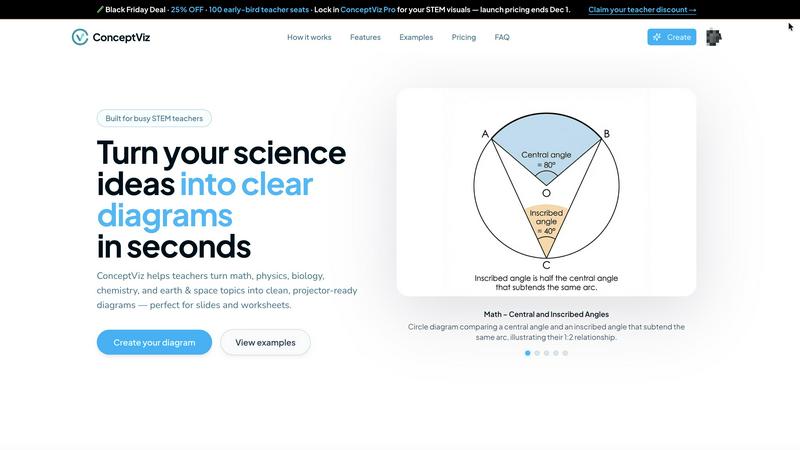
ConceptViz transforms your ideas into clear, science and math diagrams in seconds, perfect for any educational setting.
Last updated: February 28, 2026

SimpleDraw
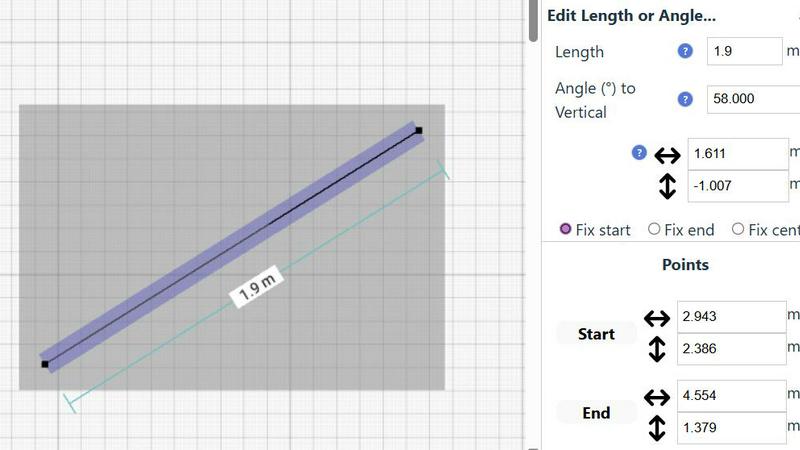
Effortlessly create accurate floor plans and room layouts online with SimpleDraw's intuitive web-based drawing tool.
Last updated: March 1, 2026
Visual Comparison
conceptviz
SimpleDraw
Feature Comparison
conceptviz
User-Friendly Interface
ConceptViz boasts a straightforward interface that eliminates unnecessary complexity. Users can easily sign in and select their subject and grade level, making it accessible for educators at all stages of their teaching journey.
Instant Diagram Generation
With ConceptViz, educators can quickly generate diagrams by simply typing a plain-English description of what they need. This feature accelerates lesson preparation and ensures that visuals align perfectly with teaching goals.
High-Quality, Projector-Ready Visuals
Each diagram created using ConceptViz is crafted to be projector-ready, featuring thick, legible lines and clear labels. The designs are optimized for both classroom presentations and printed materials, ensuring clarity from the front to the back of the room.
Subject and Grade Presets
ConceptViz includes quick presets tailored for various subjects such as physics, biology, chemistry, and mathematics, across different grade levels. These presets save time and provide educators with ready-to-use templates that cater to the specific needs of their students.
SimpleDraw
Floor Plan Mode
The Floor Plan Mode is a specialized feature designed to facilitate the creation of accurate floor plans for various spaces like rooms, apartments, and houses. With just a single click, you can draw walls and add essential elements such as windows and doors, while real-time measurements provide feedback as you adjust your design.
Smart Alignment System
This innovative system enhances your drawing experience by assisting you in positioning points and lines with pinpoint accuracy. As you move your mouse, SimpleDraw visually indicates the optimal placement for your lines or points, ensuring that everything aligns perfectly. For greater precision, you can zoom in and adjust your elements with ease.
Flexible Zoom and Variable Precision
With SimpleDraw, you can effortlessly zoom in and out to focus on any part of your drawing. The alignment precision adapts based on your zoom level, allowing you to control the detail as needed. This feature is particularly useful when fine-tuning intricate designs or layouts.
Comprehensive Measurement System
SimpleDraw offers a robust measurement system that lets you display and control measurements according to your preferences, with options for both metric and US units. Contextual measurements are dynamically shown as you work, helping you maintain accuracy in your drawings and ensuring that everything is just as you envisioned.
Use Cases
conceptviz
Enhancing Classroom Lessons
Educators can use ConceptViz to create engaging visuals that enhance their classroom lessons, such as diagrams illustrating scientific processes or mathematical concepts. This visual support fosters a deeper understanding among students.
Supporting Research Presentations
Researchers can leverage ConceptViz to generate precise visuals for academic papers and presentations. By transforming complex ideas into easily digestible diagrams, they can communicate their findings more effectively to their audience.
Facilitating Homework and Study Materials
Teachers can quickly create diagrams for homework assignments and study guides, ensuring that students have access to high-quality visuals that reinforce their learning. This feature allows for consistent and clear educational materials.
Customizing Visuals for Diverse Learning Styles
ConceptViz allows educators to tailor visuals to meet the diverse needs of their students. By generating diagrams that align with specific learning objectives, teachers can address various learning styles, enhancing overall comprehension.
SimpleDraw
Kitchen and Bathroom Renovations
Planning a renovation project for your kitchen or bathroom? SimpleDraw allows you to create accurate floor plans that help visualize layouts before you start any physical work. This ensures that all elements fit perfectly in your intended design.
Room Layouts and Furniture Planning
Before purchasing new furniture, use SimpleDraw to design layouts for your bedroom, living room, or office. This feature allows you to see how different pieces will fit within your space, ultimately saving time and money by preventing ill-suited purchases.
House and Apartment Plans
For homeowners and real estate professionals alike, SimpleDraw enables the creation of complete floor plans suitable for home projects or rental listings. This feature helps in space planning, making it easier to understand how to utilize every inch of your property effectively.
Community-Driven Feature Development
With SimpleDraw, users can actively participate in the development of the platform by providing feedback and suggesting improvements. Engaging with the community through Discord allows you to influence future features, making it a tool that evolves based on real user needs.
Overview
About conceptviz
ConceptViz is an innovative discovery engine specifically crafted for educators and researchers in the STEM fields. Imagine having immediate access to a vast visual library that simplifies complex scientific concepts into clear, engaging diagrams tailored for any classroom environment. This groundbreaking tool is designed for those who possess a thirst for knowledge and the desire to communicate effectively. By transforming a simple text prompt into a precise, projector-ready visual in just seconds, ConceptViz empowers teachers, students, and researchers alike. Its main value proposition is the ability to reclaim precious preparation time, replacing the tedious search for "almost right" images with instant, high-quality visuals. Whether you are preparing K-12 worksheets or crafting graduate-level research figures, ConceptViz ensures that your visuals are not only accurate but also pedagogically sound and visually appealing. With its user-friendly interface, educators can articulate their unique teaching points and receive customized, high-contrast diagrams that enhance learning experiences for students of all ages.
About SimpleDraw
SimpleDraw is a cutting-edge online tool tailored for individuals ranging from casual users to professionals who are keen on creating precise and accurate scale drawings effortlessly. This versatile platform caters to a variety of needs, whether you're initiating a DIY home project, planning a room renovation, or designing an entirely new layout. SimpleDraw empowers users by providing a user-friendly interface that eliminates the need for prior CAD experience, making it accessible for everyone—from homeowners to hobbyists. The standout feature of SimpleDraw is its completely free service, allowing users to dive into their drawing projects without the hassle of login or registration. This means you can start crafting detailed floor plans and technical drawings instantly. With SimpleDraw, you enjoy the convenience and precision of digital tools while retaining the simplicity and familiarity of traditional pen and paper methods, making it an essential resource for anyone looking to visualize their space.
Frequently Asked Questions
conceptviz FAQ
How does ConceptViz generate diagrams?
ConceptViz uses advanced algorithms to transform user input in plain English into detailed, accurate diagrams. This process ensures that the generated visuals are directly aligned with the user's educational needs.
Is there a limit to the number of diagrams I can create?
Currently, there are no stated limits on the number of diagrams a user can generate. Educators can create as many visuals as needed for their lessons and presentations, promoting flexibility in lesson planning.
Can I use ConceptViz for subjects outside of STEM?
While ConceptViz is primarily designed for STEM subjects, its intuitive interface and diagram generation capabilities could potentially be adapted for other fields that require visual explanations. However, its focus is on science and mathematics.
What formats can I download the diagrams in?
Users can download diagrams in high-resolution PNG format, making them suitable for printing and digital presentations. This versatility allows educators to seamlessly integrate visuals into various platforms like PowerPoint and Google Slides.
SimpleDraw FAQ
How do I start drawing with SimpleDraw?
You can start drawing immediately by visiting the SimpleDraw website. There's no need for sign-up or software installation, allowing you to dive right into your project.
Is SimpleDraw suitable for beginners?
Absolutely! SimpleDraw is designed to be user-friendly, requiring no prior CAD experience. Its intuitive interface makes it accessible for beginners while offering powerful features for advanced users.
Can I save my drawings?
While SimpleDraw is a free online tool, the ability to save drawings may depend on your browser settings. It is advisable to download or take screenshots of your work as a backup.
What types of measurements can I use in SimpleDraw?
SimpleDraw provides a comprehensive measurement system that allows you to choose between metric and standard US units. You can also customize which measurements are displayed as you create your drawings.
Alternatives
conceptviz Alternatives
ConceptViz is an innovative tool designed for educators and researchers in STEM fields, providing a way to instantly generate clear, classroom-ready diagrams from text prompts. As part of the AI Assistants and Content Creation categories, this platform aims to simplify the visualization of complex scientific concepts, enhancing teaching and learning experiences. However, users often seek alternatives due to various reasons, such as pricing, feature sets, or specific platform compatibility that better suits their needs. When searching for an alternative to ConceptViz, it’s crucial to consider factors like the ease of use, customization options, and the quality of visuals produced. Assessing whether the alternative can cater to specific educational requirements—such as grade-level presets and subject focus—will ensure that it meets your pedagogical goals while saving you valuable preparation time.
SimpleDraw Alternatives
SimpleDraw is an innovative web-based tool designed for creating precise scale drawings and detailed floor plans. It caters to a diverse audience, from casual users embarking on DIY projects to professionals in need of accurate technical drawings. Given its user-friendly nature and free access model, many users may seek alternatives to explore different features or platforms that better align with their project requirements, budget considerations, or specific functionality needs. When searching for an alternative, it’s essential to consider factors such as ease of use, available features, pricing structure, and compatibility with various devices. --- [{"question": "What is SimpleDraw?", "answer": "SimpleDraw is an online tool that allows users to create precise scale drawings and floor plans effortlessly."}, {"question": "Who is SimpleDraw for?", "answer": "SimpleDraw is designed for everyone, including homeowners, hobbyists, and professionals looking to create accurate technical drawings."}, {"question": "Is SimpleDraw free?", "answer": "Yes, SimpleDraw offers a free service with no login or registration required."}, {"question": "What are the main features of SimpleDraw?", "answer": "The main features of SimpleDraw include accurate scale drawing capabilities, a specialized floor plan creator, a smart alignment system, and comprehensive measurement tools."}]