
conceptviz vs Hush Touch | Voice-to-Text for MacOS
Side-by-side comparison to help you choose the right AI tool.

conceptviz
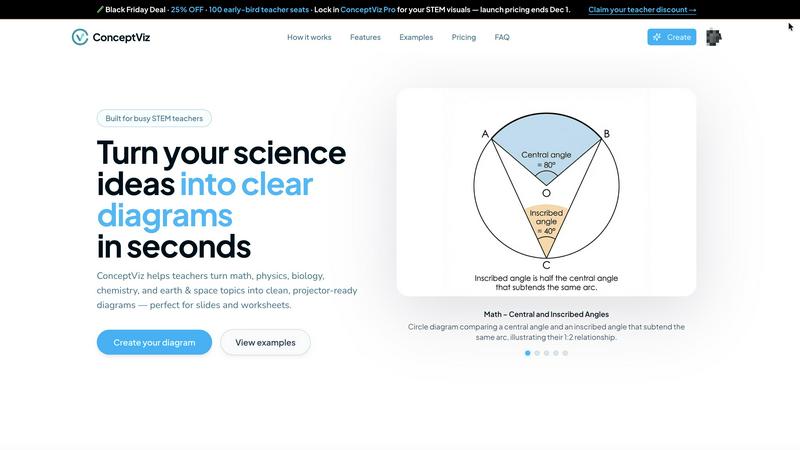
ConceptViz transforms your ideas into clear, science and math diagrams in seconds, perfect for any educational setting.
Last updated: February 28, 2026

Hush Touch | Voice-to-Text for MacOS
Transform your dictation experience with Hush Touch, the smart offline voice-to-text app for Mac that learns your.
Last updated: February 28, 2026
Visual Comparison
conceptviz
Hush Touch | Voice-to-Text for MacOS

Feature Comparison
conceptviz
User-Friendly Interface
ConceptViz boasts a straightforward interface that eliminates unnecessary complexity. Users can easily sign in and select their subject and grade level, making it accessible for educators at all stages of their teaching journey.
Instant Diagram Generation
With ConceptViz, educators can quickly generate diagrams by simply typing a plain-English description of what they need. This feature accelerates lesson preparation and ensures that visuals align perfectly with teaching goals.
High-Quality, Projector-Ready Visuals
Each diagram created using ConceptViz is crafted to be projector-ready, featuring thick, legible lines and clear labels. The designs are optimized for both classroom presentations and printed materials, ensuring clarity from the front to the back of the room.
Subject and Grade Presets
ConceptViz includes quick presets tailored for various subjects such as physics, biology, chemistry, and mathematics, across different grade levels. These presets save time and provide educators with ready-to-use templates that cater to the specific needs of their students.
Hush Touch | Voice-to-Text for MacOS
Dual-Engine Recognition
Hush Touch utilizes a unique dual-engine recognition system that combines DictationTranscriber for natural flow and punctuation with SFSpeechRecognizer to enhance custom vocabulary recognition. This blend ensures that your dictation is not only accurate but also contextually relevant.
Smart Text Processing
The app features advanced smart text processing capabilities, including the removal of filler words and intelligent auto-correction. This functionality helps streamline your dictation by ensuring that the output is clean and professional, transforming your spoken words into polished text with ease.
Context Modes & Hands-Free Operation
Hush Touch offers multiple context modes—General, Email, Code, and Notes—to optimize your dictation experience based on your specific needs. Additionally, its hands-free operation allows you to dictate without having to touch your device, thanks to voice commands that trigger automatic text insertion.
Adaptive Learning
With adaptive learning technology, Hush Touch remembers corrections you make during dictation and automatically adds these terms to your custom vocabulary. This feature means that the more you use the app, the better it becomes at recognizing your specific jargon and phrases, enhancing overall accuracy.
Use Cases
conceptviz
Enhancing Classroom Lessons
Educators can use ConceptViz to create engaging visuals that enhance their classroom lessons, such as diagrams illustrating scientific processes or mathematical concepts. This visual support fosters a deeper understanding among students.
Supporting Research Presentations
Researchers can leverage ConceptViz to generate precise visuals for academic papers and presentations. By transforming complex ideas into easily digestible diagrams, they can communicate their findings more effectively to their audience.
Facilitating Homework and Study Materials
Teachers can quickly create diagrams for homework assignments and study guides, ensuring that students have access to high-quality visuals that reinforce their learning. This feature allows for consistent and clear educational materials.
Customizing Visuals for Diverse Learning Styles
ConceptViz allows educators to tailor visuals to meet the diverse needs of their students. By generating diagrams that align with specific learning objectives, teachers can address various learning styles, enhancing overall comprehension.
Hush Touch | Voice-to-Text for MacOS
Drafting Professional Emails
Hush Touch is ideal for busy professionals who need to draft emails quickly and efficiently. By using voice commands, users can compose messages hands-free, allowing them to multitask while ensuring accuracy in their communication.
Creating Meeting Notes
During meetings, capturing key points can be challenging. Hush Touch enables users to dictate notes in real-time without distraction, ensuring that no vital information is overlooked while maintaining a clear and organized format.
Writing Content for Blogs and Articles
Content creators can leverage Hush Touch to generate ideas and draft articles effortlessly. The app's ability to process language naturally allows writers to focus on their thoughts rather than the mechanics of typing, fostering creativity.
Documenting Medical Notes
Healthcare professionals benefit from Hush Touch's adaptive learning capabilities, which allow for the recognition of complex medical terminology. This is particularly important for doctors and nurses who need to document patient information accurately and swiftly.
Overview
About conceptviz
ConceptViz is an innovative discovery engine specifically crafted for educators and researchers in the STEM fields. Imagine having immediate access to a vast visual library that simplifies complex scientific concepts into clear, engaging diagrams tailored for any classroom environment. This groundbreaking tool is designed for those who possess a thirst for knowledge and the desire to communicate effectively. By transforming a simple text prompt into a precise, projector-ready visual in just seconds, ConceptViz empowers teachers, students, and researchers alike. Its main value proposition is the ability to reclaim precious preparation time, replacing the tedious search for "almost right" images with instant, high-quality visuals. Whether you are preparing K-12 worksheets or crafting graduate-level research figures, ConceptViz ensures that your visuals are not only accurate but also pedagogically sound and visually appealing. With its user-friendly interface, educators can articulate their unique teaching points and receive customized, high-contrast diagrams that enhance learning experiences for students of all ages.
About Hush Touch | Voice-to-Text for MacOS
Hush Touch is a revolutionary voice-to-text application designed exclusively for macOS users who seek a fast, natural, and secure dictation experience. By operating entirely on-device, Hush Touch eliminates the need for cloud connectivity, ensuring that your voice data remains private. The app merges the power of two advanced Apple transcription engines with an intelligent final pass from Apple Intelligence, which results in remarkably accurate text output. Lightweight at just 5.5 MB, Hush Touch integrates seamlessly into your daily writing routines, allowing you to create emails, messages, notes, and documents hands-free. You can easily initiate dictation using a hotkey or Siri, speaking in a conversational manner while Hush Touch automatically inserts text after brief pauses. Designed for professionals who value privacy and efficiency, Hush Touch learns your vocabulary over time, enhances punctuation, and helps eliminate filler words, making your dictation process smoother and more efficient.
Frequently Asked Questions
conceptviz FAQ
How does ConceptViz generate diagrams?
ConceptViz uses advanced algorithms to transform user input in plain English into detailed, accurate diagrams. This process ensures that the generated visuals are directly aligned with the user's educational needs.
Is there a limit to the number of diagrams I can create?
Currently, there are no stated limits on the number of diagrams a user can generate. Educators can create as many visuals as needed for their lessons and presentations, promoting flexibility in lesson planning.
Can I use ConceptViz for subjects outside of STEM?
While ConceptViz is primarily designed for STEM subjects, its intuitive interface and diagram generation capabilities could potentially be adapted for other fields that require visual explanations. However, its focus is on science and mathematics.
What formats can I download the diagrams in?
Users can download diagrams in high-resolution PNG format, making them suitable for printing and digital presentations. This versatility allows educators to seamlessly integrate visuals into various platforms like PowerPoint and Google Slides.
Hush Touch | Voice-to-Text for MacOS FAQ
How does Hush Touch ensure my privacy?
Hush Touch is designed to operate entirely on-device, meaning that no data is sent to the cloud. This approach guarantees that your voice and dictation remain secure and private.
Can I try Hush Touch before purchasing?
Yes, Hush Touch offers a 7-day free trial with no credit card required. You can experience its features and see if it meets your needs before making a purchase.
What customization options are available for vocabulary?
Hush Touch allows users to store up to 500 custom vocabulary terms and learns from corrections made during dictation. This adaptability ensures that the app becomes increasingly tailored to your specific language and jargon.
Is Hush Touch suitable for all macOS versions?
Hush Touch is optimized for the latest macOS versions. However, it is advisable to check the compatibility requirements on the official website to ensure seamless integration with your system.
Alternatives
conceptviz Alternatives
ConceptViz is an innovative tool designed for educators and researchers in STEM fields, providing a way to instantly generate clear, classroom-ready diagrams from text prompts. As part of the AI Assistants and Content Creation categories, this platform aims to simplify the visualization of complex scientific concepts, enhancing teaching and learning experiences. However, users often seek alternatives due to various reasons, such as pricing, feature sets, or specific platform compatibility that better suits their needs. When searching for an alternative to ConceptViz, it’s crucial to consider factors like the ease of use, customization options, and the quality of visuals produced. Assessing whether the alternative can cater to specific educational requirements—such as grade-level presets and subject focus—will ensure that it meets your pedagogical goals while saving you valuable preparation time.
Hush Touch | Voice-to-Text for MacOS Alternatives
Hush Touch | Voice-to-Text for MacOS is an innovative app designed to enhance dictation experiences for users by providing offline voice-to-text capabilities that prioritize privacy and accuracy. Falling under the AI Assistants category, it utilizes advanced Apple transcription engines and intelligent processing to ensure seamless text conversion. Many users explore alternatives to find solutions that better fit their specific needs, whether it be budget constraints, desired features, or compatibility with different devices. When searching for an alternative, it’s essential to consider factors such as pricing models, the reliability of transcription accuracy, the ability to work without an internet connection, and how well the app integrates into existing workflows to ensure a smooth dictation experience.