
Changeflow vs Refbox
Side-by-side comparison to help you choose the right AI tool.

Changeflow
Changeflow delivers AI-driven insights on vital market changes, ensuring you stay informed without the manual hassle.
Last updated: March 4, 2026

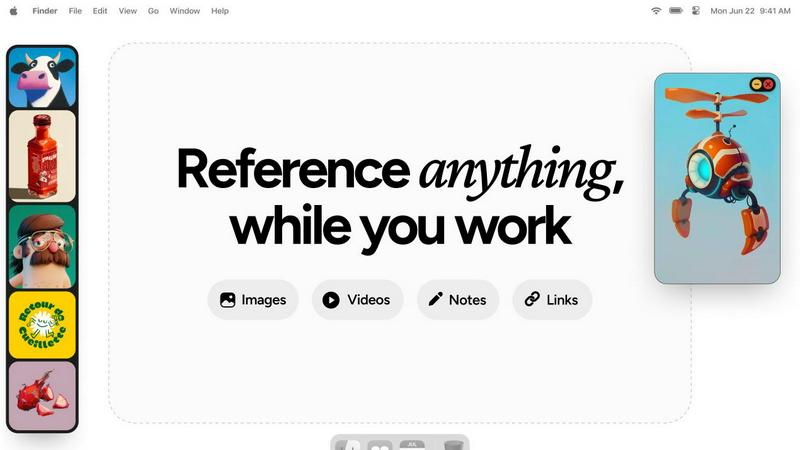
Refbox keeps your reference images and notes effortlessly accessible above your workspace for streamlined creativity.
Last updated: February 28, 2026
Visual Comparison
Changeflow

Refbox
Feature Comparison
Changeflow
Natural Language Setup
Changeflow allows you to describe what you want to track using simple, everyday language. There's no need for complex configurations, making it accessible for any user. Just enter the URLs and a brief description of your interests, and the AI takes over.
AI-Powered Monitoring
Our sophisticated AI technology continuously monitors your specified web pages, identifying relevant updates and filtering out the noise. This means you receive only the most critical information, allowing you to make informed decisions without sifting through irrelevant data.
Custom Summaries
With Changeflow, you no longer need to read through entire web pages to find the information you need. The AI generates concise summaries, highlighting the changes and their significance to your business, saving you precious time and effort.
Advanced Anti-Blocking Technology
Changeflow employs state-of-the-art anti-blocking technology to ensure that monitoring is successful even on complex sites. This high success rate means you can trust Changeflow to access the information you need without interruptions.
Refbox
Floating Reference Frames
Refbox allows you to create resizable, floating frames that can be positioned over any application. This means your references remain visible, ensuring that your focus is never compromised while you work.
Infinite Canvas
With Refbox, you can see all your references on an infinite canvas. This unique feature allows you to flip through items like a slideshow, making it easier to compare different visuals side by side without losing track of your workflow.
Auto-Hide Functionality
The auto-hide feature lets you minimize distractions by keeping the Refbox out of sight until you need it. This way, you can concentrate on your primary task without unnecessary clutter on your screen.
GIF Playback and Pixel Rendering
Refbox enhances your creative process with GIF playback that allows you to step through each frame. Additionally, the pixel rendering feature ensures that your pixel art is displayed accurately, helping you maintain precision in your work.
Use Cases
Changeflow
Competitor Monitoring
Businesses can leverage Changeflow to keep an eye on competitor pricing strategies and product updates. By receiving timely alerts about price changes or new product launches, teams can make swift adjustments to their own strategies.
Regulatory Compliance
Changeflow is ideal for compliance teams who need to stay informed about the latest regulatory changes. By monitoring specific regulatory websites, organizations can ensure they are always compliant and up-to-date with industry standards.
Legal Research
Legal professionals can utilize Changeflow to monitor court dockets and legal citations, ensuring they never miss critical updates that could impact their cases. This capability streamlines their research process and enhances their legal strategies.
Market Intelligence
Analysts and decision-makers can use Changeflow to track market movements and news mentions about their industry. By staying informed on the latest developments, they can make data-driven decisions that enhance their organization's competitive edge.
Refbox
Graphic Design
Graphic designers can utilize Refbox to keep their reference images, color palettes, and typography samples at hand. This reduces the time spent searching for inspiration, allowing for a more fluid design process.
UI/UX Development
UI/UX developers benefit from Refbox by having immediate access to design guidelines, user flows, and inspiration quotes. This helps streamline their workflow and maintain consistency across projects.
Animation
Animators can use Refbox to pin reference videos and character sheets, ensuring they can easily access inspiration and maintain continuity in their animations without disrupting their creative flow.
Concept Art Creation
Concept artists can leverage Refbox to gather mood boards, sketches, and color schemes in one place. This facilitates quick access to visual resources, enhancing creativity and efficiency during the concept development phase.
Overview
About Changeflow
Changeflow is an innovative web monitoring tool designed to keep you informed about important changes on web pages that matter to your business. Unlike traditional monitoring tools that simply notify you of generic updates, Changeflow uses advanced AI technology to analyze web content and provide precise summaries of what has changed and why it matters. This capability makes it particularly valuable for business teams needing to stay on top of competitor pricing, regulatory updates, and market movements. From legal librarians in Am Law 200 firms tracking court dockets to compliance teams in Fortune 500 companies monitoring critical FDA guidance, Changeflow empowers professionals across various sectors. With a straightforward setup process, you describe the pages you want to monitor in plain English, and Changeflow takes care of the rest, enabling you to focus on making informed decisions based on timely and relevant information.
About Refbox
Refbox is an innovative floating reference application designed specifically for creative professionals who seek to maintain their focus while working. Imagine the frustration of constantly switching between folders and browser tabs to access inspiration. Refbox solves this problem by providing an always-visible workspace on your desktop where you can pin images, videos, GIFs, and notes. This powerful tool helps you keep your visual references within arm's reach, allowing you to concentrate on your projects in programs like Photoshop, Blender, or Figma. It's perfect for illustrators, 3D artists, animators, UI/UX designers, and concept artists. With Refbox, you transform your desktop into a dynamic mood board, enhancing both speed and accuracy in your work. The core value proposition of Refbox is straightforward yet impactful: it offers seamless access to your creative inspirations, effectively eliminating distractions and enabling a deeper state of focus. By keeping your reference materials readily visible, you can create more efficiently and effectively, making Refbox an essential tool for any creative workflow.
Frequently Asked Questions
Changeflow FAQ
How does Changeflow work?
Changeflow operates by allowing users to input URLs and specify what updates they want to monitor. The AI then navigates the web pages, identifies relevant changes, and delivers concise summaries to the user.
What types of pages can I monitor with Changeflow?
You can monitor a wide variety of web pages, including competitor sites, regulatory bodies, and news outlets. Changeflow's advanced technology allows it to handle complex pages that other tools may struggle with.
Is there a limit to the number of pages I can track?
Changeflow offers different pricing plans that specify the number of pages you can monitor, starting from 20 pages in the basic plan. Higher tiers allow for monitoring up to 500 pages or more.
How quickly will I receive updates?
Updates are delivered as soon as changes are detected on your monitored pages. You can choose how frequently you want to receive notifications, ensuring you stay informed without unnecessary delays.
Refbox FAQ
How does Refbox improve my workflow?
Refbox enhances your workflow by providing a dedicated space for reference materials, eliminating the need to switch between multiple tabs and windows, thereby fostering a more focused and productive environment.
Can I use Refbox with multiple applications?
Yes, Refbox is designed to float above any application, so you can use it seamlessly with tools like Photoshop, Blender, Figma, and more, keeping your references accessible no matter what software you are using.
Is Refbox suitable for all types of creatives?
Absolutely! Refbox is built for various creative professionals including illustrators, graphic designers, 3D artists, and animators. Its versatility makes it a valuable tool for anyone who relies on visual inspiration.
What types of media can I pin in Refbox?
You can pin a variety of media types in Refbox, including images, videos, GIFs, and notes. This allows you to create a comprehensive reference library that suits your specific creative needs.
Alternatives
Changeflow Alternatives
Changeflow is an AI-driven tool designed to provide market and competitor insights by monitoring web pages for significant changes. It falls under the Productivity & Management category, offering businesses a sophisticated way to track everything from competitor pricing to regulatory updates. Users often seek alternatives for various reasons, including pricing considerations, feature sets that may better align with their needs, or platform compatibility. When exploring alternatives, it’s essential to consider factors such as ease of use, the comprehensiveness of insights, and the flexibility of integration into existing workflows. As businesses evolve, their needs may change, prompting the search for solutions that enhance operational efficiency. A suitable alternative should not only match or exceed the capabilities of Changeflow but also provide a user-friendly experience and robust support systems. Evaluate each option carefully, focusing on the specific requirements of your team and the unique features that can elevate your market tracking and insights.
Refbox Alternatives
Refbox is a floating application designed specifically for creative professionals, allowing them to keep reference images and notes visible above any workspace. This innovative tool enables users to maintain their creative flow without the disruption of constantly switching between windows. As creatives explore their options, they often seek alternatives to Refbox for various reasons, including pricing, additional features, or compatibility with different platforms. When searching for a suitable alternative, it's essential to consider factors such as user interface, ease of access to reference materials, and the ability to manage various types of media and notes. Ultimately, the goal is to find a solution that enhances productivity and maintains focus, allowing for a seamless integration of inspiration into the creative process.