
Caller vs Perkoon
Side-by-side comparison to help you choose the right AI tool.

Discover how to make cheap, high-quality international calls directly from your browser.
Last updated: March 1, 2026

Experience free and unlimited peer-to-peer file transfers with Perkoon, no signup needed and your files stay private.
Last updated: March 4, 2026
Visual Comparison
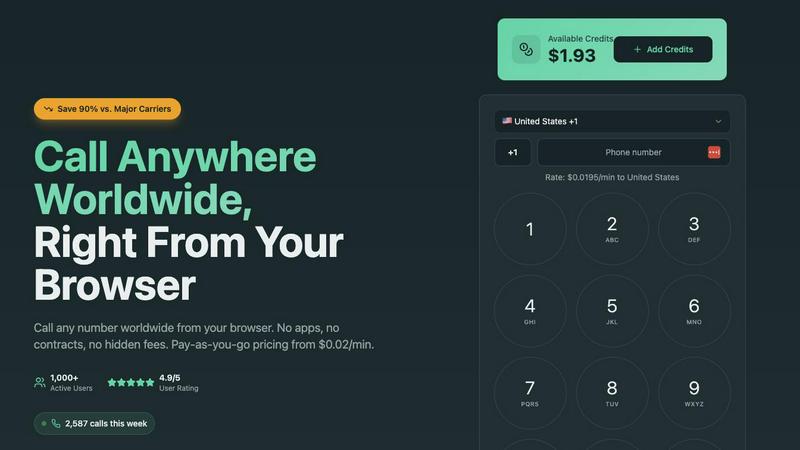
Caller
Perkoon

Feature Comparison
Caller
Browser-Based Calling
Discover the simplicity of calling without any software. Caller operates entirely within your web browser, be it on a computer, tablet, or smartphone. This eliminates the need for downloads, installations, or constant app updates. The experience is instant and uniform across devices, granting you the freedom to make a call from anywhere you have an internet connection, turning any device into an international calling hub in mere seconds.
Transparent Pay-As-You-Go Pricing
Embrace a model of true financial clarity. With Caller, you only pay for the minutes you actually use, with rates starting from just $0.02 per minute. There are no monthly subscriptions, no minimum fees, and no hidden charges. You simply add credit to your account, which never expires, and are billed precisely for your completed call time. This approach invites you to explore global communication without the burden of a financial commitment.
Global HD Voice Quality
Experience conversations as if you were in the same room. Caller is powered by enterprise-grade infrastructure dedicated to delivering high-definition audio quality on every call. This focus on clarity ensures that your important conversations with clients, loved ones, or support lines are free from distortion, lag, or dropouts, making distance feel insignificant.
Dedicated Virtual Phone Numbers
Curious about establishing a professional local presence abroad? Caller allows you to purchase your own dedicated phone numbers from countries like the US, UK, and Canada. You can choose from local, toll-free, or mobile numbers to use as your caller ID. This feature is perfect for businesses, freelancers, or anyone needing a separate contact line, providing instant credibility and convenience for international contacts.
Perkoon
Peer-to-Peer (P2P) File Transfer
Perkoon’s flagship feature allows users to send files directly between browsers without relying on a central server. This method eliminates size limits, making it possible to transfer large files for free while ensuring privacy and security since the data never passes through Perkoon’s servers.
Encrypted Cloud Storage
For instances when recipients are offline, Perkoon offers encrypted cloud storage that temporarily holds files until they can be accessed. This feature is paid but is designed to cover the operational costs of running the servers, ensuring that your files are safe and secure.
AI Integration
Perkoon is built for the AI age, offering native tools that allow AI agents to interact directly with the service. This eliminates the need for screen scraping, allowing for more efficient automation and smoother file transfers, making it an ideal solution for developers and tech enthusiasts.
Simple Command Line Interface (CLI)
For advanced users, Perkoon provides a straightforward CLI tool that enables seamless integration with various applications and systems. This feature allows users to transfer files using command line instructions, catering to those who prefer a more technical approach to file management.
Use Cases
Caller
International Business Development
Sales and business development teams can leverage Caller to cost-effectively reach leads and partners across the globe. The ability to call landlines and mobiles in over 200 countries at a fraction of traditional cost removes a significant barrier to international expansion. Using a dedicated local number can also increase answer rates and project a professional, established image.
Remote Team Communication
For distributed teams with members in different countries, Caller provides a simple, unified tool for quick voice communication. Managers can connect with remote employees, or team members can collaborate without relying on varying local carrier plans or complex corporate systems, all while enjoying clear audio quality.
Personal & Family Connections
Individuals with family and friends overseas can maintain close relationships without worrying about exorbitant phone bills. The pay-as-you-go model is ideal for sporadic, longer catch-up calls, allowing users to stay connected affordably and reliably from the comfort of their browser.
Accessing International Services
Travelers, expats, or anyone needing to contact foreign banks, government offices, or customer support lines can use Caller to bypass expensive international roaming charges. It provides a reliable way to manage affairs abroad by calling local landline numbers directly, ensuring important calls can be made clearly and without hassle.
Perkoon
Collaborative Projects
Perkoon is perfect for teams working on collaborative projects who need to share large files quickly and efficiently. The P2P transfer method allows team members to send and receive files in real-time, enhancing productivity and teamwork.
Remote Work
For remote workers, Perkoon simplifies the process of sharing files with colleagues and clients. Whether sending presentations, reports, or large datasets, users can rely on Perkoon to deliver their files securely and without delay.
Academic Research
Researchers can utilize Perkoon to share large datasets or documents with collaborators without worrying about size limitations or data privacy. The secure transfer methods ensure that sensitive information remains confidential.
Content Creation
Content creators, such as video editors or graphic designers, benefit from Perkoon’s ability to transfer large media files swiftly. The lack of size limits enables creatives to collaborate on projects without the hassle of file compression or quality loss.
Overview
About Caller
What if making an international call was as simple as clicking a link in your browser? Caller, also known as UseCaller, invites you to explore this new frontier in communication. It's a revolutionary online tool that transforms your web browser into a powerful, global telephone. This platform is designed for the curious individual and the agile business alike, eliminating the traditional friction of international dialing. Imagine connecting with a client in London, family in Australia, or a bank's helpline in Singapore without ever needing a SIM card, a calling app, or a complex VoIP setup. The core allure of Caller lies in its liberating pay-as-you-go model. It challenges the status quo of locked-in contracts and hidden fees, offering transparent rates that can be up to 90% cheaper than major carriers. With crystal-clear HD audio and coverage in over 200 countries, Caller provides a seamless, secure, and surprisingly affordable portal to the rest of the world, directly from your desktop or mobile browser.
About Perkoon
Perkoon is a revolutionary file transfer service that prioritizes simplicity, privacy, and user empowerment. Designed for a wide array of users, from casual file sharers to tech-savvy professionals, Perkoon provides a refreshing alternative to traditional file transfer methods that often come laden with restrictions and hidden costs. Its primary value proposition lies in its commitment to offering a truly free peer-to-peer (P2P) file transfer solution without compromising on user experience. With no size limits and no mandatory sign-ups, Perkoon allows users to transfer files directly between browsers, ensuring that data remains private and secure. When recipients are offline, Perkoon offers a paid cloud storage option that securely holds files until they are ready to be accessed. With built-in AI tools and automation capabilities, Perkoon is designed for the modern age, making it a versatile choice for anyone looking to share files effortlessly and without the baggage of conventional services.
Frequently Asked Questions
Caller FAQ
How do I start calling with Caller?
Starting is an exploration in simplicity. First, visit the UseCaller website and sign up for a free account; no credit card is required initially. Next, add some credit to your account using a secure payment method. Finally, simply enter any international phone number into the browser dialer and click call. Your connection is established instantly using your computer's microphone and speakers or a headset.
What countries can I call with Caller?
Your curiosity can span the globe. Caller offers coverage to over 200 countries and territories worldwide, including all major destinations. You can call both landline and mobile numbers in these countries. The specific per-minute rate for each destination is clearly displayed on their rates page before you call, ensuring complete transparency.
Do I need a phone or SIM card to use Caller?
This is where Caller redefines the norm: no, you do not. The service operates independently of your traditional phone line or mobile SIM. All you need is an internet connection and a device with a web browser (like Chrome, Safari, or Edge) and audio capabilities. Your existing phone number is not used or required for the service to function.
Are my calls with Caller secure and private?
Absolutely. Caller employs bank-level SSL encryption to secure your call data and all financial transactions. This means your conversations and payment information are protected. They adhere to a strict no-hidden-fees policy and do not require long-term contracts, prioritizing your privacy and trust.
Perkoon FAQ
How does Perkoon keep my files private?
Perkoon ensures your files remain private by using P2P technology for transfers, meaning your data never touches their servers. For cloud transfers, files are encrypted, adding an extra layer of security.
What happens if the recipient is offline?
If the recipient is offline, Perkoon will hold the file securely in encrypted cloud storage until the recipient is available to access it. This feature is part of the paid offering.
Can I use Perkoon on any browser?
Perkoon works best on Chrome, Edge, and Brave, which have no limitations. Users of Firefox and Safari may experience some restrictions, so it is advisable to use compatible browsers for optimal performance.
How can I earn extra storage with Perkoon?
You can share your unique referral link with others. When they sign up and transfer files, both you and the new user earn extra cloud storage, making it a mutually beneficial arrangement.
Alternatives
Caller Alternatives
Caller is a web-based communication tool in the productivity and management category, designed to simplify international calling directly from your browser. It eliminates the need for apps or SIM cards with a transparent, pay-as-you-go model. Users often explore alternatives for various reasons. Some may seek different pricing structures, like subscription plans, while others might need specific features like call recording or integration with other business tools. Platform preference, such as a dedicated mobile app or desktop software, can also drive the search for different solutions. When evaluating other options, consider your core needs. Look at the total cost structure, the quality and reliability of the service, and which specific features are essential for your calls. The goal is to find a tool that aligns perfectly with your communication habits and budget.
Perkoon Alternatives
Perkoon is a user-friendly file transfer service that falls under the category of productivity and management tools. It offers a refreshingly straightforward approach to sharing files, utilizing peer-to-peer technology to facilitate direct transfers without the need for sign-ups or artificial limitations. Users often seek alternatives to Perkoon for various reasons, including specific feature requirements, pricing structures, or compatibility with different platforms. As you explore your options, consider factors such as ease of use, privacy policies, transfer speed, and whether the service aligns with your specific needs for file management. When selecting an alternative to Perkoon, it's essential to prioritize your requirements and values. Look for services that maintain a strong focus on user privacy, provide reliable transfer speeds, and offer flexibility in terms of file size limits. Additionally, consider how well the platform integrates with your existing tools and workflows, as a seamless user experience can significantly enhance productivity. By keeping these aspects in mind, you can find an option that best suits your file transfer needs.