
Blueberry vs diffray
Side-by-side comparison to help you choose the right AI tool.

Blueberry
Blueberry is an AI-native Mac workspace that combines your editor, terminal, and browser for seamless product building.
Last updated: February 28, 2026

diffray
Unlock superior code quality with diffray's intelligent AI review that detects real bugs and reduces false alarms.
Last updated: February 28, 2026
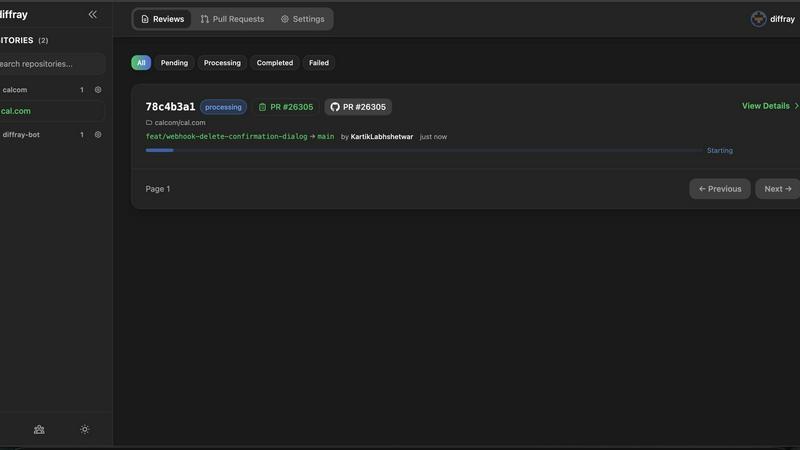
Visual Comparison
Blueberry

diffray
Feature Comparison
Blueberry
Unified AI-Native Workspace
Blueberry consolidates your editor, terminal, and browser into one seamless, distraction-free window. This isn't just about putting panels side-by-side; it's about creating a cohesive environment where each component is aware of the others. The integrated design ensures that your workflow remains fluid, eliminating the cognitive load of managing multiple applications and allowing you to ship products faster from a single, powerful hub designed for modern development.
Live AI Context via MCP
This is the core intelligence of Blueberry. Its built-in MCP server acts as the nervous system, giving your connected AI model (like Claude or Codex) real-time, read-only access to your entire workspace context. The AI can see your open files, monitor terminal output, and observe the live browser preview simultaneously. This creates a paradigm shift where your AI assistant has full situational awareness, enabling it to provide accurate, context-rich suggestions and answers without you ever needing to manually provide snippets or screenshots.
Pinned Apps & Visual Context
Extend your workspace's intelligence beyond code. Blueberry allows you to dock essential web apps like GitHub, Linear, Figma, or PostHog directly within the interface. These pinned apps load with your project and share context with your AI. Furthermore, you can provide visual context by capturing screenshots or using an element selector directly from the preview browser, allowing your AI to understand UI issues or design intentions at a glance.
Professional-Grade Editor & Multi-Device Preview
You don't compromise on editing power. Blueberry includes a full-featured code editor with syntax highlighting, multi-cursor support, find/replace, and Git integration. Alongside it, the preview browser isn't basic—it offers built-in views for desktop, tablet, and mobile screens. This lets you instantly see how your application renders and behaves across different devices without leaving your workspace, ensuring what you build delights every user.
diffray
Multi-Agent Architecture
diffray employs a unique multi-agent architecture that harnesses the power of over 30 specialized agents. Each agent is finely tuned to focus on distinct aspects of code review such as security, performance, and best practices. This ensures that feedback is relevant and targeted, reducing the noise often associated with traditional code review tools.
Contextual Feedback
One of the standout features of diffray is its ability to provide contextual feedback based on the specific codebase being analyzed. This means that the insights generated are not only precise but also actionable, allowing developers to understand the nuances of their code and implement improvements effectively.
Reduced Review Times
With diffray, teams experience a significant drop in PR review times. By streamlining the code review process and minimizing unnecessary distractions, developers can focus on what truly matters: enhancing their code and delivering quality software efficiently.
Enhanced Detection of Issues
The specialized agents within diffray excel at identifying a range of potential issues, including bugs, security vulnerabilities, and performance bottlenecks. This advanced detection capability empowers developers to proactively address problems before they escalate, fostering a culture of quality and safety in software development.
Use Cases
Blueberry
Rapid Prototyping & Iteration
When speed is essential, Blueberry accelerates the build-measure-learn loop. You can write code, see changes live in the preview, debug terminal output, and ask your AI for implementation advice or bug fixes—all without switching contexts. This tight integration is perfect for quickly mocking up features, experimenting with new libraries, or iterating on UI components based on immediate visual feedback.
AI-Powered Debugging & Explanation
Stuck on a cryptic error in the terminal or complex logic in your route handler? Simply ask your AI assistant. Because it sees the exact error output and the relevant code files, it can diagnose issues with remarkable accuracy. You can also ask "how does this file work?" and receive an explanation grounded in the actual codebase, turning debugging from a frustrating hunt into an interactive learning session.
Cross-Platform UI Development
Building responsive web applications requires constant checking across screen sizes. With Blueberry's integrated multi-device preview, you can write a CSS rule and immediately toggle between desktop, tablet, and phone views to verify its effect. This seamless context switch ensures your UI is robust and responsive from the very first line of styling, streamlining the front-end development process.
Onboarding & Codebase Exploration
New to a project? Use Blueberry as your exploration companion. Open the repository, and let your AI assistant tour you through the codebase. Ask questions like "What's the main data flow here?" or "How is authentication handled?" The AI, with its live access to the entire file structure and code, can provide specific, guided answers, dramatically reducing the time it takes to understand and contribute to a new codebase.
diffray
Accelerated Code Reviews
Development teams can leverage diffray to accelerate their code review processes significantly. By providing tailored feedback and reducing false positives, developers can review PRs more quickly and efficiently, allowing for faster delivery cycles.
Improved Code Quality
diffray aids teams in enhancing their overall code quality by identifying issues that might otherwise go unnoticed. This leads to cleaner, more maintainable code and helps prevent technical debt from accumulating over time.
Security Enhancements
Security is paramount in software development, and diffray addresses this need effectively. By utilizing its specialized agents focused on security vulnerabilities, teams can ensure that their code is resilient against potential threats and adheres to best practices.
Continuous Learning and Improvement
By consistently using diffray, development teams foster a culture of continuous learning. The actionable insights provided by the tool help developers refine their skills and understanding of best practices, leading to ongoing improvement in their coding abilities.
Overview
About Blueberry
What if your entire development environment could think alongside you? Blueberry is an AI-native product development platform for macOS that reimagines the modern builder's workspace. It elegantly unifies the three core tools—a sophisticated code editor, a powerful terminal, and a live preview browser—into a single, focused application. This eliminates the constant, distracting juggle of windows and applications, allowing you to maintain deep focus on creating and shipping web applications. Designed for modern product builders, from indie hackers to engineering teams, Blueberry's true magic lies in its context-aware AI integration. By connecting to models like Claude, Gemini, or Codex via its built-in MCP (Model Context Protocol) server, your AI assistant gains a live, holistic view of your entire project: the code you're writing, the terminal output, and the real-time browser preview. This means you can stop the tedious copy-pasting of context and start having meaningful, informed conversations with AI that understands exactly what you're building, as you build it. It's more than a tool; it's a collaborative partner for your development flow.
About diffray
diffray is a groundbreaking AI code review tool that aims to revolutionize the code review process for development teams. Unlike traditional AI solutions that often rely on a one-size-fits-all approach, diffray utilizes an innovative multi-agent architecture comprised of over 30 specialized agents. Each agent is meticulously designed to focus on specific areas of code evaluation, such as security vulnerabilities, performance optimization, bug detection, and adherence to best practices. This targeted approach minimizes irrelevant feedback and significantly increases the likelihood of identifying genuine issues within the code. As a result, development teams using diffray have reported dramatic reductions in pull request (PR) review times alongside a notable decrease in false positives, making it an invaluable tool for software developers and engineering teams. The core value proposition of diffray lies in its ability to deliver precise and actionable feedback tailored to the unique context of each codebase. This ultimately enhances the development workflow and elevates code quality, paving the way for more efficient and effective software creation.
Frequently Asked Questions
Blueberry FAQ
What is MCP and why is it important?
MCP stands for Model Context Protocol, an open standard developed by Anthropic. It's crucial because it provides a secure, structured way for AI models to access tools and data. In Blueberry, the built-in MCP server safely exposes your workspace's context (files, terminal, browser) to AI models. This means the AI operates with a rich, real-time understanding of your project without ever needing direct access to your system, ensuring both powerful assistance and security.
Is Blueberry just for web development?
While Blueberry is explicitly designed as a premier platform for building web applications, its core features are beneficial for many software projects. The unified workspace and AI context are powerful for any development task that involves writing code, running commands, and needing live feedback. However, its optimized preview browser and web-focused workflow make it particularly exceptional for full-stack and front-end web development.
Can I use my own AI API keys?
Yes, Blueberry is model-agnostic. While it showcases integrations with popular models like Claude, Gemini, and Codex, it is designed to connect to any AI model that supports the MCP standard. You can configure it to use your preferred model by providing your own API keys and endpoints, giving you the flexibility to choose the AI assistant that best fits your workflow and budget.
Is Blueberry really free?
Yes, Blueberry is currently 100% free during its beta period. The team is focused on gathering feedback and refining the product with its early community of users. There is no indication of specific future pricing plans in the provided materials, but the product is completely free to download and use for macOS while it remains in beta.
diffray FAQ
How does diffray improve the code review process?
diffray enhances the code review process by employing a multi-agent architecture that delivers precise, contextual feedback tailored to the specific codebase, thereby reducing noise and increasing the likelihood of identifying real issues.
Can diffray integrate with existing development workflows?
Yes, diffray is designed to seamlessly integrate into existing development workflows, making it easy for teams to adopt without disrupting their current processes.
What types of issues can diffray detect?
diffray specializes in detecting a wide range of issues, including security vulnerabilities, performance bottlenecks, bugs, and adherence to coding best practices, ensuring comprehensive code quality assessments.
Is diffray suitable for all programming languages?
While diffray is optimized for a variety of programming languages, its effectiveness may vary based on the specific language and the complexity of the codebase. It is advisable to review the supported languages on the diffray website for more details.
Alternatives
Blueberry Alternatives
Blueberry is a macOS application designed for developers, specifically within the integrated development environment (IDE) category. It consolidates the essential tools of an editor, terminal, and browser into a single, unified workspace to streamline workflow and reduce context switching. Users often explore alternatives for various practical reasons. These can include budget constraints, the need for cross-platform compatibility beyond macOS, or a desire for different feature sets, integrations, or user interface philosophies. The search for the right tool is a personal journey in optimizing one's development environment. When evaluating alternatives, consider your core needs. Key factors include the depth of native integrations, support for your preferred programming languages and frameworks, the overall user experience, and how well the tool facilitates the specific workflow you aim to enhance, whether it's AI-assisted coding, web development, or system operations.
diffray Alternatives
diffray is an innovative AI code review tool that enhances code quality by utilizing a unique multi-agent architecture. This category of software is essential for development teams looking to streamline their pull request processes and improve the overall efficiency of code reviews. Users often seek alternatives to diffray due to factors such as pricing, specific feature requirements, or compatibility with their existing platforms. When choosing an alternative, it’s essential to evaluate the technology's ability to provide relevant and actionable feedback while also considering integration capabilities, user experience, and support for team workflows. A well-suited alternative should align with the specific needs of your development process, ensuring that it enhances productivity without introducing unnecessary complexity.