
BarBrain vs SupaSidebar
Side-by-side comparison to help you choose the right AI tool.

BarBrain
Discover how BarBrain transforms your bar and restaurant inventory into a fast, effortless process with precise digital tracking.
Last updated: April 4, 2026

SupaSidebar
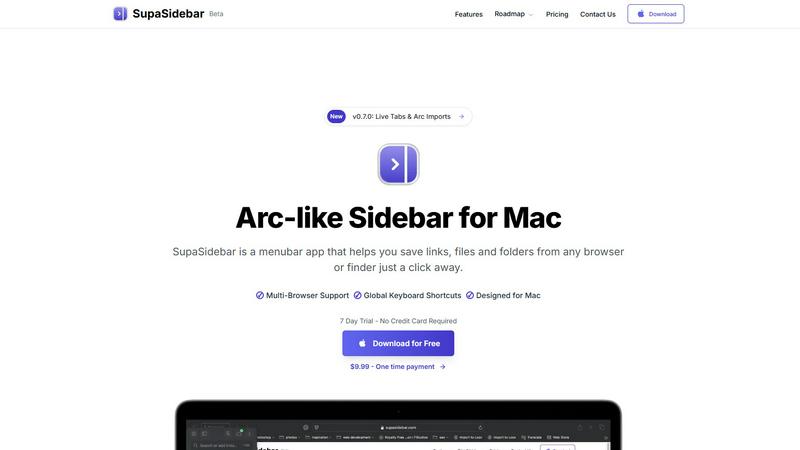
Discover an Arc-style sidebar for Mac that instantly saves and opens your links, files, and folders.
Last updated: February 28, 2026
Visual Comparison
BarBrain

SupaSidebar
Feature Comparison
BarBrain
Parallel Counting on Multiple Devices
Unlock unprecedented speed by conducting your inventory count simultaneously across several iOS and Android smartphones or tablets. This collaborative feature allows your team to split up, cover different sections like the bar, kitchen, and storage rooms at the same time, and sync all data instantly. It turns a hours-long solo mission into a coordinated team effort that can be completed in a fraction of the time, drastically reducing labor costs and operational downtime.
Vast Pre-Loaded Product Catalog
Jumpstart your inventory setup with immediate access to a massive, industry-specific catalog containing over 30,000 products. This extensive database covers everything from spirits, wines, and AFGs (alcohol-free beverages) to food ingredients and even housekeeping supplies. It eliminates the need to manually enter every single item from scratch, ensuring consistency and saving countless hours during the initial configuration and when adding new stock items.
Automatic Inventory Reporting
Imagine finishing a count and having a comprehensive, polished report generated for you automatically—that's the reality with BarBrain. The software compiles all the data from your digital count, eliminating the need for manual transcription, cross-referencing spreadsheets, or error-prone calculations. You receive a clear, finalized summary of your stock levels, values, and variances immediately, ready for analysis and action.
Fill-Level Slider for Open Items
Accurately accounting for partially used products like open bottles of liquor, wine, or food containers is now effortless. Instead of guessing or using complex fractions, staff simply uses an intuitive slider on the app to visually indicate the remaining amount. This one-tap capture ensures precise tracking of usage and cost for every item, providing much more accurate data for recipe costing and waste identification than estimating with generic software.
SupaSidebar
Universal Save & Copy Shortcuts
Ever felt the process of saving a link or file was just a few clicks too many? SupaSidebar streamlines this into an instant action. With dedicated global keyboard shortcuts, you can press CMD+CTRL+S to save the current website link directly to your sidebar, or CMD+CTRL+C to copy it. This feature turns a multi-step process into a single, fluid motion, capturing inspiration and references before they slip away, all without interrupting your current task.
Recents & Intelligent Tracking
Lost in a labyrinth of tabs and recently opened files? SupaSidebar's "Recents" feature acts as your digital short-term memory. It automatically tracks every website you've visited across all major browsers within the last 48 hours, presenting them in a clean, searchable list. This means you can instantly jump back to that article, dashboard, or document you were just viewing, effectively ending the frantic tab-switching hunt and bringing lost context back to your fingertips.
Fast, Unified Search
Switching between apps to find a file, folder, or website breaks your concentration. SupaSidebar's powerful search function, activated with CMD+CTRL+K, becomes your universal finder. Simply start typing to instantly search across all your saved links, files, folders, and even applications. This creates a seamless bridge between your local machine and your online workspace, delivering what you need in seconds and keeping you firmly in a state of flow.
Organized Spaces & Pinned Favorites
To combat the chaos of opening the same resources repeatedly, SupaSidebar offers elegant organization. You can pin your most crucial items to the top of your sidebar for immediate, one-click access. Furthermore, the app supports multiple "Spaces"—allowing you to create dedicated sidebars for different projects, contexts, or modes of work. This lets you organize links, files, and folders exactly how your mind works, making context-switching a clean and organized affair.
Use Cases
BarBrain
Independent Bars and Restaurants
For a single-location establishment, every minute and every euro counts. BarBrain empowers independent owners and managers to gain precise control over their stock without needing a dedicated inventory manager. They can quickly identify which drinks are most profitable, spot unusual shrinkage, and place accurate supplier orders, all leading to tighter cost control and improved bottom-line visibility from a tool designed for their scale.
Multi-Unit Restaurant Groups
Managing consistency and cost across several locations is a monumental challenge. BarBrain provides a unified system for standardizing inventory procedures group-wide. Headquarters can oversee data from all venues in one place, compare performance, identify best practices, and ensure every site is operating with the same level of efficiency and financial oversight, turning inventory data into a powerful tool for centralized management.
Hotels and Resorts
The hospitality sector manages a vast and varied inventory, from minibar items and banquet supplies to restaurant stock and breakfast buffet ingredients. BarBrain's comprehensive catalog and flexible structure are perfectly suited to track all F&B (Food & Beverage) products across multiple outlets and storage areas within a hotel, providing a complete, real-time picture of usage and cost for complex operations.
Nightclubs and High-Volume Venues
In fast-paced environments with high product turnover and often complex drink recipes, speed and accuracy are paramount. BarBrain's parallel counting feature allows teams to conduct a full inventory during short closing windows. The precise tracking of pours and bottle usage helps manage high-cost spirit inventory effectively, control waste, and ensure profitability on every high-volume night.
SupaSidebar
The Researcher & Student
For anyone conducting deep research or managing academic projects, SupaSidebar is a game-changer. As you dive through dozens of browser tabs for sources, articles, and papers, you can instantly save each crucial link to a dedicated "Research" space with a single shortcut. Later, all your references are neatly organized and instantly searchable in one place, eliminating the tab overload and making citation and review processes dramatically faster and more coherent.
The Creative Professional
Designers, writers, and content creators constantly juggle inspiration boards, asset folders, tool websites, and project files. SupaSidebar becomes the central staging area for all creative resources. Save mood board links, pin frequently used design tool websites, and have quick access to local brand asset folders—all accessible from a unified sidebar without ever leaving your creative software, allowing uninterrupted creative flow.
The Multitasking Project Manager
Professionals managing multiple clients or projects need to switch contexts rapidly and efficiently. With SupaSidebar, you can create a separate Space for each client or project. Each Space contains all relevant communication links (Slack, email), cloud documents, project management boards, and local files specific to that context. Switching your entire digital workspace for a meeting or focused work session becomes as simple as clicking between Spaces.
The Developer & Technical Worker
Developers often work with a complex stack of local documentation, API references, GitHub repositories, and terminal commands. SupaSidebar can host quick links to all essential documentation, pinned repository pages, and local project directories. The global search allows for instantly pulling up a specific command reference or a project folder, streamlining the development process and reducing context-switching friction between the browser, IDE, and system finder.
Overview
About BarBrain
What if the most tedious, error-prone task in your bar or restaurant could become a source of clarity and profit? BarBrain is the answer to that very question. It's a specialized inventory management platform built from the ground up for the unique rhythms and challenges of the hospitality industry. Forget adapting clunky warehouse software; BarBrain speaks the language of hospitality, understanding pours, recipes, and perishables intuitively. It is designed for anyone who manages stock in a food and beverage setting, from the owner of a single cocktail bar to the operations manager of a multi-location restaurant group or hotel. Its core mission is to transform inventory from a dreaded chore into a strategic advantage. By enabling lightning-fast digital counts, providing exact cost analysis per menu item, and highlighting waste in real-time, BarBrain delivers the reliable data operators need to protect their margins, optimize orders, and ultimately, stop leaving money on the table. It's not about adding complexity; it's about providing a clean, focused tool that works the way your business already does, saving you over half your inventory time according to their users.
About SupaSidebar
Have you ever imagined what your digital workflow could be if you had a single, elegant command center for everything on your Mac? SupaSidebar is the answer to that daydream. It's a beautifully crafted, Arc-inspired menubar application designed to fundamentally transform how you interact with your digital workspace. At its heart, SupaSidebar is about eliminating friction and rediscovering flow. It acts as your universal sidebar, a central hub where you can instantly save, organize, and access your most important links, files, and folders. The magic lies in its simplicity: pull anything from any browser or Finder window directly into your sidebar with a simple global shortcut. Built natively for macOS, it runs lightly and seamlessly in the background, staying out of your way until the moment you need it. Whether you're a researcher drowning in a sea of tabs, a creator juggling countless resources, or a professional multitasking across multiple projects, SupaSidebar is for anyone who craves a more organized, faster, and intuitively fluid way of working. Its core promise is profound yet elegantly simple: it keeps everything you need right where you need it, in one beautiful, distraction-free panel, helping you maintain your focus without ever leaving the app you're in.
Frequently Asked Questions
BarBrain FAQ
How does BarBrain save so much time on inventory?
BarBrain digitizes the entire process, eliminating manual pen-and-paper counting and subsequent data entry into spreadsheets. Features like parallel counting with multiple devices allow your team to count simultaneously, while the automatic report generation removes all post-count administrative work. This streamlined workflow is why users report saving over 75% of the time previously spent on inventory.
Can BarBrain handle both food and beverage inventory?
Absolutely. BarBrain is built as a comprehensive F&B (Food & Beverage) solution. Its extensive catalog and flexible item creation allow you to track everything from spirits, wine, and beer to all food ingredients, dry goods, and even non-food items like cleaning supplies. The fill-level slider is particularly useful for accurately tracking open food containers.
Is BarBrain difficult to set up for my existing stock?
The setup process is designed to be straightforward. You can leverage the massive pre-loaded product catalog to quickly find and add your items. Furthermore, the BarBrain team offers support during onboarding to help you build your digital stock list, ensuring a smooth transition from your old system, whether it was a spreadsheet or another software.
Do I need special hardware or training to use BarBrain?
No special hardware is required. BarBrain runs on standard iOS and Android smartphones and tablets that you likely already have. The interface is designed to be intuitive for hospitality staff, requiring minimal training. The counting process is as simple as scanning a barcode or selecting an item and adjusting the quantity or fill level.
SupaSidebar FAQ
Is SupaSidebar a browser extension?
No, SupaSidebar is not a browser extension. It is a standalone, native macOS application that runs from your menubar. It works by intelligently integrating with your system and all major browsers (like Safari, Chrome, Firefox, and Arc) to capture the active tab's URL when you use its global keyboard shortcuts. This architecture ensures broad compatibility, light performance, and deep system integration without being tied to a single browser.
Which browsers does SupaSidebar work with?
SupaSidebar is designed to work seamlessly with all major browsers on macOS. This includes Safari, Google Chrome, Mozilla Firefox, Arc, and others. Because it operates at the system level using global shortcuts, it can capture the currently active tab's URL from virtually any browser you use, making it a truly universal tool for capturing web content regardless of your browser preference.
What macOS version do I need?
SupaSidebar requires macOS 13 (Ventura) or a newer version to run. This ensures the application can utilize the latest macOS frameworks and technologies to provide a smooth, native, and secure experience. Always check for the most up-to-date system requirements on the official SupaSidebar website before downloading.
Where is my data stored?
Your data privacy is a core principle. All the data you save into SupaSidebar—your links, file paths, and organizational structures—is stored locally on your Mac. Nothing is sent to external servers or the cloud unless you explicitly choose to use a syncing service. This means your information remains private, secure, and under your control.
Alternatives
BarBrain Alternatives
BarBrain is a specialized inventory management tool built for the unique demands of bars and restaurants. It belongs to the hospitality productivity category, focusing on solving the tedious and error-prone task of counting stock and calculating costs. Its purpose is to replace manual spreadsheets and generic software with a system that understands pours, recipes, and the fast-paced nature of the industry. Users often explore alternatives for various reasons. Some may need a solution that fits a very specific budget or business model, while others might require deeper integrations with their existing point-of-sale or accounting platforms. The search can also be driven by a need for different feature sets, such as advanced reporting, employee scheduling modules, or a particular user interface style that better suits their team's workflow. When evaluating other options, it's crucial to look for software that genuinely understands hospitality operations. Key considerations include how the tool handles recipe costing, tracks waste and variance in real-time, and simplifies the physical counting process. The ideal alternative should provide clear visibility into your exact pour costs and profit margins without requiring extensive training or forcing you to adapt to a system designed for a warehouse.
SupaSidebar Alternatives
SupaSidebar is a macOS productivity tool that reimagines your menubar as a universal command center. It belongs to the category of workflow and information management apps, designed to centralize your links, files, and folders for instant access. This approach helps users cut through digital clutter and maintain focus. People often explore alternatives for various reasons. Perhaps they need a solution that works across multiple operating systems, or they have specific budget constraints. Others might be looking for a different feature mix, such as deeper integration with certain cloud services or a distinct organizational philosophy. When evaluating options, consider what truly streamlines your personal workflow. Look at how an app captures information, its search capabilities, and its overall design philosophy. The goal is to find a tool that feels like a natural extension of your thinking process, reducing friction rather than adding another system to manage.