
BarBrain vs Oneprofile
Side-by-side comparison to help you choose the right AI tool.

BarBrain
Discover how BarBrain transforms your bar and restaurant inventory into a fast, effortless process with precise digital tracking.
Last updated: April 4, 2026

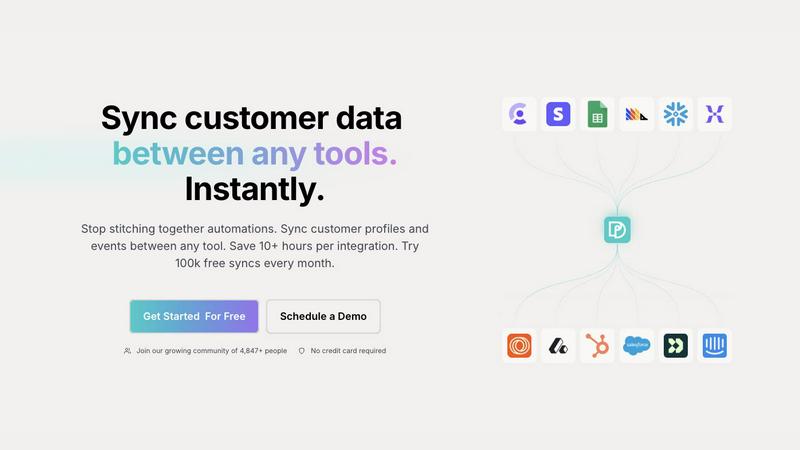
Seamlessly sync and unify customer profiles across tools to ensure consistent data and save hours on integrations.
Last updated: February 28, 2026
Visual Comparison
BarBrain

Oneprofile
Feature Comparison
BarBrain
Parallel Counting on Multiple Devices
Unlock unprecedented speed by conducting your inventory count simultaneously across several iOS and Android smartphones or tablets. This collaborative feature allows your team to split up, cover different sections like the bar, kitchen, and storage rooms at the same time, and sync all data instantly. It turns a hours-long solo mission into a coordinated team effort that can be completed in a fraction of the time, drastically reducing labor costs and operational downtime.
Vast Pre-Loaded Product Catalog
Jumpstart your inventory setup with immediate access to a massive, industry-specific catalog containing over 30,000 products. This extensive database covers everything from spirits, wines, and AFGs (alcohol-free beverages) to food ingredients and even housekeeping supplies. It eliminates the need to manually enter every single item from scratch, ensuring consistency and saving countless hours during the initial configuration and when adding new stock items.
Automatic Inventory Reporting
Imagine finishing a count and having a comprehensive, polished report generated for you automatically—that's the reality with BarBrain. The software compiles all the data from your digital count, eliminating the need for manual transcription, cross-referencing spreadsheets, or error-prone calculations. You receive a clear, finalized summary of your stock levels, values, and variances immediately, ready for analysis and action.
Fill-Level Slider for Open Items
Accurately accounting for partially used products like open bottles of liquor, wine, or food containers is now effortless. Instead of guessing or using complex fractions, staff simply uses an intuitive slider on the app to visually indicate the remaining amount. This one-tap capture ensures precise tracking of usage and cost for every item, providing much more accurate data for recipe costing and waste identification than estimating with generic software.
Oneprofile
Unified Customer Profiles
Oneprofile excels at unifying customer profiles across different tools. This feature ensures that every system within a business refers to the same customer identity, eliminating variations and discrepancies that can arise from using multiple platforms. By providing a single, consistent view of each customer, businesses can make informed decisions and enhance their customer engagement strategies.
Real-Time Data Synchronization
With Oneprofile, customer data is synchronized in real-time, meaning any changes made in one system are instantly reflected across all connected platforms. This capability significantly reduces the risk of outdated information and ensures that teams are always working with the most current data available, fostering better collaboration and more effective communication.
Customizable Data Flow Control
Oneprofile offers businesses the ability to define how customer data flows between systems. Users can map fields automatically or manually, control the direction of data synchronization, and determine how updates are propagated. This level of customization allows companies to tailor the integration to their specific operational needs, making data management flexible and adaptable.
Smart Field Mapping
The smart field mapping feature enables users to easily align data fields between different tools. Oneprofile intelligently matches identities and fields, ensuring that the right data is sent to the right place without manual intervention. This automation reduces the time and effort required to maintain accurate data synchronization, allowing teams to focus on their core tasks.
Use Cases
BarBrain
Independent Bars and Restaurants
For a single-location establishment, every minute and every euro counts. BarBrain empowers independent owners and managers to gain precise control over their stock without needing a dedicated inventory manager. They can quickly identify which drinks are most profitable, spot unusual shrinkage, and place accurate supplier orders, all leading to tighter cost control and improved bottom-line visibility from a tool designed for their scale.
Multi-Unit Restaurant Groups
Managing consistency and cost across several locations is a monumental challenge. BarBrain provides a unified system for standardizing inventory procedures group-wide. Headquarters can oversee data from all venues in one place, compare performance, identify best practices, and ensure every site is operating with the same level of efficiency and financial oversight, turning inventory data into a powerful tool for centralized management.
Hotels and Resorts
The hospitality sector manages a vast and varied inventory, from minibar items and banquet supplies to restaurant stock and breakfast buffet ingredients. BarBrain's comprehensive catalog and flexible structure are perfectly suited to track all F&B (Food & Beverage) products across multiple outlets and storage areas within a hotel, providing a complete, real-time picture of usage and cost for complex operations.
Nightclubs and High-Volume Venues
In fast-paced environments with high product turnover and often complex drink recipes, speed and accuracy are paramount. BarBrain's parallel counting feature allows teams to conduct a full inventory during short closing windows. The precise tracking of pours and bottle usage helps manage high-cost spirit inventory effectively, control waste, and ensure profitability on every high-volume night.
Oneprofile
Marketing Automation
Oneprofile can revolutionize marketing automation efforts by ensuring that customer profiles are consistently updated across all marketing tools. This means that marketing campaigns can be more accurately targeted, leading to higher engagement rates and improved conversion metrics.
Customer Support Enhancement
Customer support teams benefit greatly from Oneprofile’s ability to maintain synchronized customer information. When a support agent accesses a customer's profile, they have the latest data at their fingertips, allowing for more informed and efficient service interactions that boost customer satisfaction.
Sales Team Efficiency
Sales teams can leverage Oneprofile to ensure they are working with up-to-date customer data across their CRM and other sales tools. This real-time access allows for better prospecting and follow-ups, ultimately leading to increased sales and improved client relationships.
Product Development Insights
Product teams can utilize Oneprofile to gather consistent feedback and data from various sources, ensuring that customer insights are accurately reflected in their development processes. This leads to a product that better meets customer needs and drives higher user satisfaction.
Overview
About BarBrain
What if the most tedious, error-prone task in your bar or restaurant could become a source of clarity and profit? BarBrain is the answer to that very question. It's a specialized inventory management platform built from the ground up for the unique rhythms and challenges of the hospitality industry. Forget adapting clunky warehouse software; BarBrain speaks the language of hospitality, understanding pours, recipes, and perishables intuitively. It is designed for anyone who manages stock in a food and beverage setting, from the owner of a single cocktail bar to the operations manager of a multi-location restaurant group or hotel. Its core mission is to transform inventory from a dreaded chore into a strategic advantage. By enabling lightning-fast digital counts, providing exact cost analysis per menu item, and highlighting waste in real-time, BarBrain delivers the reliable data operators need to protect their margins, optimize orders, and ultimately, stop leaving money on the table. It's not about adding complexity; it's about providing a clean, focused tool that works the way your business already does, saving you over half your inventory time according to their users.
About Oneprofile
Oneprofile is a groundbreaking solution designed to streamline the way businesses manage their customer data across multiple tools and platforms. In today’s fast-paced digital landscape, organizations often struggle with fragmented customer information scattered across various systems, leading to inefficiencies and confusion. Oneprofile solves this problem by synchronizing customer profiles and events in real-time across all the tools a company utilizes, including CRMs, analytics, marketing, and support platforms. This means that when customer data changes in one location, it is instantly reflected everywhere else, ensuring everyone within the organization is on the same page. By eliminating the need for manual processes and preventing integration failures, Oneprofile offers a seamless data management experience that saves time and enhances productivity. Designed for businesses of all sizes, it allows teams to focus on what truly matters—delivering exceptional customer experiences without the hassle of data discrepancies.
Frequently Asked Questions
BarBrain FAQ
How does BarBrain save so much time on inventory?
BarBrain digitizes the entire process, eliminating manual pen-and-paper counting and subsequent data entry into spreadsheets. Features like parallel counting with multiple devices allow your team to count simultaneously, while the automatic report generation removes all post-count administrative work. This streamlined workflow is why users report saving over 75% of the time previously spent on inventory.
Can BarBrain handle both food and beverage inventory?
Absolutely. BarBrain is built as a comprehensive F&B (Food & Beverage) solution. Its extensive catalog and flexible item creation allow you to track everything from spirits, wine, and beer to all food ingredients, dry goods, and even non-food items like cleaning supplies. The fill-level slider is particularly useful for accurately tracking open food containers.
Is BarBrain difficult to set up for my existing stock?
The setup process is designed to be straightforward. You can leverage the massive pre-loaded product catalog to quickly find and add your items. Furthermore, the BarBrain team offers support during onboarding to help you build your digital stock list, ensuring a smooth transition from your old system, whether it was a spreadsheet or another software.
Do I need special hardware or training to use BarBrain?
No special hardware is required. BarBrain runs on standard iOS and Android smartphones and tablets that you likely already have. The interface is designed to be intuitive for hospitality staff, requiring minimal training. The counting process is as simple as scanning a barcode or selecting an item and adjusting the quantity or fill level.
Oneprofile FAQ
How does Oneprofile ensure data consistency across different tools?
Oneprofile uses real-time synchronization to ensure that any changes made to customer data in one system are automatically updated across all connected tools, maintaining data consistency and accuracy.
Can I customize how data flows between my systems with Oneprofile?
Yes, Oneprofile allows users to define how customer data moves between systems. You can map fields, control the sync direction, and set specific triggers for updates based on your business processes.
Is there a limit to the number of syncs I can perform each month?
Oneprofile offers a generous plan that includes 100,000 free syncs every month, allowing businesses to efficiently manage their data without incurring additional costs.
What types of tools can Oneprofile connect with?
Oneprofile is designed to integrate with a wide variety of tools, including CRMs, analytics platforms, marketing automation software, and support systems, making it a versatile solution for any business stack.
Alternatives
BarBrain Alternatives
BarBrain is a specialized inventory management tool built for the unique demands of bars and restaurants. It belongs to the hospitality productivity category, focusing on solving the tedious and error-prone task of counting stock and calculating costs. Its purpose is to replace manual spreadsheets and generic software with a system that understands pours, recipes, and the fast-paced nature of the industry. Users often explore alternatives for various reasons. Some may need a solution that fits a very specific budget or business model, while others might require deeper integrations with their existing point-of-sale or accounting platforms. The search can also be driven by a need for different feature sets, such as advanced reporting, employee scheduling modules, or a particular user interface style that better suits their team's workflow. When evaluating other options, it's crucial to look for software that genuinely understands hospitality operations. Key considerations include how the tool handles recipe costing, tracks waste and variance in real-time, and simplifies the physical counting process. The ideal alternative should provide clear visibility into your exact pour costs and profit margins without requiring extensive training or forcing you to adapt to a system designed for a warehouse.
Oneprofile Alternatives
Oneprofile is a powerful tool designed to sync customer profiles and events across various platforms, ensuring that businesses maintain a unified view of their customers. By eliminating the need for each system to manage its own version of customer data, Oneprofile automates the synchronization process, allowing for seamless integration between CRMs, analytics, support, and marketing tools. This capability is essential in today’s data-driven landscape, where accuracy and immediacy are paramount. Users often seek alternatives to Oneprofile for a myriad of reasons, including pricing considerations, specific feature requirements, or differing platform needs. The search for a suitable alternative can also stem from the desire for more flexibility, user-friendliness, or integration options. When exploring alternatives, it’s vital to consider factors such as ease of use, the extent of integration with existing tools, pricing models, and the level of customer support provided. A thorough evaluation of these elements can lead to a better fit for your unique business requirements.