
APIMCP.dev vs TrafficClaw
Side-by-side comparison to help you choose the right AI tool.

APIMCP.dev
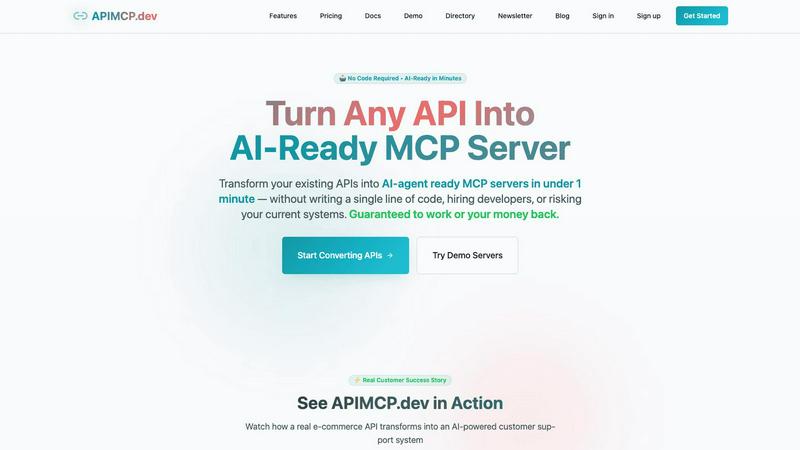
Discover how APIMCP.dev instantly transforms your REST APIs into AI-ready servers without any code.
Last updated: March 1, 2026

TrafficClaw
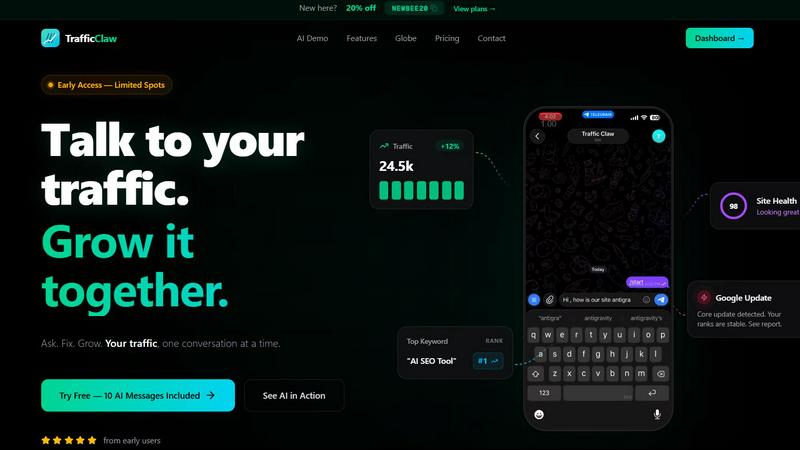
TrafficClaw is your AI analyst that answers questions about your real SEO and traffic data to help you grow.
Last updated: April 13, 2026
Visual Comparison
APIMCP.dev
TrafficClaw
Feature Comparison
APIMCP.dev
Instant No-Code Conversion
Imagine feeding your OpenAPI specification into a digital forge and watching a ready-to-use MCP server emerge moments later. This feature is the heart of APIMCP.dev, an intelligent conversion engine that automates the entire translation process. It meticulously parses your API's endpoints, parameters, and data models, then automatically generates the corresponding MCP tools with clear, AI-understandable descriptions. There's no manual coding, no complex configuration files to write—just connect your API specs and witness the transformation, empowering you to bypass lengthy development cycles entirely.
Enterprise-Grade Security & Authentication
Venturing into AI integration naturally raises questions about security. APIMCP.dev addresses this head-on with a robust, built-in security layer. The platform supports multiple authentication methods, ensuring your original API credentials and systems remain completely isolated and untouched. All connections and data flows are handled with enterprise-grade protocols, giving you the confidence to connect sensitive business data to AI agents. This secure gateway means you can innovate without compromising the integrity or safety of your existing infrastructure.
Real-Time Analytics Dashboard
What happens after your MCP server is live? The real-time analytics feature provides a window into the dynamic interactions between AI agents and your API. This dashboard allows you to monitor usage patterns, track performance metrics like response times, and observe exactly how AI tools are leveraging your endpoints. It’s an exploratory tool for optimization, helping you understand the value being generated and identify opportunities to refine both your API and the AI agent's capabilities for even greater efficiency.
Seamless AI Agent Integration
The ultimate goal is connection, and this feature ensures your newly minted MCP server speaks the native language of modern AI. APIMCP.dev produces standards-compliant MCP servers that are instantly recognizable and connectable to a wide ecosystem of AI platforms. Whether you're working within Claude Desktop, ChatGPT with MCP capabilities, Cursor IDE, or other compatible agents, the integration is plug-and-play. This removes the friction of custom adapters, letting you focus on exploring what these powerful AI collaborations can achieve for your specific use case.
TrafficClaw
AI Chat Analyst
This is the heart of TrafficClaw. Move beyond static reports and interact with your data using natural language. Ask complex questions like "Why did my traffic drop last Tuesday?" or "What are my top underperforming pages?" The AI analyst scours your connected GA4 and Search Console data to deliver instant, evidence-based verdicts and actionable recommendations, complete with supporting charts and insights, all within a conversational chat interface.
SEO Intelligence Suite
Proactively manage your search presence with a suite of automated SEO tools. TrafficClaw continuously monitors for critical issues like keyword gaps where competitors rank but you don't, content decay as older posts lose traction, and keyword cannibalization where your own pages compete against each other. It also includes an AEO (Answer Engine Optimization) engine to help optimize your content for AI-driven search experiences, keeping you ahead of evolving search trends.
Integrated Analytics Dashboard
Consolidate your key metrics into a single, real-time overview. Stop switching tabs between different platforms. This dashboard brings together live visitor counts, traffic trend visualizations, bounce rates, conversion funnel data, and top referrers. It provides a unified, configurable view of your site's health and performance, making it effortless to spot trends and anomalies at a glance.
Live Visitor Globe & Embed
Visualize your global audience in real-time with an interactive 3D globe. This feature plots live visitor activity by country directly on your TrafficClaw dashboard. Uniquely, you can also generate an embed code to showcase this live globe on your own public website, displaying anonymized visitor locations and activity feeds without needing to install any additional tracking scripts.
Use Cases
APIMCP.dev
AI-Powered Customer Support Automation
Consider an e-commerce business drowning in routine customer inquiries. By transforming their order and inventory API with APIMCP.dev, they can equip an AI agent to act as a 24/7 support specialist. A customer can simply ask, "Where is my order #12345?" and the AI, through the MCP server, can autonomously call the GET /api/orders/12345 endpoint, retrieve the shipping status and tracking number, and deliver an instant, accurate response. This automates a high-volume task, freeing human agents for complex issues while dramatically improving customer experience.
Intelligent Internal Business Intelligence
Businesses possess vast operational data locked in internal APIs. APIMCP.dev can unlock this for natural language querying. Imagine a manager asking an AI assistant, "What were our top-selling products last quarter?" or "Show me current inventory levels for all warehouses." The AI agent, connected via MCP, can translate these questions into precise API calls to sales and inventory systems, compiling a report in seconds. This turns data analysis from a technical chore into a conversational exploration, empowering faster, data-driven decision-making across the organization.
Rapid Prototyping for Startups
For startups racing to validate an idea, building custom AI integrations is a costly detour. APIMCP.dev allows them to rapidly prototype AI features using their existing API backbone. A fintech app could explore a conversational budgeting assistant, or a health tech company could test a symptom-checking chatbot that pulls from their medical database—all without writing a single line of integration code. This accelerates innovation cycles, allowing small teams to experiment with AI capabilities and gather user feedback with incredible speed and minimal resource expenditure.
Enhancing Developer Tools & IDEs
Developers can supercharge their workflows by connecting their internal development APIs to AI agents within tools like Cursor or Claude for Desktop. An MCP server created from a project management API (like Jira or Linear) allows a developer to ask, "What are my open high-priority bugs?" directly in their IDE. The AI fetches the list instantly. Similarly, connecting a database schema API enables the AI to answer complex questions about data models, turning the AI into a powerful, context-aware programming companion that understands the specifics of their systems.
TrafficClaw
Diagnosing Sudden Traffic Drops
When your analytics show an unexpected traffic decline, instead of manually cross-referencing data for hours, you can directly ask the AI analyst "What caused my traffic drop on March 15th?" It will analyze your data, pinpoint the cause—such as a Google core update impacting specific pages, a technical crawl error, or a drop in ranking for a key keyword—and provide a step-by-step fix.
Uncovering Content Optimization Opportunities
Discover which pieces of your existing content have the most potential for improvement. Ask the AI to "find blog posts with declining traffic but high historical authority." It will identify candidates for content refresh, suggest new keyword targets from its gap analysis, and can even help generate updated copy or optimal internal linking structures to revive their performance.
Monitoring Site Health Proactively
Use TrafficClaw as an early warning system. The integrated site audit tool continuously checks page-level performance, Core Web Vitals, and technical SEO factors. You can ask for a summary of critical issues or set up alerts for when health scores dip, allowing you to fix problems like slow page speed or broken links before they significantly impact user experience and rankings.
Demonstrating Real-Time Audience Engagement
For agencies, creators, or businesses wanting to showcase their live reach, the embeddable visitor globe provides a powerful visual tool. Embed it on a landing page, portfolio, or during a live stream to visually demonstrate active, global engagement in real time, adding a layer of social proof and dynamism to your public-facing presence.
Overview
About APIMCP.dev
What if you could give your existing software a direct line to the world's most advanced AI? APIMCP.dev unlocks this very possibility, serving as a revolutionary bridge between the familiar world of REST APIs and the emerging frontier of AI agents. At its core, this platform is a powerful, no-code engine that transforms any standard REST API specification into a fully functional Model Context Protocol (MCP) server in under 60 seconds. This process, which traditionally demands 40-80 hours of specialized development, is now instantaneous. It's designed for the curious developer, the agile startup, and the forward-thinking enterprise who are asking: "How can I integrate AI into my services without a massive overhaul?" The answer lies in APIMCP.dev's elegant solution, which leaves your core systems untouched and secure while granting AI tools like Claude, ChatGPT, and Cursor direct, intelligent access to your data and functionality. Its value proposition is profound: democratize AI integration by eliminating the coding barrier, slashing development time from weeks to minutes, and providing a secure, enterprise-ready conduit for your applications to converse with AI.
About TrafficClaw
Ever stared at a sudden traffic dip in your analytics, feeling lost in a sea of graphs that offer no answers? TrafficClaw transforms that confusion into a clear, actionable conversation. It's an AI-powered command center that connects directly to your Google Analytics 4 and Search Console data, allowing you to simply ask questions about your traffic and get intelligent, data-backed verdicts. Instead of piecing together clues from disparate tools, you engage with an AI analyst that examines your real performance, identifies root causes like keyword cannibalization or content decay, and provides specific fixes. Built for website owners, marketers, and developers who crave clarity, TrafficClaw consolidates analytics, SEO intelligence, site audits, and content tools into one intuitive interface. The core promise is profound yet simple: stop guessing why your traffic changes and start having a dialogue that drives measurable growth, all powered by your own data.
Frequently Asked Questions
APIMCP.dev FAQ
What exactly is an MCP server?
The Model Context Protocol (MCP) is an open standard that allows AI applications and agents to connect securely to external data sources and tools. An MCP server acts as a secure bridge or adapter for a specific data source—like your API. APIMCP.dev automatically builds this bridge for your REST API, translating its capabilities into a format that AI tools like Claude can natively understand and use, enabling them to fetch data or perform actions on your behalf.
Do I need any coding skills to use APIMCP.dev?
Absolutely not. This is the core magic of APIMCP.dev. The platform is designed as a completely no-code solution. You simply provide your API's specification (typically an OpenAPI/Swagger file) and authentication details. The platform's intelligent engine handles all the complex translation and server generation automatically. You can go from a standard API to a live AI-ready MCP server without writing a single line of code.
Is my existing API data and system secure?
Security is a foundational priority. APIMCP.dev acts as a secure proxy; your original API servers remain untouched and behind your firewall. The platform uses enterprise-grade security practices, including support for standard authentication methods like API keys and OAuth. All traffic is securely managed, and your core system credentials are never exposed to the end AI agent, ensuring your infrastructure remains protected while enabling powerful new AI functionalities.
Which AI tools can I connect to my new MCP server?
APIMCP.dev generates standards-compliant MCP servers that are compatible with any application supporting the MCP protocol. This includes popular AI platforms such as Anthropic's Claude Desktop, OpenAI's ChatGPT (when configured with MCP clients), the Cursor IDE, and a growing ecosystem of other AI agent frameworks. Once your server is live, you can connect it to multiple compatible tools to explore different use cases and interfaces.
TrafficClaw FAQ
How does TrafficClaw access my data?
TrafficClaw uses secure, read-only Google OAuth to connect to your Google Analytics 4 and Search Console accounts. This means we never see your password, and our access is limited to viewing your analytics data only. Your data remains in your Google account and is not sold or used to train public AI models.
What kind of questions can I ask the AI Analyst?
You can ask virtually any question about your website's performance and SEO. This includes diagnostic questions ("Why did my conversions drop?"), exploratory queries ("What are my top keyword opportunities this month?"), comparative analysis ("How does my mobile traffic compare to desktop?"), and requests for specific actions ("Generate meta descriptions for my top 5 pages.").
Is there a setup or configuration required?
Setup is designed to be virtually instant. After signing in with Google, TrafficClaw auto-detects your connected GA4 properties and Search Console sites. Your dashboard and AI chat are populated with insights immediately, requiring no manual configuration, tag installation, or complex settings to start getting answers.
Can I use the live globe on any website?
Yes, the interactive visitor globe can be embedded on any website or CMS that supports iframes, such as WordPress, Webflow, or a custom-coded site. You simply copy the provided iframe code snippet and paste it into your site's HTML. It pulls real-time data from your connected GA4 property without requiring any additional tracking code on your site.
Alternatives
APIMCP.dev Alternatives
APIMCP.dev is a pioneering tool in the productivity and management space, designed to instantly transform REST APIs into AI-ready MCP servers without any coding. It's a powerful solution for developers and businesses seeking to integrate their data with AI agents like Claude and ChatGPT in record time. Users often explore alternatives for various reasons. Some may be seeking different pricing models or specific feature sets that better align with their workflow. Others might require compatibility with a particular development platform or have unique security and scalability needs that prompt a broader market evaluation. When considering other options, it's wise to look for core capabilities like conversion speed, security robustness, and ease of integration. The ideal tool should not only connect your API to AI ecosystems but also maintain the integrity and performance of your existing systems while offering clear value for your investment.
TrafficClaw Alternatives
TrafficClaw is an AI assistant for SEO and analytics, designed to let you ask direct questions about your traffic and get actionable answers from your connected data sources like GA4 and Search Console. It belongs to the growing category of conversational analytics tools that aim to simplify complex data interpretation. Users often explore alternatives for various reasons, such as budget constraints, the need for different feature sets, or compatibility with other platforms in their tech stack. Some may seek tools with broader integrations, more advanced reporting, or a different approach to data visualization. When evaluating other options, consider the core ability to translate raw data into clear insights. Look for robust data source connections, the intelligence of the analysis provided, and how seamlessly the tool fits into your existing workflow. The goal is to move from static graphs to dynamic, understandable guidance for your website's performance.