
AI Couple Photo vs SparkPix
Side-by-side comparison to help you choose the right AI tool.

AI Couple Photo
Imagine creating authentic couple portraits from two separate photos with AI.

SparkPix
Discover what happens when you edit photos simply by typing your creative vision.
Last updated: March 11, 2026
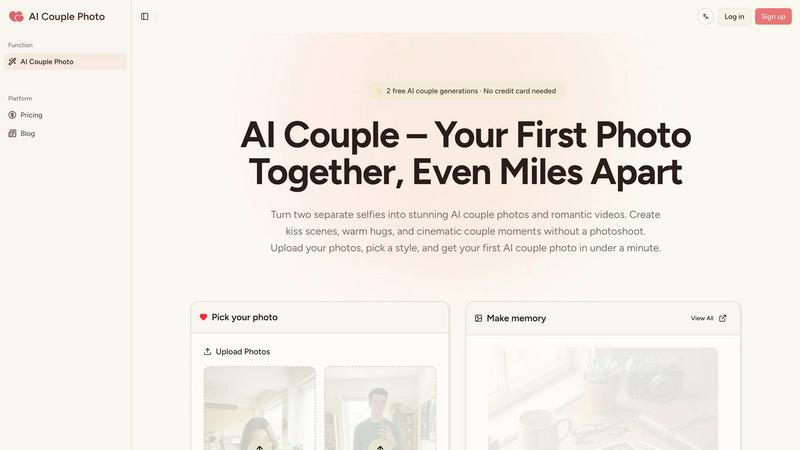
Visual Comparison
AI Couple Photo
SparkPix

Feature Comparison
AI Couple Photo
Intelligent Photo Fusion Engine
This is the technological heart of the tool. It doesn't just paste one face next to another. The AI performs a deep analysis of each uploaded solo image, examining hundreds of data points to ensure a seamless blend. It matches the lighting conditions, adjusts for skin tone variations, aligns facial perspectives, and harmonizes the background ambiance. This meticulous process is what transforms two disjointed photos into one cohesive, high-resolution portrait that looks authentically captured by a photographer, with both subjects naturally inhabiting the same space and moment.
Dynamic Video Template Library
Moving beyond still images, AI Couple Photo offers a library of pre-designed animated templates. Users can instantly transform their generated or existing photos into short, looping video clips featuring romantic gestures. With ready-made kiss and hug templates, you can see a fleeting moment of affection come to life in seconds. This feature adds an emotional layer of warmth and movement, creating shareable moments that feel more personal and engaging than a standard picture.
Context-Aware Style Selection
The tool empowers your creative direction with a variety of adjustable "vibes" and settings. You can guide the AI to output images that match a specific mood or setting—be it a cozy indoor cafe, a sunset beach walk, a formal studio portrait, or a casual selfie-style shot. This control over the contextual style ensures the final image not only looks real but also fits the story you want to tell, making each creation uniquely tailored to your vision.
High-Resolution Output for Any Use
Every generated image and video clip is rendered in high resolution, ensuring the quality is suitable for both digital and print applications. Whether you intend to set it as a detailed lock-screen wallpaper, design a sharp social media post, incorporate it into a wedding moodboard, or even print it for a framed gift, the output retains clarity and detail. This versatility makes the creations genuinely functional for a wide array of personal and sentimental projects.
SparkPix
AI Photo Editor (Text-to-Edit)
This is the heart of SparkPix's innovation. Instead of manually selecting tools, you simply type a descriptive command into a text box. You can instruct the AI to "remove the background and replace it with a beach sunset," "make the colors more vibrant," or "erase the trash can on the sidewalk." The AI interprets your natural language prompt and applies the corresponding edits, making professional-grade photo editing accessible to everyone without any prior technical knowledge or design skills required.
Background Remover
SparkPix offers a specialized, one-click solution for instantly isolating subjects. Its AI is trained to handle complex scenes with fine details like hair, fur, or intricate product edges. This feature is perfect for creating clean portraits with transparent backgrounds, preparing product images for e-commerce listings, or composing creative scenes by placing subjects into new environments, all without the tedious manual labor of traditional selection tools.
Photo Restoration & Enhancement
Breathe new life into old memories with AI-powered restoration. This feature can automatically repair scratches, tears, and stains on scanned photographs, reduce noise and grain, and intelligently colorize black and white images. Furthermore, the enhancer tool can sharpen blurry details, correct faded colors, and upscale images to higher resolutions, effectively combining multiple corrective actions into a single, powerful step to revive cherished historical photos.
AI Image Generator & Style Transfer
Unleash pure creativity by generating entirely new images from text descriptions at resolutions up to 4K. Beyond generation, you can transform any existing photo by applying over 15 artistic styles, such as converting a portrait into an anime character, a landscape into a watercolor painting, or a street photo into a pencil sketch. This allows for incredible artistic experimentation and content creation, enabling users to explore unique visual aesthetics with ease.
Use Cases
AI Couple Photo
For Long-Distance Relationship Milestones
Couples separated by miles can visually celebrate anniversaries, virtual dates, or holidays together. Creating a "photo" from a video call screenshot or two recent pictures allows them to build a shared album of moments that feel real, helping to maintain a visual sense of partnership and closeness despite the physical separation. It turns the abstract feeling of "wishing you were here" into a concrete image.
Creating Pre-Meeting Memories for Online Couples
For relationships that spark and grow online, there's often a gap in shared photographic history before the first in-person meeting. AI Couple Photo allows these couples to generate images that imagine what they might look like together on a hike, at a concert, or sharing a laugh, building excitement and a sense of established togetherness as they plan their future meet-up.
Surprise Gift Creation and Personal Keepsakes
The tool is perfect for crafting deeply personal gifts. Imagine surprising a partner with a framed portrait "from" a dream vacation destination, or creating a custom anniversary card featuring a photo that never was. Military families can create portraits during deployments. These AI-generated keepsakes carry significant emotional weight as tangible symbols of love and future plans.
Enhancing Wedding and Commitment Ceremony Planning
Couples can use the tool during the wedding planning phase to visualize and create moodboards. They can generate sample portraits in different attire or settings to decide on a photography style. For commitment ceremonies or vow renewals where a partner may be absent, it can help create inclusive visual materials that honor the bond, serving both practical planning and profound emotional purposes.
SparkPix
Reviving Family Archives
Genealogists and family historians can use SparkPix to restore and colorize old, damaged photographs. By simply uploading a scanned image and prompting the AI to "restore this photo and remove scratches," users can preserve and enhance historical family portraits, making past generations appear clearer and more vibrant for future family trees and digital albums.
E-commerce Product Photography
Online sellers and small business owners can create professional-looking product images without a studio. They can use the background remover to get clean, white-background shots for Amazon or Shopify, or employ the AI editor to generate realistic mockups—like placing a phone case on a model's hand in a lifestyle setting—directly from a simple text prompt, drastically reducing photoshoot costs.
Social Media Content Creation
Bloggers, influencers, and social media managers can rapidly produce eye-catching graphics. They can remove unwanted photobombers from a perfect shot, transform personal photos into unique artwork for posts, generate custom illustrations for stories, or create perfectly framed profile pictures and YouTube thumbnails, all tailored to their brand's aesthetic with minimal effort.
Creative Exploration and Design
Artists, students, and hobbyists can use SparkPix as a sandbox for visual experimentation. They can explore how their photos would look in different art movements, generate conceptual art from written ideas, or quickly edit personal projects. It serves as an instant visualizer, turning abstract concepts into concrete images and fueling the creative process through playful and immediate feedback.
Overview
About AI Couple Photo
What if distance was just a detail, and you could create a tangible memory from a digital dream? AI Couple Photo is a fascinating exploration into the intersection of artificial intelligence and human connection, designed to bridge physical gaps with visual authenticity. At its core, this tool is a sophisticated image synthesis engine that takes two separate, solo photographs and weaves them into a single, believable portrait of a couple. It goes beyond simple photo merging by intelligently analyzing and matching critical elements like facial features, skin tones, lighting direction, shadows, and even the perspective and angle of each original shot. The result is a high-resolution image that feels organically captured in a shared moment, not digitally stitched together. It's a poignant solution for long-distance partners yearning for a visual token of togetherness, military families separated by duty, or online couples who have built a relationship through screens but lack conventional "couple photos." The magic extends beyond static images into motion, with templates that animate affection. By transforming the deeply personal need for connection into a creative, accessible process, AI Couple Photo offers a unique value proposition: it empowers anyone to author their own visual narrative of intimacy, regardless of geography.
About SparkPix
Imagine having a professional photo editor's skill set at your fingertips, accessible not through complex menus and tools, but through the simple act of typing a request. SparkPix is that reality—a revolutionary web-based AI photo editor that transforms your words into visual edits. It's designed for anyone who has ever looked at a photo and thought, "I wish I could remove that person," "This background is too busy," or "I wonder what this would look like as an oil painting." From complete beginners intimidated by software like Photoshop to seasoned content creators needing rapid, high-quality edits, SparkPix democratizes advanced image manipulation. Its core value proposition is profound simplicity: you describe the change you envision, and its sophisticated AI interprets and executes your command, often in under 30 seconds. Whether you're restoring a precious family heirloom, creating a stunning thumbnail for your YouTube channel, or generating a completely new image from your imagination, SparkPix provides a powerful, intuitive, and accessible platform to bring your creative vision to life, starting with a generous free tier to fuel your initial exploration.
Frequently Asked Questions
AI Couple Photo FAQ
How realistic do the final AI-generated couple photos look?
The photos are designed to be highly believable. The key is the AI's advanced matching of lighting, skin tones, facial angles, and perspective. When provided with clear, well-lit solo photos taken from similar angles, the output can be remarkably seamless and natural. The technology is sophisticated enough to blend textures and shadows convincingly, making the couple appear as if they were photographed together in the same environment.
What kind of source photos work best for good results?
For optimal results, upload clear, high-quality front-facing photos of each person with good lighting. Photos taken in similar lighting conditions (e.g., both in daylight or both indoors) yield the most cohesive blends. Avoid pictures with heavy filters, extreme angles, or obstructions like hats or hands covering the face. The more consistent the source images, the more flawless and natural the final composite will be.
Can I use AI Couple Photo to create videos with more than two people?
Based on the described functionality, the core technology is specifically engineered for blending two individuals into a single frame. The kiss and hug video templates are also designed for couple-based interactions. For creating group photos or videos with more than two subjects, you would likely need a different type of AI image tool built for multi-person synthesis.
Is there a limit to how many photos or videos I can create?
The provided content does not specify usage limits. Typically, such AI tools operate on a freemium or subscription model, where basic usage might be free with limitations, and paid plans offer more generations, higher resolutions, or access to premium templates. To know the exact limits, you would need to check the current terms on the official AI Couple Photo website or app.
SparkPix FAQ
How do I start using SparkPix?
Getting started is completely free and requires no download. Simply visit the SparkPix website from any desktop or mobile browser. You can sign up to receive 5 free credits instantly without a credit card. Upload your first image, type your edit instructions into the prompt box, and let the AI generate your transformed photo in seconds.
What can I do with the free credits?
The free tier provides 5 credits to explore the platform's core capabilities. Each credit typically allows for one AI edit or generation. This is perfect for trying out key features like background removal, basic photo enhancement, or a style transfer to see how the AI interprets your commands and understand the tool's potential before committing to a paid plan.
What is the difference between editing and generating?
Editing refers to making changes to an existing photo you upload, such as removing an object, changing the background, or applying a filter. Generating, or AI Image Generation, involves creating a brand new image from scratch based solely on a text description you provide, without needing a reference photo to start with.
Are my uploaded images private and secure?
SparkPix processes images to perform the requested AI tasks. It is advisable to review the platform's privacy policy for specific details on data handling, retention, and usage. For highly sensitive or confidential images, users should consider this before uploading, though reputable AI tools typically have measures in place to protect user data during processing.