

Plate Photo AI
Turn ordinary phone food shots into menu-ready images that boost orders for restaurants, delivery platforms, and creators.
About Plate Photo AI
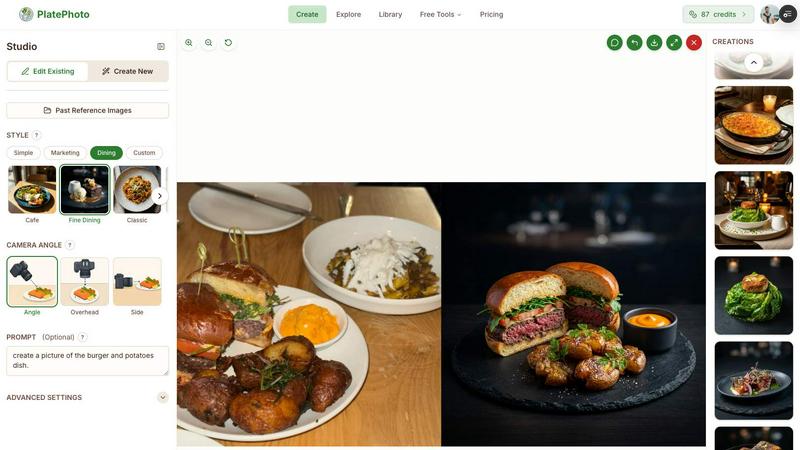
What if you could conjure a professional food photograph from a simple smartphone snapshot, in the time it takes to brew an espresso? That is the proposition of Plate Photo AI, a tool designed to dissolve the traditional barriers of cost, time, and skill that have long separated restaurants from studio-quality imagery. At its core, this is an AI-powered food photography studio that lives in your browser. You upload a photo of a dish, choose from a curated library of professional visual styles like Cafe, Fine Dining, or Delivery App, and the AI transforms your raw image into a high-resolution, menu-ready photograph in seconds. The real curiosity, however, lies in its ambition to solve a deeper operational problem for restaurants and food businesses. Beyond simple style transfers, Plate Photo AI introduces a text-prompt editing system that lets you alter lighting, swap backgrounds, remove unwanted ingredients, or add garnishes without touching complex software like Photoshop. It even allows you to import existing photos directly from your website or Google Maps listing, creating a seamless pipeline for updating an entire menu. For restaurateurs, marketers, and content creators who have felt the friction of coordinating photographers and managing inconsistent visual branding, this tool offers a compelling alternative: on-demand, consistent, and affordable professional imagery that can directly influence a customer's decision to order.
Features of Plate Photo AI
One-Click Style Transformation
This feature is the engine of the tool, offering a curated selection of professional photography presets that instantly redefine the mood and composition of a food image. Instead of manually adjusting lighting, angles, and depth of field, you simply select a style like "Cafe" for a warm, inviting brunch vibe, "Fine Dining" for a dramatic, upscale presentation, or "Menu Zoom" for a tight, detail-oriented shot perfect for a digital menu. The AI analyzes your original photo and applies the chosen aesthetic, adjusting everything from the background and plate arrangement to the shadows and highlights. This allows a single dish to be visualized across multiple contexts, from a delivery app thumbnail to a glossy social media post, without any design expertise.
Text Prompt Editing
This feature moves beyond simple filters and grants you granular, language-driven control over the final image. You can write a natural language prompt like "make the lighting warmer and more golden hour," "remove the parsley garnish," or "add a steaming effect to the soup," and the AI interprets and executes the command. This eliminates the need to learn complex layer-based editing tools or color grading panels. It effectively turns the editing process into a conversation with the AI, allowing for rapid iteration and creative experimentation. Whether you need to adjust a dish's color balance to match a brand palette or remove a distracting element from the background, this feature makes sophisticated photo editing accessible to anyone who can type a sentence.
Import from Web and Google Maps
This feature addresses the tedious, often overlooked task of sourcing and centralizing existing food images. Instead of manually downloading photos from your restaurant's website or your Google My Business listing, Plate Photo AI allows you to pull them directly into the editor with a single click. This is a powerful solution for restaurants with extensive menus or multiple locations, as it creates a unified digital library of their food photography. Once imported, you can instantly apply a consistent style across all images, ensuring that every dish on your online menu or delivery app listing has a uniform look. This eliminates the common problem of a menu featuring a mix of professional shots, amateur phone photos, and outdated images.
Custom Style Creation
For businesses that need a truly unique visual identity, this feature allows you to define and save your own proprietary photography style. By uploading a reference image or fine-tuning the parameters of an existing preset, you can create a signature look that perfectly aligns with your brand's aesthetic. This style can then be applied to every future dish photo with a single click, ensuring perfect consistency across your menu, website, and marketing materials. This is particularly valuable for high-end restaurants, food chains, and brands that rely on a specific visual language to communicate their identity, as it allows them to scale their unique look without hiring a dedicated photographer for every new menu item.
Use Cases of Plate Photo AI
Menu Design and Digital Ordering
A restaurant's menu is its primary sales tool, and the quality of its photography directly impacts customer choices. This use case involves using Plate Photo AI to transform a collection of inconsistent, amateur phone photos into a cohesive, professional menu. By applying a consistent style like "Menu Zoom" to all dishes, a restaurant can create a visually appealing and appetizing digital menu for its website or a third-party delivery app. The ability to quickly edit photos with prompts, such as removing a wilted garnish or brightening a dark image, ensures every dish looks its best. The result is a menu that builds trust and triggers cravings, directly contributing to a potential increase in orders.
Social Media Content Creation
Food content is a staple of social media, but maintaining a feed of high-quality, engaging photos can be a full-time job. Plate Photo AI empowers social media managers and food bloggers to generate a steady stream of professional-looking content from a single photo shoot. They can experiment with different styles to see what resonates with their audience, creating "Cafe" style images for a cozy Instagram post and "Fine Dining" style shots for a more formal Facebook advertisement. The prompt editing feature allows for quick customization, like adding a text overlay or adjusting the color temperature to match a seasonal campaign, making it an efficient tool for keeping social feeds fresh and visually consistent.
Delivery App Optimization
On platforms like Uber Eats, DoorDash, and Grubhub, the food photo is the first and most critical point of contact with a potential customer. This use case focuses on using Plate Photo AI to create images specifically optimized for the small, crowded thumbnails of delivery apps. The "Delivery App" preset is designed to make dishes pop, with enhanced colors and clear, appetizing focus. Restaurants can quickly update photos for seasonal specials or new menu items without waiting for a photoshoot. By ensuring every dish has a high-quality, consistent image, restaurants can improve their click-through rate and stand out from competitors, directly impacting their bottom line.
Marketing and Advertising Campaigns
For marketing directors and brand managers, visual consistency across all channels is paramount. This use case involves using the Custom Style Creation feature to define a unique visual identity for a restaurant or food brand. This signature style is then applied to all photos used in email newsletters, website banners, print ads, and billboards. The ability to import photos from a website and instantly re-style them saves significant time and resources. This ensures that a customer sees the same professional, on-brand aesthetic whether they are scrolling through an email, browsing the website, or seeing a digital ad, reinforcing brand recognition and trust.
Frequently Asked Questions
What kind of photos can I use as a starting point?
Plate Photo AI is designed to work with ordinary photos taken on a smartphone or any digital camera. You do not need a professional setup, special lighting, or a high-end camera. The AI is trained to analyze and enhance the image, correcting for poor lighting, unappealing backgrounds, and awkward angles. The best results come from a clear, well-composed photo of the dish, but the tool is robust enough to salvage and improve even less-than-ideal snapshots.
How does Plate Photo AI compare to hiring a professional food photographer?
The primary differences are cost, time, and flexibility. A professional food photoshoot can cost between $500 and $2,000 and take weeks to schedule and receive final edits. Plate Photo AI generates images at a fraction of the cost, approximately $0.33 per image, and delivers them in seconds. While a photographer offers a unique artistic eye and custom setup, Plate Photo AI provides on-demand access to high-quality, studio-style results and the ability to instantly update and re-style your entire menu without additional expense or scheduling.
Can I maintain a consistent look across all my menu items?
Yes, this is one of the core strengths of the tool. You can select a single style, such as "Fine Dining" or "Menu Zoom," and apply it to every photo you upload. This ensures that all your dishes have the same lighting, background, mood, and camera angle, creating a cohesive and professional menu. For an even more unique brand identity, you can create and save a custom style, which can then be applied to all future images with one click.
What kind of edits can I make with a text prompt?
The text prompt feature is remarkably flexible. You can make a wide range of edits, including changing the lighting (e.g., "make it brighter," "add warm afternoon light"), removing or adding ingredients (e.g., "remove the lemon wedge," "add a sprig of rosemary"), altering the background (e.g., "change to a wooden table," "make it a clean white plate"), and adjusting the overall mood of the image (e.g., "make it look more rustic," "give it a dark and moody feel"). This eliminates the need for complex software and puts creative control directly in your hands.
Similar to Plate Photo AI

GamesPad tester
A simple online gamepad tester that helps you check controller buttons, sticks, triggers, D-pad, and other inputs instantly.


Labrynth AI
AI regulatory intelligence platform that turns complex requirements into cited, audit-ready outputs.

Built2Win AI Indexing
AI‑ready websites, WebAgentScan SaaS, and Indexing Pack. MCP, A2A, llms.txt — hand‑coded PHP, complete ownership, flat‑fee, free quote.


JsonTranslate
Translate JSON, Markdown, and TXT files while preserving keys, nested paths, and project structure.