

Picture Enhancer
Discover how Picture Enhancer lets you deblur, upscale, and restore photos instantly in your browser with free guest tries.
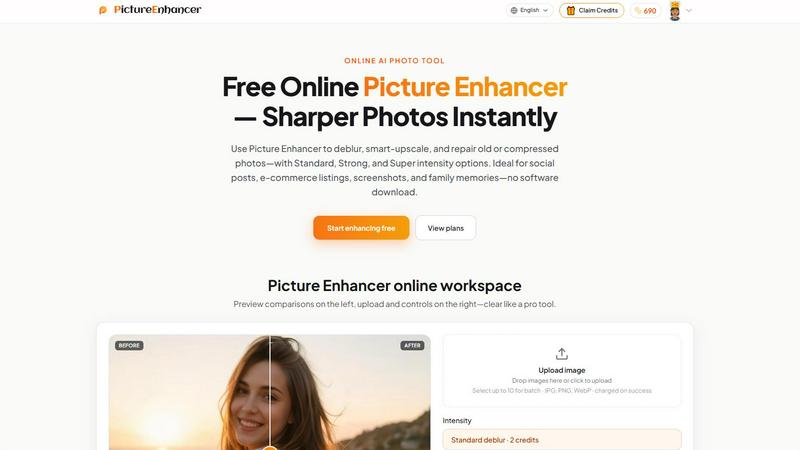
About Picture Enhancer
Picture Enhancer is a free online AI photo enhancement tool designed for creators, sellers, and everyday users who need sharper, cleaner images without the hassle of complex software. At its core, this tool invites you to explore what happens when you apply intelligent processing to your blurry, low-resolution, or damaged photos. You simply upload a JPG, PNG, or WebP image, then choose from three distinct enhancement modes: Deblur, Upscale, or Restore. Each mode offers three intensity levels (Standard, Strong, and Super) so you can experiment with different results and discover the perfect balance for your specific image.
What makes Picture Enhancer particularly intriguing is its curiosity-friendly approach. Guests get three free lifetime tries per IP address with no signup required, letting you test the waters and see the transformation for yourself. After uploading, you can preview a before-and-after comparison using a slider, then download a watermark-free result when the enhancement succeeds. For those who want to explore further, signing in unlocks a credit-based system where new accounts receive starter credits. Credits are only charged on successful enhancements, meaning you never waste resources on failed attempts. This structure encourages playful experimentation, whether you are polishing a product photo, sharpening a screenshot, or reviving an old family memory.
Features of Picture Enhancer
AI Deblur Mode
This feature invites you to explore how artificial intelligence can rebuild lost edges and texture from common image problems like camera shake, soft focus, or mild motion blur. You can choose between Standard, Strong, and Super deblur intensities to see how aggressively the AI reconstructs details. Faces become clearer, text becomes readable again, and overall sharpness improves dramatically. The curiosity lies in testing how much blur the AI can handle and discovering the threshold where your image transforms from unusable to crisp.
Smart Upscale Mode
Ever wondered what hidden detail exists inside a small, low-resolution image? Smart Upscale allows you to enlarge your photos by 2x or 4x while intelligently adding realistic detail rather than simply stretching pixels. This feature is perfect for exploring how far you can push a small file, whether it is a thumbnail for a social cover, a product hero shot for e-commerce, or a preview for print. The AI analyzes patterns and textures to fill in missing information, making the upscaled image appear natural and detailed rather than pixelated.
Old Photo and Damage Restore Mode
This mode invites you to breathe new life into scanned family prints or heavily compressed digital images. It works to reduce scratches, fade, and compression artifacts that accumulate over time. Strong and Super restore intensities are designed to handle heavier damage, making it fascinating to see how the AI interprets and repairs damaged areas. You can experiment with different intensity levels to find the sweet spot between preserving original character and removing unwanted imperfections, turning a worn memory into a shareable, print-ready image.
Credit-Based Success Billing
Picture Enhancer uses a unique credit system that charges you only when an enhancement succeeds. This means you can explore different modes and intensities without fear of wasting credits on failed attempts. Standard enhancements cost 2 credits, Strong costs 4, and Super costs 6. Guests get three free lifetime tries per IP, while signed-in users receive starter credits and can purchase monthly subscriptions or permanent credit packs. This billing model encourages curiosity because you can freely experiment and only pay for results that meet your expectations.
Use Cases of Picture Enhancer
Portraits and Everyday Photos
Have you ever taken a photo that was almost perfect, except for a slight blur that ruins the moment? Picture Enhancer lets you explore how much clarity you can recover from casual snapshots. Whether it is a portrait with soft focus or a group photo with mild camera shake, the Deblur mode can rebuild facial features and clothing details. You can experiment with Standard versus Strong intensity to see which level restores natural texture without introducing artifacts, making your everyday photos worthy of social feeds or personal portfolios.
E-commerce and Product Shots
For sellers, product images are everything. Picture Enhancer allows you to upscale small product photos or sharpen images that suffer from compression noise. You can explore how Smart Upscale adds detail to product textures, making them look more professional and appealing in online listings. The Restore mode can also clean up artifacts from low-quality source images. By testing different intensities, you can discover the optimal balance between sharpness and natural appearance, helping your products stand out in crowded marketplaces.
Screenshots and UI Captures
If you create tutorials, documentation, or support threads, sharp text edges are essential. Picture Enhancer invites you to see how well it can deblur screenshots that have become soft due to resizing or compression. The AI focuses on rebuilding text and interface elements, making them crisp and readable again. You can explore whether Strong deblur improves clarity beyond Standard, and how the tool handles different types of UI captures, from code snippets to app interfaces, ensuring your instructional content looks professional.
Old Photo Memories
Family photo albums often contain scans of old prints that have faded, scratched, or developed compression artifacts over the years. Picture Enhancer gives you the chance to explore how much of that original detail can be recovered. The Restore mode with Strong or Super intensity can significantly reduce visible damage while preserving the emotional essence of the image. You can experiment with different settings to see how the AI interprets and repairs each unique imperfection, turning fragile memories into durable digital files ready to share or print.
Frequently Asked Questions
What is Picture Enhancer?
Picture Enhancer is a free online AI photo enhancement tool that lets you deblur, upscale, and restore images. It is designed for creators, sellers, and everyday users who need sharper photos without downloading software. You upload a JPG, PNG, or WebP image, choose a mode and intensity level, preview the result, and download a watermark-free file. Guests get three free lifetime tries per IP, and signed-in users use credits that are only charged on successful enhancements.
Can I try Picture Enhancer without signing in?
Yes, absolutely. Guests receive three free lifetime tries per IP address with no signup required. This allows you to test the tool and explore its capabilities before committing to an account. Each try lets you upload one image, choose any mode and intensity, preview the before-and-after comparison, and download the enhanced result without any watermark. After using your three tries, you can sign in to continue using credits.
How does billing work after sign-in?
After signing in, you receive starter credits on your new account. Credits are charged only when an enhancement succeeds, meaning you never pay for failed attempts. Standard enhancements cost 2 credits, Strong costs 4, and Super costs 6. You can purchase monthly subscription plans that grant credits each billing cycle, or buy permanent credit packs that never expire. Paid users also unlock Super intensity tiers and the ability to batch enhance up to 10 images at once.
Which modes does Picture Enhancer support?
Picture Enhancer supports three main modes: Deblur, Upscale, and Restore. Deblur rebuilds edges and texture from camera shake, soft focus, and motion blur. Upscale enlarges images by 2x or 4x while adding realistic detail. Restore reduces scratches, fade, and compression artifacts on old or damaged photos. Each mode offers Standard, Strong, and Super intensity levels, with Super tiers available to paid users.
Pricing of Picture Enhancer
Picture Enhancer operates on a credit-based pricing model. Guests receive three free lifetime tries per IP address with no signup required. Signed-in users receive starter credits on new accounts. Credits are charged only on successful enhancements: Standard costs 2 credits, Strong costs 4, and Super costs 6. Paid users unlock Super intensity tiers and batch enhancement (up to 10 images). Monthly subscription plans grant credits each billing cycle, while permanent credit packs never expire, giving you flexibility in how you explore and use the tool.
Explore more in this category:
Similar to Picture Enhancer

ImageGenerator
Create and edit AI images online with multiple models, text-to-image, image-to-image, background removal, and upscaling.

ColorBestie
AI color previews and marker color suggestions for coloring pages.

EditTextPhoto
AI-powered image text editor to edit, replace, fix, or translate text in images while preserving the original font, color, size, and style.

nanobanana 21
A fast image studio for creating and editing high-quality images with accurate details, readable text, and consistent characters.

AIPetGen
AIPetGen turns a photo of your dog, cat, or other pet, or a written description, into a new picture or a short animation.

Image to Layers AI
Turn any image into editable transparent PNG/PSD layers with AI

AI Album Cover Maker
Create release-ready album covers from a prompt or photo. Generate, refine, and export art for singles, EPs, mixtapes, and playlists.

Sprite Sheet Maker
A free browser-based toolkit for creating, cutting, converting, and previewing sprite sheet animations.