

Opal
Opal is your all-in-one visual workspace that instantly organizes projects and notes, ensuring you never lose track of your ideas again.
About Opal
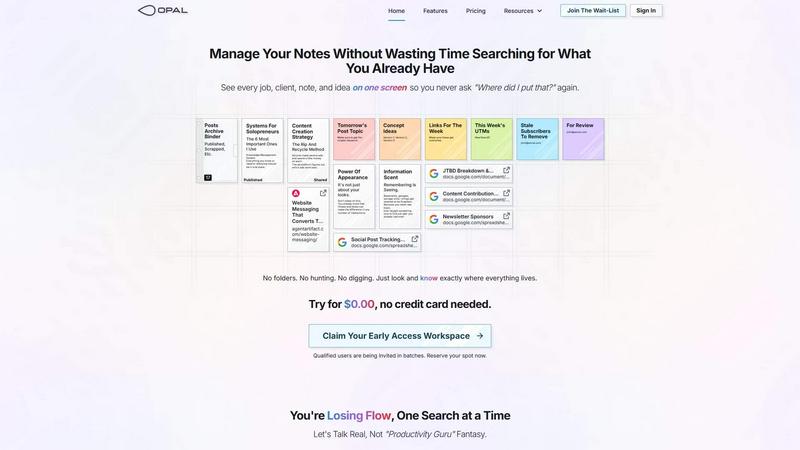
Opal is a revolutionary visual knowledge and project management workspace tailored for those who think spatially. It addresses the common pain points of traditional note-taking and information management systems that often lead to lost ideas and disorganized data. With Opal, users are empowered to utilize an infinite digital canvas where they can drag and drop notes, documents, files, and links, organizing them in a visually appealing manner, akin to arranging items on a physical desk. This unique spatial memory approach enables users to remember not just the content, but where it is located, facilitating instant retrieval without the frustration often associated with conventional apps. Designed for solopreneurs, consultants, agency owners, writers, and anyone reliant on conversations, details, and commitments, Opal keeps your active projects, client information, and creative ideas visible and accessible, allowing you to focus on your work without interruptions.
Features of Opal
Infinite Digital Canvas
Opal provides an expansive and limitless digital workspace that allows users to visually organize their notes, files, and tasks. You can customize the layout to fit your workflow, making it easy to see everything at a glance.
Spatial Memory Organization
Unlike traditional apps that rely on hierarchical folders, Opal uses a spatial approach, enabling users to remember where items are located rather than just their names. This means instant access to the information you need, exactly when you need it.
Drag-and-Drop Functionality
With Opal's intuitive drag-and-drop feature, you can easily move notes, documents, and links around your workspace. This flexibility allows for a personalized arrangement that enhances your productivity and keeps your ideas flowing.
Multi-Window Capabilities
Opal allows you to open multiple documents and notes side by side on your screen. This feature promotes a seamless workflow, enabling you to reference various pieces of information simultaneously without losing focus.
Use Cases of Opal
Project Management for Solopreneurs
Solopreneurs can leverage Opal to manage their entire business landscape—from client details to project timelines—all within a single visual workspace. This ensures that nothing falls through the cracks and everything is easily accessible.
Creative Brainstorming Sessions
Writers and creatives can use Opal as a brainstorming hub, where they can visually arrange ideas, notes, and drafts. The spatial layout encourages free thinking and fosters creativity, making it ideal for generating and developing new concepts.
Client Management for Agencies
Agency owners can utilize Opal to keep track of multiple clients and projects simultaneously. The visual format helps in organizing client requirements, deadlines, and communications, ensuring that critical details are always at hand.
Information Storage and Retrieval
Opal serves as a powerful knowledge management system where users can store and retrieve vast amounts of information efficiently. The ability to see everything in one place eliminates the frustrations of searching through nested folders or complicated dashboards.
Frequently Asked Questions
How does Opal improve my productivity?
Opal enhances productivity through its visual organization and spatial memory features, allowing you to find information quickly without losing focus on your work.
Can I collaborate with others using Opal?
Yes, Opal is designed to facilitate collaboration, enabling teams to share workspaces and insights seamlessly, enhancing communication and project management.
Is Opal suitable for all types of businesses?
Absolutely! Opal is versatile and caters to a wide range of users, including solopreneurs, agencies, and teams, making it adaptable for various business needs.
Do I need technical skills to use Opal?
No technical skills are required to navigate Opal. Its user-friendly interface and intuitive design allow anyone to start organizing their work effectively without a steep learning curve.
Similar to Opal

Novastart
Apps and files on an infinite canvas where people and AI agents work together.

MD to Text
Convert Markdown to plain text online. Remove formatting instantly, copy readable output, and keep every conversion private in your browser.

AUTOMATER.ai
A tray helper for every AI coding tool: one searchable library of past sessions, waiting alerts and usage across 9 providers.

stackledge
A human-vetted discovery directory for practical AI tools, SaaS apps, and custom n8n workflows, free from bot-scraped spam and dead links.

Kody Tools
Free collection of online developer utilities, code formatters, and digital converters designed to streamline your daily workflow.

What's on the menu
Smart translate any restaurant menu

Forms Plugin
The #1 Native Form Builder Plugin for Framer - No Code, No Embeds, No External Platforms.

Product Launch Checklist
A free launch checklist for SaaS, apps, AI tools and more. Every step says why it matters and when you can skip it.